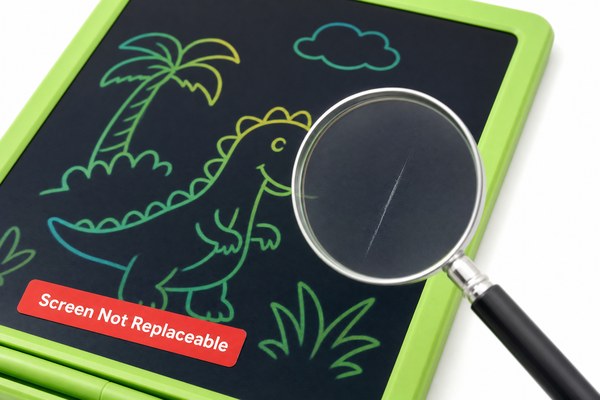
You notice a scratch on your LCD writing tablet. It ruins the writing surface. You wonder if anything can be done about it.
In most cases, a scratched LCD writing tablet screen cannot be fully repaired at home. The damage is usually permanent. But depending on the scratch type and depth, you have options. You can replace the screen layer, replace the whole unit, or prevent further damage.
I have worked closely with LCD writing tablet production for years. I have seen all kinds of screen damage. Some scratches look terrible but cause no function loss. Others go deep and break the LCD layer underneath. The right answer depends on what kind of scratch you have. Let me walk you through everything I know. By the end, you will know exactly what to do next.
Why LCD Writing Tablet Screens Scratch So Easily
You treat your tablet carefully. Still, scratches appear. This frustrates so many users I talk to.
LCD writing tablet screens scratch easily because the top layer is a soft plastic film. It is not glass. It is designed to be written on with a stylus. That softness makes it work well but also makes it vulnerable to sharp objects, keys, and rough surfaces.
I remember a customer who bought a batch of tablets from our Shenzhen factory. He stored them loosely in a bag with metal tools. When he pulled them out, every screen had surface scratches. He panicked and called us right away. I explained that the top protective film had scratched, not the actual LCD panel underneath. That was good news. The tablets still worked perfectly. The writing function was not affected at all. We talked about how to store them better going forward. A simple sleeve or case would have prevented everything. That one conversation changed how he handled all his stock.
Types of Scratches and What They Mean
| Scratch Type | Location | Affects Function? | Repair Possible? |
|---|---|---|---|
| Surface film scratch | Top plastic layer only | No | Film replacement possible |
| Deep groove scratch | Cuts through film into panel | Sometimes | Usually needs full screen swap |
| LCD layer damage | Inside the display panel | Yes — dead areas appear | Full unit replacement recommended |
| Frame or bezel scratch | Outer plastic edge | No | Cosmetic only — no repair needed |
What You Can Actually Do About a Scratched Screen
You want a fix. You search online and find confusing advice. Some tips help. Most do not apply to LCD writing tablets.
For surface-level scratches on an LCD writing tablet, you can apply a new screen protector film to cover minor marks. For deep scratches that damage the LCD layer, the only real solution is to replace the screen assembly or the entire tablet. Home repair kits for glass screens do not work here.
I once tested a popular scratch repair paste on a damaged tablet in our lab. The paste is made for glass phone screens. It filled the scratch visually for about a day. Then it smeared the writing surface and made the stylus drag badly. The tablet became harder to use, not easier. I learned that these products are not designed for soft plastic writing surfaces. They can make things worse. I now always tell people: do not use glass repair kits on these tablets. The materials are completely different. Always check what your screen surface is made of before trying any fix.
Repair Options Compared Side by Side
| Repair Option | Best For | Cost Level | Success Rate |
|---|---|---|---|
| Screen protector film | Light surface scratches | Very low | Good for cosmetic cover |
| Screen layer replacement | Deep scratches, film damage | Medium | Good if done by manufacturer |
| Full unit replacement | LCD layer damage | Higher | Best and most reliable |
| Glass repair paste | Not suitable at all | Low | Poor — can cause more damage |
How to Prevent Scratches on Your LCD Writing Tablet
You cannot undo a deep scratch. But you can stop the next one from happening. Prevention is always cheaper than repair.
Preventing scratches on your LCD writing tablet is simple. Use only the included stylus. Store the tablet in a soft sleeve. Keep it away from keys, coins, and sharp objects. Apply a screen protector film from day one. These steps add years to the life of your tablet surface.
At our Shenzhen factory, we think about durability from the very first design step. GY-industries produces OEM and ODM LCD writing tablets that meet CE, RoHS, and CPC certification standards. Those certifications cover material safety and product quality. When I walk the production floor, I see teams testing screen resistance carefully. We choose screen film materials that balance softness for writing feel with reasonable resistance to daily wear. I always advise our B2B buyers to include a stylus holder or attached pen in their product design. This one feature alone reduces screen scratches dramatically. A loose stylus rattling in a bag is one of the top causes of damage I see reported.
Best Practices to Protect Your Screen Daily
| Habit | Why It Helps | Difficulty |
|---|---|---|
| Use only the included stylus | Avoids sharp tip damage | Easy |
| Apply a screen protector film | Absorbs surface scratches | Easy |
| Store in a dedicated sleeve | Keeps screen away from hard objects | Easy |
| Attach stylus to tablet body | Prevents loose stylus from scratching | Easy with right product design |
According to Consumer Reports guidance on caring for electronics, simple storage habits are among the most effective ways to extend the life of any personal device screen.
If you are a business buyer looking for durable LCD writing tablets with built-in protection features, you can explore our OEM and ODM service options at GY-industries. We help you design tablets that last longer and reduce customer complaints about screen damage.
Conclusion
A scratched LCD writing tablet screen is rarely fixable at home. Prevention beats repair every time. Contact GY-industries today to build a better, more durable product for your customers.
