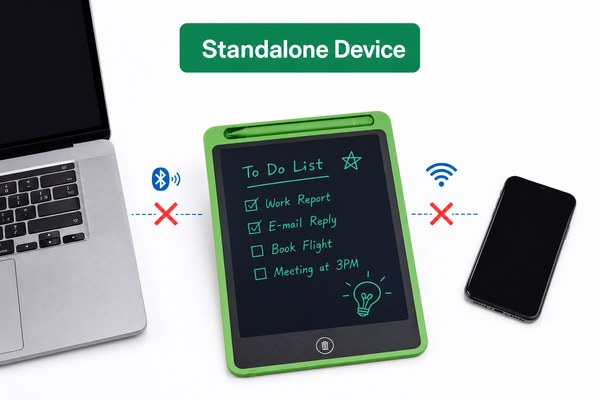
You grab an LCD writing tablet. You want to connect it to your phone or computer. But you have no idea where to start.
Most basic LCD writing tablets do not connect to phones or computers. They work as standalone drawing tools. But some newer models do have connectivity features. These let you transfer drawings or use the tablet as a digital input device.
I have worked closely with LCD tablet technology for years. I have seen this question come up again and again. People buy a tablet for simple note-taking. Then they wonder if it can do more. The answer depends on the type of tablet you have. Some models stay simple and offline. Others come packed with smart features. Let me break this down for you clearly. By the end, you will know exactly what to look for.
1. Understanding How LCD Writing Tablets Actually Work
You press the stylus down. A drawing appears. But you have no idea what is happening inside the tablet.
LCD writing tablets use pressure-sensitive liquid crystal technology. When you write, the crystals react to pressure. This creates visible marks. Most models do not have chips or software. They are purely mechanical and electronic tools.
I remember the first time I explained this to a customer. He was frustrated. He thought his tablet was “broken” because it would not pair with his laptop. I told him his tablet was a basic pressure-response model. It had no Bluetooth or USB data transfer. It was not broken at all. It was doing exactly what it was designed to do. Once he understood that, he felt much better. He ended up ordering a smarter model with app connectivity. That is when everything clicked for him. Simple models are great for kids and quick notes. Smart models serve professionals who need data transfer.
Basic vs. Smart LCD Tablet Feature Comparison
| Feature | Basic LCD Tablet | Smart LCD Tablet | Best For |
|---|---|---|---|
| Connectivity | None | Bluetooth / USB | Office and school use |
| App Support | No | Yes | Professionals |
| Data Transfer | Not possible | Yes, to phone/PC | Remote workers |
| Battery Use | Very low | Moderate | Depends on user need |
2. Can You Connect an LCD Writing Tablet to a Phone?
You want to save your notes to your phone. You draw something great. But it disappears when you erase it. That is painful.
Yes, some LCD writing tablets can connect to a phone. They use Bluetooth to sync drawings to a mobile app. You can save, share, and store your notes digitally. But this feature only exists in specific connected models.
I once tested a Bluetooth-enabled LCD tablet alongside a standard one. The difference was night and day. I drew a quick diagram on the smart model. I opened the companion app on my phone. The drawing appeared on my screen in seconds. I saved it as a PNG file. Then I emailed it to a colleague. The whole process took under a minute. The basic tablet next to it just sat there silently. It had no way to send anything anywhere. For someone who needs to keep records, the smart model wins every single time. It is a game changer for remote meetings and field notes.
Bluetooth LCD Tablet and Phone Compatibility
| Connection Type | Works With | App Required | File Format Output |
|---|---|---|---|
| Bluetooth 4.0+ | iOS and Android | Yes | PNG, JPG, PDF |
| USB-C Data | Android phones | Sometimes | SVG, PNG |
| No Connection | Standalone only | No | None |
3. Can You Connect an LCD Writing Tablet to a Computer?
You want to use your LCD tablet at your desk. You want notes on your computer screen. But you are not sure if that is even possible.
Some LCD writing tablets connect to computers via USB or Bluetooth. They can work as input devices or sync notes to desktop software. Not all models support this. You need to check the product specs before buying.
I have seen businesses in education and healthcare ask about this a lot. One school district I worked with wanted teachers to write on tablets. They needed those notes saved to a classroom computer system instantly. We recommended a connected LCD tablet model with USB-C output. Teachers loved it. They could write on the tablet during lessons. Notes synced to the school’s learning platform in real time. According to EdTech Magazine, digital writing tools improve student engagement significantly. That matched exactly what these teachers reported back to us.
At GY-industries, I have seen our OEM clients in Shenzhen build custom connected models for exactly these use cases. Our LCD tablets carry CE, RoHS, and CPC certifications. This gives schools and businesses confidence in the product quality. You can learn more about our OEM and ODM services here.
LCD Tablet to Computer Connection Options
| Connection Method | Compatible OS | Use Case | Typical Tablet Type |
|---|---|---|---|
| USB-C Data Transfer | Windows, Mac | Save and export notes | Smart LCD tablet |
| Bluetooth 5.0 | Windows, Mac, Linux | Wireless note sync | Premium smart model |
| Micro USB | Windows | Charging and data | Mid-range model |
| No Port | Not applicable | Offline use only | Basic LCD tablet |
Conclusion
Now you know the real answer. Basic tablets stay offline. Smart tablets connect to everything. Ready to explore connected LCD tablet options? Contact GY-industries today and let us help you find the perfect model.
