“`html
You want a simple writing tool. But you keep looking at the Kindle Scribe and iPad. They are expensive. They are complicated. They do so much more than you need.
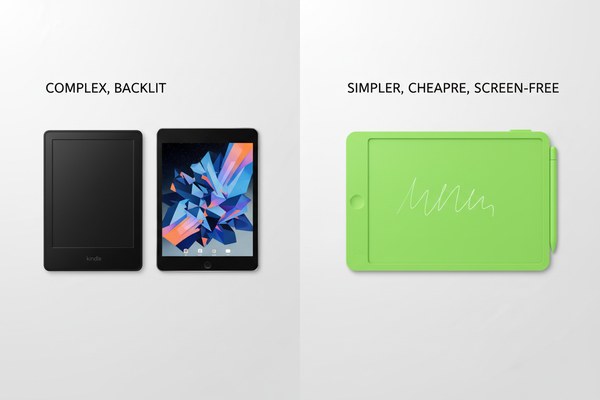
An LCD writing tablet can replace a Kindle Scribe or iPad for basic writing, sketching, and note-taking tasks. It costs far less. It needs no charging for months. It is lighter and simpler. But it cannot browse the web, read ebooks, or run apps. Your choice depends on what you actually need.
I have spent a lot of time looking at how people use writing devices every day. Most people do not use half the features on their iPad. Most Kindle Scribe owners only want to jot notes. I have seen this pattern over and over. So let me break this down clearly. I will show you where an LCD writing tablet wins, where it loses, and who should buy which device. By the end, you will know exactly what fits your life.
1. Price and Value: What Are You Actually Paying For?
You open the product page. The iPad starts at $329. The Kindle Scribe starts at $199. Your stomach drops. You just want something to write on.
An LCD writing tablet costs between $5 and $30 depending on size and features. It does not need Wi-Fi, apps, or subscriptions. For pure writing and sketching, it delivers real value at a fraction of the cost. I believe this price gap is the single biggest reason people switch.
I remember a teacher who came to us at GY-industries. She needed 30 writing boards for her classroom. An iPad setup would have cost her over $10,000. A Kindle Scribe setup was not much better. She chose our LCD writing tablets instead. Her total cost was under $500. The kids used them every single day. They drew, practiced letters, and solved math problems. She told me it was the best classroom purchase she ever made. The boards needed no charging, no app updates, and no tech support. Simple tools often work best in real life.
Price Comparison at a Glance
| Feature | LCD Writing Tablet | Kindle Scribe | iPad (Base Model) |
|---|---|---|---|
| Average Cost | $5 – $30 | $199 – $369 | $329 – $599 |
| Subscription Needed | No | Optional (Kindle Unlimited) | Optional (iCloud, apps) |
| Battery Life | Months (button cell or USB) | Weeks | Hours |
| Replacement Cost | Very low | High | Very high |
2. Writing Feel and Daily Use: Which One Actually Works Better?
You pick up a stylus. The screen lags. The app crashes. You just wanted to write one quick note. Technology gets in the way again.
An LCD writing tablet responds instantly. There is zero lag. The writing feel is smooth and direct. I find it closer to writing on paper than any iPad app I have tried. For quick notes, to-do lists, and freehand sketches, it feels natural and fast every single time.
My colleague here at GY-industries uses an LCD tablet on his desk every day. He writes phone numbers, meeting reminders, and quick diagrams on it. He told me he tried a note-taking app on his phone for months. He always got distracted by notifications. The LCD tablet fixed that. It only does one thing. That focus is powerful. I have also tested our own GY-industries LCD tablets from our Shenzhen factory. The pressure-sensitive screen feels responsive. The erase button wipes everything in one click. No menus. No loading. Just write and erase. That simplicity is hard to beat for daily quick notes.
Writing Experience Comparison
| Factor | LCD Writing Tablet | Kindle Scribe | iPad with Apple Pencil |
|---|---|---|---|
| Response Time | Instant | Slight delay | Very slight delay |
| Distraction Level | None | Low | High (notifications, apps) |
| Paper-like Feel | Very close | Good (e-ink) | Moderate (glass screen) |
| Setup Required | None | Account + Wi-Fi | Apple ID + setup |
3. Who Should Choose an LCD Writing Tablet vs. the Others?
You read reviews all day. Every reviewer seems to need every feature. But you are not every reviewer. You have specific needs.
I believe LCD writing tablets are perfect for kids, teachers, office workers, and minimalists. If you need ebook reading, cloud storage, or internet access, choose a Kindle Scribe or iPad. If you want a fast, affordable, and distraction-free writing surface, the LCD tablet wins clearly every time.
I have seen GY-industries supply LCD writing tablets to clients across retail, education, and corporate markets. Our OEM and ODM clients put their own brand on our tablets. They sell them as kids’ doodle boards, office memo pads, and classroom tools. All our tablets carry CE, RoHS, and CPC certifications. That matters to buyers in the US and Europe. One retail brand came to our Shenzhen factory for a custom order. They wanted a specific size and a logo. We handled everything. Their product launched in major stores within months. According to Grand View Research, the electronic stationery market is growing fast. More people want simple digital writing tools every year.
Best Device by User Type
| User Type | Best Choice | Key Reason |
|---|---|---|
| Young children (3–8 years) | LCD Writing Tablet | Safe, durable, no screen time concerns |
| Students needing ebooks | Kindle Scribe | Reading + note-taking in one device |
| Creative professionals | iPad with Apple Pencil | Full app support and color display |
| Office workers, minimalists | LCD Writing Tablet | Quick notes, zero distraction, low cost |
Conclusion
An LCD writing tablet cannot replace every function of a Kindle Scribe or iPad. But for simple, fast, and affordable writing, it wins easily. If you want to explore custom LCD writing tablet options for your brand or business, contact GY-industries today or learn more about our OEM and ODM services. We are ready to help you build the right product.
“`
