“`html
Handwriting practice frustrates many children. Paper rips. Mistakes feel permanent. Children give up fast. That frustration slows real progress at home.
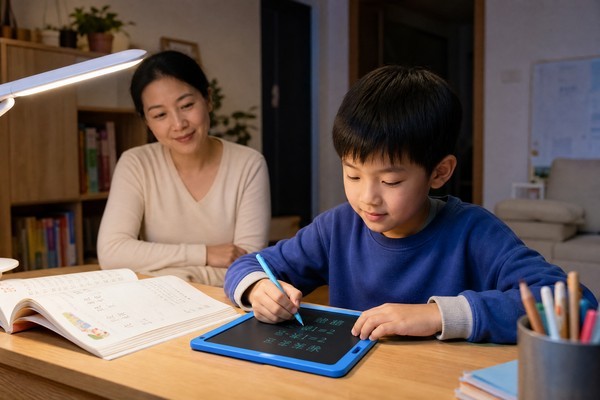
LCD writing tablets remove that frustration completely. Children erase instantly, try again freely, and practice longer without wasting a single sheet of paper.
I have seen this change happen in real families. One parent told me her six-year-old refused every paper worksheet. Then she introduced a small LCD tablet. Within two weeks, her daughter was tracing letters voluntarily every morning before breakfast. The difference was not the skill. The difference was the tool. When practice feels like play, children stop resisting it. They start choosing it. That shift changes everything about how fast they improve at home.
1. Why Do Children Resist Handwriting Practice on Paper but Enjoy It on an LCD Tablet?
Paper feels permanent to children. One wrong stroke and the page looks ruined. That feeling kills motivation fast.
LCD tablets eliminate the fear of mistakes. Children erase instantly and start over without guilt. Practice becomes a low-stakes activity they actually want to repeat. That psychological shift is the real reason progress happens faster.
The Story Behind the Resistance
I remember speaking with a father whose eight-year-old son hated handwriting homework. Every evening ended in tears. The paper showed every mistake clearly. Erasing left smudges. The boy felt ashamed of his own work.
His father switched to a 12-inch GY-Industries LCD tablet. The pressure-sensitive surface felt exactly like pencil on paper. But every mistake disappeared with one swipe. His son started practicing words independently. He used the anti-erase lock to show finished sentences proudly to his parents. No smudges. No torn pages. Just clean, confident work.
Within a month, his teacher noticed the improvement. The father said his son now asks to practice. That single change — removing the permanence of paper — unlocked everything.
According to the CDC’s child development guidelines, children aged 3–8 learn best through low-pressure, repetitive activities that feel rewarding rather than corrective.
Paper vs. LCD Tablet: What Children Experience
| Experience Factor | Paper Practice | LCD Tablet Practice |
|---|---|---|
| Mistake correction | Visible smudges remain | Instant clean erase |
| Writing surface feel | Familiar but fragile | Pressure-sensitive, pencil-like |
| Work display | Crumpled or torn | Anti-erase lock shows clean work |
| Child’s emotional response | Frustration, avoidance | Confidence, willingness to retry |
| Parent involvement needed | High — managing waste | Low — child works independently |
| Cost over time | Ongoing paper purchases | One-time device, 1–2 year battery |
2. How Should Parents Structure a Daily Handwriting Practice Routine Using an LCD Tablet?
Random practice without structure rarely builds lasting skill. Children need a simple, consistent daily routine to improve.
A short, structured daily session on an LCD tablet builds muscle memory faster than long, irregular paper sessions. Ten focused minutes every day beats one frustrated hour once a week. Consistency creates confidence.
A Routine That Actually Works
I talked with a mother who homeschools her two children, aged five and nine. She struggled to find tools that worked for both ages at once. Paper practice was messy and hard to manage for two children simultaneously.
She started using an 8.5-inch tablet for her younger child and a 16-inch tablet for her older one. Her five-year-old traces basic shapes and letters every morning for ten minutes. Her nine-year-old uses the larger surface for character practice and simple essay planning. The RoHS-certified materials mean she never worries about safety during daily use.
The 1–2 year battery life means neither tablet ever dies mid-session. No charging interruptions. No excuses to stop early. Both children now finish their sessions without complaint. She described it as the most peaceful part of their school day.
Recommended Daily Routine by Age
| Age Group | Recommended Tablet | Daily Session Length | Suggested Focus | Parent Role |
|---|---|---|---|---|
| Ages 3–6 | 8.5-inch LCD tablet | 8–10 minutes | Letter tracing, basic shapes | Guide and praise attempts |
| Ages 6–10 | 12-inch LCD tablet | 10–15 minutes | Word practice, short sentences | Set a word list, review with lock feature |
| Ages 8+ | 16-inch LCD tablet | 15–20 minutes | Character practice, essay planning | Discuss ideas, review locked work |
The parents whose children improved fastest all said the same thing. Their child stopped seeing practice as a chore once they could erase instantly and try again without wasting paper. Structure plus the right tool makes all the difference.
3. At What Age Should Children Start Using an LCD Tablet for Handwriting Preparation?
Many parents wait too long. They think screens are not appropriate for young children. But an LCD tablet is not a screen — it is a writing surface.
Children as young as three can begin handwriting preparation on an LCD tablet. Early shape tracing builds the fine motor control that makes formal handwriting easier later. Starting early creates a genuine advantage in school readiness.
Starting Early: One Family’s Experience
I spoke with a grandmother raising her four-year-old granddaughter. She worried about screen time but wanted to prepare the child for kindergarten. She discovered that LCD tablets produce no blue light and no digital content. They are simply electronic paper.
She chose the 8.5-inch tablet, sized perfectly for small hands. Her granddaughter began tracing circles, squares, and simple letter shapes. The pressure-sensitive surface responded naturally to her light grip. The RoHS certification gave the grandmother confidence in daily, safe use.
By the time the child entered kindergarten, her teacher remarked on her unusually strong pencil grip and letter recognition. The grandmother credits those ten-minute morning tracing sessions entirely. Starting at age four made kindergarten feel easy rather than overwhelming.
Age and Tablet Guide for Parents
| Child’s Age | Developmental Stage | Best GY-Industries Tablet | Key Skills Practiced |
|---|---|---|---|
| Age 3–4 | Pre-writing, grip development | 8.5-inch | Shapes, simple curves, holding a stylus |
| Age 5–6 | Letter recognition, tracing | 8.5-inch | Alphabet letters, numbers, name writing |
| Age 6–8 | Early word formation | 12-inch | Simple words, spacing, sentence structure |
| Age 8–10 | Building fluency and speed | 12-inch or 16-inch | Word practice, legibility, consistency |
| Age 10+ | Complex composition | 16-inch | Character practice, essay planning, drafting |
The 8.5-inch tablet is ideal for ages 3–6. It fits small hands. It builds the fine motor foundation every child needs. Do not wait until school demands perfection. Start early, keep it short, and make it feel like play.
Final Thoughts
LCD tablets make handwriting practice feel safe, fun, and rewarding. Children practice more often. They improve faster. You spend less on paper.
Ready to find the right tablet size for your child? Contact GY-Industries today or explore our full OEM service options to get started.
“`
