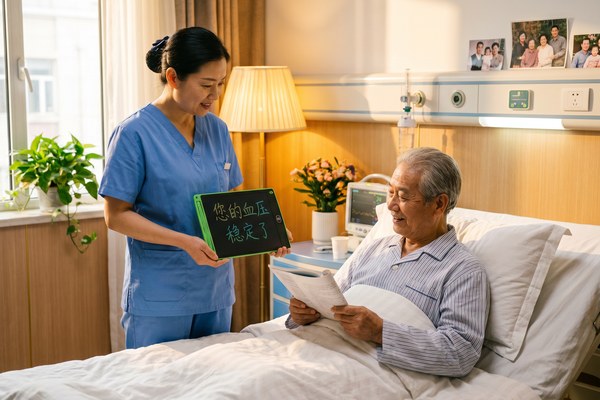
Nurses face a real problem every day. Some patients simply cannot speak. Communication breaks down fast, and care suffers.
Yes, nurses can absolutely use an LCD writing tablet to communicate with patients. It is silent, reusable, and easy to hold. A patient can write or draw their needs quickly. No paper, no pen searching, no noise. It is one of the simplest tools a nurse can add to any ward.
I have worked closely with hospitals and care teams through my role at GY-industries. I have seen how a small device can change a patient’s whole experience. When someone cannot speak, they feel scared and alone. Giving them a way to write back — even just one word — changes everything. In this article, I want to show you exactly how nurses are using LCD writing tablets right now, and why this tool deserves a place in every care setting.
Why Silent Communication Is a Real Problem in Healthcare
Nurses often stand beside patients who cannot speak. It is frustrating for both sides. Care gets delayed, and patients feel helpless.
Many patients lose the ability to speak after surgery, stroke, or intubation. Writing on paper works, but paper runs out. A whiteboard is too big. An LCD writing tablet solves this. It is lightweight, clean, and always ready. It gives patients a voice without using one.
I remember speaking with a ward manager at a clinic in Southeast Asia. She told me her nurses kept losing pens and paper pads. Patients with tracheostomies could not call out for help. The team tried small whiteboards, but they were heavy and hard to wipe clean. Then they switched to LCD writing tablets. I saw her face change when she described it. She said patients looked calmer. They could tap a nurse, hold up the tablet, and write one word: “pain” or “water” or “scared.” That word was enough. It took seconds. It made a real difference to patient comfort and nurse response time.
Common Patient Communication Barriers and How LCD Tablets Help
| Patient Condition | Communication Problem | How LCD Tablet Helps | Key Tablet Feature |
|---|---|---|---|
| Post-surgery intubation | Cannot speak at all | Patient writes words or draws pictures | Pressure-sensitive stylus tip |
| Stroke or aphasia | Struggles with words | Patient draws simple shapes or symbols | Wide writing surface |
| Hearing impairment | Misses spoken instructions | Nurse writes instructions on tablet | Clear, bright LCD display |
| Severe anxiety or trauma | Cannot form spoken words | Patient writes at their own pace | One-button erase, no pressure |
How Nurses Use LCD Writing Tablets During Daily Rounds
Daily rounds move fast. A nurse visits many patients in a short time. Any tool that slows things down gets dropped quickly.
An LCD writing tablet fits perfectly into a fast nursing routine. It is thin and light enough to carry in one hand. A nurse can pass it to a patient in seconds. The patient writes. The nurse reads. The nurse erases with one button. The whole exchange takes under a minute. That speed matters in a busy ward.
I think about one specific product we make at our Shenzhen factory at GY-industries. Our LCD tablets are built with a smooth erase button and a durable writing surface. Nurses need things that survive drops and daily use. Our tablets go through strict CE, RoHS, and CPC certification checks. That matters to healthcare buyers. One hospital procurement team told me they needed proof of safety certifications before placing an order. We had all the documents ready. They ordered a custom OEM batch with their logo on it. Those tablets are now in use across three hospital floors. I love hearing stories like that.
LCD Tablet Use Cases Across a Typical Nursing Shift
| Time of Day | Nursing Task | How Tablet Is Used |
|---|---|---|
| Morning rounds | Check patient comfort | Patient writes pain level or main complaint |
| Medication time | Confirm patient consent | Nurse writes drug name, patient writes “yes” or “no” |
| Afternoon care | Post-procedure check | Patient writes how they feel after treatment |
| Night shift | Silent check-in | Tablet used so patient does not wake others nearby |
Why LCD Tablets Beat Paper and Traditional Whiteboards in Clinical Settings
Paper gets wet, lost, or messy. Traditional whiteboards are too bulky for a bedside. Nurses need something better.
An LCD writing tablet is cleaner and more practical than either option. There is no ink, no marker smell, and no smearing. It wipes clean with a single button press. It uses very little battery power. According to research published by the American Nurses Association, improving patient-nurse communication directly improves patient safety outcomes. An LCD tablet is a direct, low-cost step toward that goal.
I have tested many LCD tablets personally in our GY-industries quality lab. I once compared a standard paper notepad to one of our 8.5-inch LCD tablets during a timed test. With paper, I counted 11 steps — find pad, find pen, write, hand over, wait, take back, flip to new page. With the LCD tablet, I counted four steps — hand over, patient writes, read, press erase. That is less than half the effort. In a busy ward, those saved seconds add up to hours over a week. Our tablets also support OEM and ODM customisation. A hospital can add its own branding or choose a specific size that fits their bedside trays.
LCD Tablet vs Paper vs Whiteboard — Quick Comparison
| Feature | LCD Writing Tablet | Paper Notepad | Traditional Whiteboard |
|---|---|---|---|
| Weight | Very light | Light but grows heavy | Heavy and bulky |
| Erase speed | One button, instant | Must flip page | Requires cloth and marker |
| Hygiene | No ink, easy to wipe | Porous surface, germ risk | Marker residue builds up |
| Cost over time | Low — reusable | High — constant resupply | Medium — markers and cloths needed |
Conclusion
Nurses can absolutely use an LCD writing tablet to help patients communicate. It is fast, clean, and kind. Contact GY-industries today to explore custom OEM options built for healthcare settings.
