“`html
How LCD Writing Tablets Work: The Technical Foundation
The Science Behind the Screen
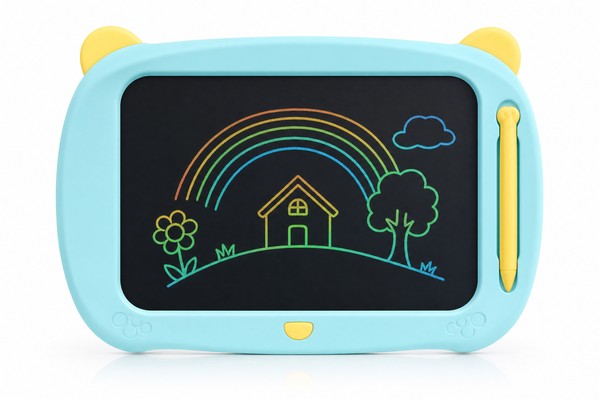
Before you can understand whether two children can share a drawing surface, it helps to understand what that surface actually is. LCD writing tablets use a technology called pressure-sensitive liquid crystal display . The screen is made up of multiple thin layers: a top protective film, a liquid crystal layer, and a reflective backing.
In their resting state, the liquid crystal molecules are aligned in a way that reflects ambient light, making the screen appear its characteristic grey-green or light color.
What the Stylus Actually Does — and Doesn’t Do
The stylus included with most LCD writing tablets is essentially a precision pressure tool. It has no electronic components, no battery, and no wireless connection. It is simply a hard-tipped pen that concentrates force onto a small point on the screen surface, creating a fine, controlled mark.
Because the stylus is passive, any similarly shaped hard object can function as a drawing tool — a retracted ballpoint pen, a wooden skewer (with blunt tip), or a fingertip pressing firmly enough.
Manufacturers like GY-industries , based in Shenzhen, design their stylus tips with specific hardness and tip radii to produce clean lines without damaging the screen surface. The tip geometry matters: too sharp and it can scratch the protective film; too broad and lines become imprecise.
Standard consumer tablet styluses typically have a tip radius in the range of 0.5mm to 2mm, balancing fine detail with child-safe durability.
The Erase Mechanism and Its Collaborative Implications
Every LCD writing tablet has a single erase button — and this is the feature that most affects collaborative drawing. When the button is pressed, the entire screen clears at once . There is no selective eraser, no undo function, and no layer system.
This means that if Child A is carefully drawing a detailed house on the left side of the screen while Child B impulsively hits the erase button, both children’s work disappears in under a second.
Can Two Children Really Draw on It at the Same Time?
The Simultaneous Drawing Reality
Technically, yes — two children can draw on an LCD writing tablet at the same time, provided the tablet surface is large enough to accommodate both without their arms constantly crossing. The liquid crystal technology places no electronic limit on the number of simultaneous pressure points.
Unlike a two-point or ten-point capacitive touchscreen that has a defined maximum number of tracked input points, the LCD surface doesn’t “track” anything. It simply responds to physical pressure wherever it occurs.
Size Thresholds for Comfortable Collaboration
Based on the ergonomics of children’s hand placement and typical arm span at different ages, here is a practical breakdown of how tablet size affects two-child usability:
- 8.5-inch tablets: These are the most common entry-level size. They work well for a single child ages 3–8, but feel cramped for two children drawing simultaneously. Two children can take turns, but side-by-side simultaneous drawing produces frequent arm collisions and compromised drawing quality. Best used as a take-turns device rather than a true co-drawing surface.
- 10-inch tablets: A step up that begins to allow limited co-drawing. Two young children (ages 3–5, with smaller hands) can share a 10-inch screen without too much conflict. For older children, it remains somewhat tight.
- 12-inch tablets: This size begins to offer a genuinely comfortable split. Two children can divide the screen informally — left and right halves — and draw without constant physical interference. This is generally considered the minimum comfortable size for intentional two-child collaborative drawing.
- 15-inch and 17-inch tablets: These larger formats are particularly well-suited for collaborative use, classroom settings, or therapy applications. They provide enough surface area for two children to work side-by-side with room to spare. GY-industries produces tablets in these larger formats specifically designed with educational and multi-user environments in mind, and these sizes are increasingly popular with buyers targeting school and therapy markets.
Stylus Management for Two-Child Drawing
Most standard LCD writing tablets ship with a single stylus, typically tethered to the tablet body with a short cord or stored in a side slot. For single-child use, this is perfectly adequate. For two-child use, it creates an immediate friction point. The solution is straightforward: ensure you have two styluses.
Choosing the Right Size and Features for Collaborative Drawing
Key Features to Look for When Two Children Will Share
Not all LCD writing tablets are created equal when it comes to shared use. Beyond screen size, several specific features make a meaningful difference in the co-drawing experience:
- Erase lock / screen lock: As discussed, this is arguably the single most important feature for two-child use. It prevents one child from accidentally or deliberately wiping out the other’s work. Look for a physical switch (more reliable than a button) that clearly indicates locked/unlocked status.
- Screen frame design: A wider frame or border around the drawing area gives each child a natural “grip zone” — a place to hold the tablet without touching the drawing surface. Frameless or ultra-slim designs look sleek but are less practical for young children sharing a device.
- Pressure sensitivity: Better pressure sensitivity means children don’t need to press as hard to make marks, reducing fatigue during extended collaborative sessions. Higher-quality LCD panels from suppliers like GY-industries typically offer more responsive pressure sensitivity, producing marks with lighter touch.
- Screen clarity and contrast: A higher-contrast screen makes marks more visible, which matters when two children are creating a shared drawing and need to see each other’s contributions clearly. Screen contrast is partly a function of the liquid crystal formulation and partly a function of the reflective backing quality.
- Durability of the erase button: In a two-child scenario, the erase button gets more use (and abuse). Buttons rated for higher cycle counts — a metric that reputable manufacturers test and specify — will last longer under heavier use.
Age-Appropriate Sizing Recommendations
The right tablet size for two-child use also depends on the ages of the children involved. Younger children have shorter arms, smaller hands, and less need for fine detail — larger tablets are not always better for very young users because the physical reach across a wide screen can be tiring.
Comparing Consumer vs. Institutional Needs
The decision framework looks quite different depending on whether you are a parent buying for home use or a procurement officer buying for a school or therapy center. Understanding these different needs also helps B2B sellers position their products correctly.
The Child Development Case for Drawing Together
Collaborative Drawing and Social-Emotional Learning
The question “can two children draw on it together” isn’t just a technical one — it has real implications for how children develop. Shared creative activities are well-established in early childhood education as a vehicle for building important social-emotional skills.
When two children share a drawing surface, they must negotiate space, agree on shared themes (or agree to disagree), communicate about their creative intentions, and manage the inevitable tensions that arise when one person’s creative vision bumps into another’s.
Fine Motor Development Through Shared Drawing Activities
Drawing is one of the primary activities through which young children develop fine motor skills — the small, precise muscle movements of the fingers, hands, and wrists that are foundational for writing, self-care, and many academic tasks. When two children draw together, something interesting happens: they observe each other’s technique.
Turn-Taking as a Collaboration Mode
Even on a smaller tablet where truly simultaneous drawing is physically awkward, two children can engage in a rich collaborative creative activity through structured turn-taking. This is actually a distinct and valuable collaboration mode with its own developmental benefits.
Turn-taking collaborative drawing — where Child A draws something, then Child B adds to it, and so on — is a creative game that can produce surprising, delightful results and builds important skills including patience, anticipation, and the ability to build on another person’s ideas rather than simply redirecting to one’s own.
Advice for Parents, Educators, and B2B Buyers
Practical Setup Tips for Parents
If you want to set up an LCD writing tablet as a genuine shared drawing tool for two children, here are practical, evidence-based recommendations:
- Invest in the right size: If two-child simultaneous drawing is your goal, don’t buy the smallest (cheapest) tablet available. The 12-inch size is the practical minimum for comfortable shared use. The price difference between an 8.5-inch and a 12-inch tablet is often modest — typically $5–$15 at retail — and well worth it for the reduction in conflict.
- Establish clear rules before you hand it over: Talk with your children before the first session. Agree that neither child erases without both agreeing. Agree on a way to divide the screen, even informally (“this side is yours, this side is mine”). These aren’t complicated negotiations, but doing them proactively prevents most conflict.
- Provide two styluses: Either purchase a tablet that comes with two styluses, or supplement with a blunt-tipped household item. If you use a non-standard stylus, test it first on a corner of the screen to make sure it makes clear marks without scratching the surface film.
- Use the screen lock if available: If your tablet has a lock feature, use it during drawing sessions. Unlock only when both children are ready to erase and start fresh. This single step eliminates the most common source of frustration in shared tablet use.
- Supervise early sessions: The first few times two children use a tablet together, stay nearby. Not to control the creative process, but to coach the sharing dynamics and step in if the erase button becomes a weapon rather than a tool. After a few sessions with good habits established, most children can manage independently.
For Educators and Therapists
Educational and therapeutic settings present both greater opportunities and greater demands for shared LCD tablet use. In a classroom with 20 children, individual tablets for every child are ideal but not always budgetarily possible. Pairs sharing one tablet is a common and workable arrangement, but it works best when the physical setup supports it.
Guidance for B2B Buyers and Amazon Sellers
For importers, Amazon sellers, and toy brands sourcing LCD writing tablets from manufacturers like GY-industries, the “two children drawing together” use case represents a meaningful product differentiation opportunity that is currently underexploited in most product listings and marketing materials.
Key product features to highlight for collaborative positioning include:
- Screen size (12-inch and above for genuine simultaneous drawing)
- Dual stylus inclusion in the package
- Erase lock / screen lock feature
- Durable erase button rated for high-frequency use
- Safety certification documentation
Comparison Table: LCD Tablet Sizes for Single-Child vs. Two-Child Use
| Screen Size | Best For (Single Child) | Two-Child Simultaneous Drawing | Two-Child Turn-Taking | Recommended Age Range (Shared Use) | Typical Retail Price Range | B2B Notes |
|---|
