“`html
LCD writing tablets have become a staple in households, classrooms, and offices around the world — and for good reason. They are affordable, reusable, screen-time-free, and remarkably simple to use. But a question that parents, teachers, and product buyers frequently ask is this: can water damage an LCD writing tablet?
Whether a toddler has knocked a glass of juice onto the drawing board, a child has taken it into the bath, or a B2B buyer is evaluating a product’s durability specifications before a large import order, the answer to this question matters more than most people realize.
In this article, we will walk through exactly how LCD writing tablet technology works, where water vulnerability exists, what happens in real-world exposure scenarios, and how manufacturers like GY-industries approach waterproofing and water resistance in product design.
How LCD Writing Tablets Actually Work — And Why Water Is a Concern
The Basic Technology Inside Every LCD Writing Tablet
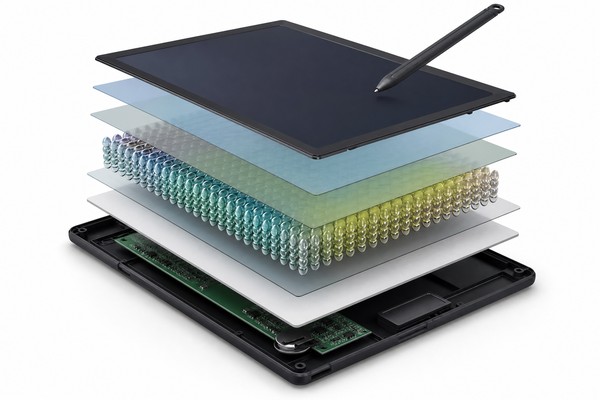
To understand why water is a potential threat to an LCD writing tablet, it helps to first understand what is actually happening inside the device when you draw a line or press the erase button. Despite their toy-like appearance and low price point, LCD writing tablets use a surprisingly elegant piece of physics.
When you press the erase button, a brief low-voltage electrical charge is sent across the entire panel, causing all the liquid crystal molecules to snap back to their original reflective configuration simultaneously — the entire screen appears to “clear” in an instant. This process can typically be repeated tens of thousands of times without degradation.
Manufacturers like GY-industries engineer these panels to maintain consistent erase performance across the lifespan of the product, a metric that matters enormously in both consumer and commercial applications.
Where Does Water Fit Into This Picture?
Now that we understand the internal structure, the vulnerability becomes clearer. The liquid crystal layer is, by definition, a fluid-like substance. It is sealed between two substrate layers, but that seal is not always engineered to be airtight or waterproof in lower-cost manufacturing runs.
The frame — typically made of ABS or polycarbonate plastic — holds the screen panel in place, and at the edges of the panel, there are seams, gaps, and access points for internal wiring connecting the erase button circuit to the panel electrodes.
Component-Level Vulnerability Summary
Each internal component of an LCD writing tablet has a different sensitivity to water. Understanding this helps both parents and product buyers calibrate their expectations appropriately.
- LCD panel (liquid crystal layer): Generally resilient to small amounts of moisture if the seal is intact, but if water penetrates the substrate seam, it can disrupt the liquid crystal alignment permanently, causing cloudy patches, lines, or areas that no longer write or erase correctly.
- Electrode films (ITO coating): Indium tin oxide (ITO) is the transparent conductive material typically used on the inner surfaces of the substrates. ITO is relatively resistant to oxidation, but prolonged moisture exposure can degrade the thin film over time, reducing conductivity and causing incomplete erasing across the panel.
- Conductive traces and erase circuit: These are the thin copper or silver-printed lines that carry the erase voltage from the battery to the panel. They are highly vulnerable to corrosion if exposed to moisture, especially salted or acidic liquids like juice or sports drinks.
- Battery and battery contacts: The small coin cell or AAA battery powering the erase function is housed in a separate compartment, often with its own cover. The metal contacts are vulnerable to corrosion from water, which can prevent the erase function from working even if the panel itself is undamaged.
- Plastic frame and housing: Generally the most water-resistant part of the assembly, but can allow water to wick into the internal cavity along molding seams and around button cutouts.
Understanding these vulnerabilities helped shape the design philosophy at manufacturers like GY-industries, whose engineering teams consider edge sealing, housing design, and component layout as interconnected factors in product durability.
What Happens When Water Contacts an LCD Writing Tablet?
Scenario One: Surface Splash or Spill
This is the most common real-world scenario for a household with young children. A cup of water, a juice box, or a damp sponge makes contact with the writing surface of the tablet. In most cases, if the contact is brief and the tablet is not submerged, the outcomes range from minor to negligible — provided the device has been manufactured with reasonable attention to edge sealing and housing integrity.
Scenario Two: Submersion or Soaking
Some children — and many parents will confirm this — are remarkably creative in finding ways to submerge objects that should not be submerged. An LCD writing tablet left near a bath, taken into a pool, dropped into a sink, or subjected to heavy rain outdoors is a fundamentally different scenario than a surface spill.
- Immediate clouding or white patches on the LCD panel, caused by water disrupting the liquid crystal layer alignment or forming a film between the substrate layers.
- Failure of the erase function, because water has reached the battery contacts or the conductive traces of the erase circuit, shorting or corroding the electrical pathway.
- Persistent dark or light lines across the screen that do not clear even after erasing, caused by permanent disruption of the liquid crystal orientation in affected areas.
- Intermittent or no erase response after the device appears to dry out, caused by mineral deposits on the battery contacts or circuit traces that impede electrical conductivity.
Scenario Three: Humidity and Condensation
This scenario is less dramatic than the previous two, but it is relevant in certain climates and use environments. Prolonged storage or use of an LCD writing tablet in a high-humidity environment — such as a bathroom, a coastal region during monsoon season, or a shipping container in transit through tropical regions — can cause gradual moisture ingress that is difficult to diagnose until visible damage appears.
- Slow corrosion of battery contacts and circuit traces, causing the erase function to become inconsistent or fail entirely.
- Gradual clouding or yellowing of the display panel, caused by moisture affecting the optical properties of the substrate layers.
- Delamination of the top writing surface film (in flexible-film screen designs), where moisture penetrates between the adhesive layer and the substrate.
This is a particularly important consideration for B2B importers and Amazon FBA sellers who are shipping products from Shenzhen to markets in Southeast Asia, India, or other high-humidity regions. Packaging with appropriate desiccants, and sourcing from manufacturers like GY-industries who can advise on humidity-protective packaging specifications, can significantly reduce the rate of in-transit and in-storage product degradation.
Water Resistance vs. Waterproof: What Do These Terms Really Mean for LCD Tablets?
Understanding IP Ratings and How They Apply to Consumer Electronics Toys
The terms “water resistant” and “waterproof” are among the most frequently misused and misunderstood terms in consumer electronics marketing. For LCD writing tablets specifically, these terms are rarely used with precision — and buyers on both the consumer and B2B side benefit enormously from understanding the actual standard that governs these claims.
Here is what the relevant liquid protection ratings mean in practice:
- IPX0: No protection against water. A standard, unmodified LCD writing tablet from most manufacturers carries this implicit rating, even if no rating is stated.
- IPX2: Protected against dripping water when tilted up to 15 degrees. This would cover most light-splash scenarios.
- IPX4: Protected against water splashing from any direction. A tablet with this rating can handle a direct water splash from any angle without damage — suitable for active children’s use.
- IPX7: Protected against temporary immersion in water up to 1 meter deep for up to 30 minutes. This would be genuinely “waterproof” for all practical household scenarios.
- IPX8: Protected against continuous immersion beyond 1 meter. This level of protection is rarely needed for a writing tablet and typically reserved for professional outdoor or marine equipment.
How Manufacturers Achieve Water Resistance in LCD Writing Tablets
For manufacturers who do pursue genuine water resistance in their LCD writing tablet designs, there are several engineering approaches that can be applied. These are not mutually exclusive — higher water resistance ratings typically involve a combination of multiple techniques applied together.
At GY-industries, OEM and ODM buyers can discuss specific water resistance requirements as part of the custom product specification process. Different market segments and price points justify different levels of water protection engineering, and understanding what is achievable at a given cost structure helps buyers make informed sourcing decisions.
The Honest Tradeoff: Water Resistance Adds Cost and Complexity
It is important to be candid about this: designing an LCD writing tablet with certified water resistance adds real cost and complexity to the manufacturing process. This cost comes from several sources:
- Additional materials: Gaskets, O-rings, conformal coatings, and sealed covers all add material cost per unit.
- Tighter tolerances: A sealed housing requires more precise injection molding to ensure that mating surfaces align correctly and compress the gasket evenly. This can increase tooling costs and slow production speed.
- Testing: IP certification requires laboratory testing (either third-party certified or conducted in-house to standard protocols), which adds time and cost to the product development cycle.
- Repairability: A sealed device is generally harder (or impossible) to repair when the internal components eventually fail. For a low-cost consumer toy, this is often an acceptable tradeoff, but it is worth noting.
Protecting Your LCD Writing Tablet: Practical Advice for Parents and Everyday Users
Everyday Habits That Reduce Water Damage Risk
For parents and caregivers who already own an LCD writing tablet and want to extend its useful life, the good news is that most water damage scenarios are preventable with simple habits. You do not need a specially engineered waterproof tablet to keep your device safe in a normal household environment — you just need to be thoughtful about where and how the tablet is used.
What to Do If the Tablet Gets Wet
If water damage has already occurred, the following steps give the tablet the best chance of recovery — particularly in surface-splash or light-exposure scenarios. It is important to act quickly, because the damage caused by water exposure is often less about the water itself and more about the corrosion and mineral deposits that form as the water evaporates.
- Do not press the erase button. If water has reached the circuit board or battery contacts, applying voltage through a wet circuit can accelerate corrosion and potentially cause a short circuit. Wait until the device has dried completely before attempting to use the erase function.
- Remove the battery immediately. If the battery compartment is accessible, remove the battery as soon as possible. This eliminates the electrical potential that drives electrochemical corrosion in a wet environment. Inspect the contacts for any signs of water intrusion and wipe them dry.
- Allow thorough drying time. Place the tablet in a warm, dry environment with good air circulation. Do not use a hair dryer directly on the device — the focused heat can warp plastic components or damage the liquid crystal layer. Room temperature air drying for 24–48 hours is more appropriate. Placing the device near (but not on) a warm radiator or in a warm, dry room is acceptable.
- Do not use silica gel bags as a quick fix. The “put it in a bag of rice” or “silica gel” approach that many people know from smartphone water damage is of limited effectiveness for LCD writing tablets because the primary damage mechanism here is corrosion of circuit traces rather than water trapped in a microprocessor assembly. Desiccants help, but they are not a substitute for removing the battery promptly and allowing proper drying time.
- Inspect before powering up. Before reinserting the battery and pressing erase, visually inspect all accessible surfaces for any white residue (mineral deposits from tap water or beverages). These can be carefully cleaned with a cotton swab lightly dampened with 90%+ isopropyl alcohol, which dissolves mineral deposits and displaces any remaining water while evaporating quickly.
Even with the best recovery procedure, it is important to set realistic expectations: submersion damage in particular is very often permanent. If the liquid crystal layer has been disrupted or the ITO electrode films have been damaged, these are not repairable at the consumer level.
Fortunately, LCD writing tablets are relatively affordable to replace, and manufacturers like GY-industries maintain a broad product catalog that makes finding a suitable replacement straightforward.
Choosing the Right LCD Writing Tablet for Your Environment
If water exposure is a realistic possibility in your household — perhaps because you have very young children, the tablet will be used outdoors, or it will be used in a classroom or daycare setting with high accident probability — it is worth evaluating products specifically designed with this use case in mind, rather than retrofitting protective habits onto a product that was never designed for wet environments.
When shopping for a more water-resistant LCD writing tablet, consider the following:
- Look for an IP rating in the product specification. If a manufacturer claims “water resistant” or “splash proof,” ask for the specific IP rating number. IPX4 is a reasonable minimum for active children’s use; IPX7 is appropriate if bath or pool use is anticipated.
- Evaluate the frame design. A tablet with a thick, rubberized frame that covers the edges of the writing panel provides significantly more physical protection against water entry than one with exposed panel edges. Some tablets designed for young children include a full silicone bumper case that also helps with impact protection.
- Check the battery compartment design. A sealed battery compartment with a screw closure or O-ring sealed cover is a positive indicator of water resistance attention in the overall design. An open or loosely fitting battery cover is a red flag for water vulnerability.
- Consider the age and use case of the primary user. A 7-year-old using the tablet at a desk is in a fundamentally different risk environment than an 18-month-old using it as a bath toy. Match the product specification to the realistic risk profile.
What B2B Buyers and Amazon Sellers Need to Know About Water Resistance in LCD Tablet Sourcing
Water Damage as a Product Return Driver — and How to Minimize It
GY-industries · Factory Direct · Shenzhen
Ready to Source LCD Writing Tablets?
Get factory pricing, free samples, CE/FCC/CPC certificates, and OEM/ODM consultation. Response within 24 hours.
✓ MOQ from 500 units
✓ CE / FCC / CPC certified
✓ 15+ years experience
References
- [1] U.S. Consumer Product Safety Commission. Toy Safety guidelines for children’s products. https://www.cpsc.gov/Business–Manufacturing/Business-Education/Toy-Safety
- [2] American Academy of Pediatrics. AAP guidelines on media and children. https://www.aap.org/en/patient-care/media-and-children/
Related Articles
LCD Writing Tablet Buyer Review Table
| Area | Buyer check | Evidence |
|---|---|---|
| Product factor | Buyer check | Evidence to request |
| Writing response | Test line clarity and pressure response | Sample review |
| Erase function | Confirm reset behavior and lock feature | Functional test |
| Durability | Review surface, stylus, and housing use case | Specification sheet |
