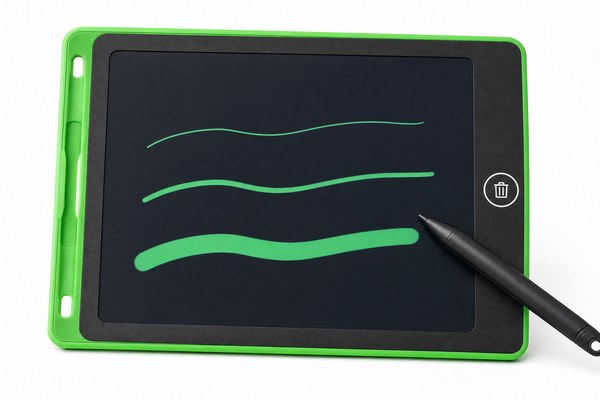
You want clean, bold lines. But your LCD writing tablet keeps giving you the same thin stroke every time. That is frustrating.
Most standard LCD writing tablets do not let you adjust line thickness manually. The line width depends on the stylus tip size, the pressure you apply, and the screen technology built into the tablet at the factory. You cannot change it with a button or setting.
I know this question comes up a lot. Parents ask it. Teachers ask it. Artists ask it too. They want more control over their writing tool. The good news is that line thickness is not totally fixed. There are real ways to influence it. And if you are sourcing tablets in bulk, the right OEM partner can build exactly what you need from the start. Let me break it all down for you right now.
Why Line Thickness Feels Fixed on Most LCD Writing Tablets
You press the stylus and get one thin line. You press harder and nothing changes. That feels like a design flaw.
LCD writing tablets use a pressure-sensitive film layer. The stylus physically presses into this film. The line width is mostly determined by the tip shape and the screen’s sensitivity level, both set during manufacturing. There is no software layer to change these values after purchase.
I have tested dozens of LCD tablet samples here at our Shenzhen factory. One thing I always notice is that users expect digital-style control. But LCD writing tablets are not like drawing apps on a tablet. They are closer to a pen and paper. The technology is simple and low-power by design. I once handed a sample unit to a primary school teacher at a trade show. She tapped the side looking for a settings button. There was none. I had to explain that the “setting” is really in the stylus itself and how you hold it. She actually smiled when I showed her how changing her grip angle gave her a slightly thicker stroke.
How the Screen Layer Affects Line Width
| Screen Factor | Effect on Line Thickness | Can It Be Changed After Purchase? | Notes |
|---|---|---|---|
| Pressure film sensitivity | Determines how wide the press mark spreads | No | Set at the factory level |
| Screen thickness | Thicker screens may reduce tip contact area | No | Varies by product model |
| LCD layer type | Cholesteric LCD reacts differently to pressure | No | Standard in most writing tablets |
| Surface texture coating | Rough surface can widen the perceived line | Not easily | Can be specified in OEM orders |
What You Can Actually Do to Change Line Thickness
You feel stuck with thin lines. You want bolder strokes for your child or your classroom. There are real options available to you.
You can swap the stylus for one with a wider or rounder tip. You can also change your writing angle and apply more deliberate pressure. Some users use a blunt-ended stylus for thick marks and a pointed one for fine detail. These small changes make a real difference.
I have seen this work many times with customers who buy our LCD tablets for kids. One daycare center in Europe ordered a batch through our OEM service. They wanted bold lines for toddlers learning to draw. We recommended a wider stylus tip in the product spec. The result was a noticeably thicker, more visible line. The teachers loved it. It was not a software fix. It was a hardware decision made early in the process. That is the kind of practical solution I always push our clients toward. Thinking about the end user before the product is even built saves a lot of frustration later.
Stylus Tip Options and Their Line Output
| Stylus Tip Type | Typical Line Width | Best Use Case | Available as OEM Option? |
|---|---|---|---|
| Fine point (1–2mm) | Thin, precise | Note-taking, adult use | Yes |
| Medium round tip (3mm) | Medium weight stroke | General writing, kids | Yes |
| Blunt wide tip (4–5mm) | Bold, thick lines | Toddlers, art, visibility needs | Yes |
| Chisel tip | Variable — thin or thick by angle | Calligraphy practice | Custom OEM request |
How OEM Buyers Can Specify Line Thickness from the Start
You are sourcing LCD tablets for a brand or a retail chain. You need a consistent product. Getting line thickness right from day one matters.
As an OEM buyer, you can specify stylus tip width, screen sensitivity level, and surface coating during the product development stage. Working directly with a factory like GY-industries means these details are built in before mass production. You do not have to accept a generic default.
I work with buyers from all over the world at our Shenzhen facility. Many come to us after a bad experience with a generic product. One stationery brand from the UK contacted us because their previous supplier sent tablets with lines too thin for their target audience — young children. We walked them through our OEM process. We adjusted the stylus tip diameter and softened the screen coating. The new samples tested beautifully. Our products carry CE, RoHS, and CPC certifications, so the finished goods sailed through their compliance checks too. That full-service approach is what I believe makes working with a real factory partner so valuable. You are not just buying a product. You are building one. According to Consumer Reports, product-specific customization is one of the top reasons buyers choose OEM partners over off-the-shelf solutions.
OEM Customization Options for Line Thickness Control
| Customization Option | Impact on Line Thickness | MOQ Consideration | Certification Support |
|---|---|---|---|
| Stylus tip width change | Direct and significant | Low — simple part swap | CE, RoHS, CPC compliant |
| Screen sensitivity tuning | Moderate effect on spread | Medium — requires film sourcing | Tested at Shenzhen factory |
| Surface coating adjustment | Visual texture affects perceived width | Medium | RoHS compliant materials |
| Custom stylus shape/grip | Encourages better pressure angle | Higher — tooling may be needed | Full OEM/ODM support |
Conclusion
Line thickness on LCD writing tablets is mostly set by hardware. But you have more control than you think. Want a custom solution? Contact GY-industries today and let us build it right for you.
