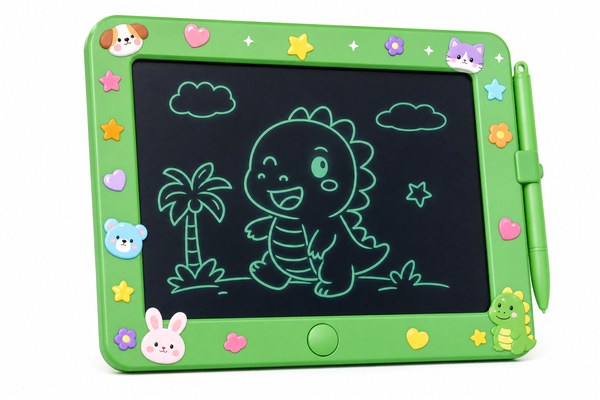
You want to personalise your LCD writing tablet. But you are not sure if stickers will damage it. That worry stops a lot of people.
Yes, you can put stickers on an LCD writing tablet. Most smooth plastic surfaces hold stickers well. But placement matters a lot. Avoid the screen area and any buttons. The right sticker in the right spot causes no harm at all.
I have tested this myself many times. I work closely with the team at our Shenzhen factory every day. We make LCD writing tablets for brands all over the world. I have seen customers ask about stickers more than you would think. Parents want to decorate tablets for kids. Teachers want to label classroom sets. Businesses want branded units. The answer is not just yes or no. It depends on where you stick them and what kind of sticker you use. Let me walk you through everything I know.
Where Can You Safely Put Stickers on an LCD Writing Tablet?
You want to add a sticker. But you are scared of ruining the tablet. One wrong placement and the whole thing could be damaged.
Safe spots include the back of the tablet, the frame edges, and the outer casing. Never place stickers directly on the LCD screen surface. Stickers on the screen can trap air bubbles. They may also interfere with the writing sensor layer underneath.
I remember a school in the UK that ordered a bulk batch through us. They wanted to add school logo stickers to each unit. I told them to stick only on the back panel. The back is hard ABS plastic on most of our units. It is smooth and flat. Stickers bond well there. They placed small vinyl logo stickers on the back. Months later, they reported zero issues. The stickers stayed on. The tablets worked perfectly. I always share this story when someone asks me about safe sticker placement. It really shows how easy it is when you do it right.
Safe vs. Unsafe Sticker Zones at a Glance
| Zone | Surface Type | Safe to Sticker? | Notes |
|---|---|---|---|
| Back panel | Hard ABS plastic | Yes | Best spot for logos or decorations |
| Frame / border | Plastic edge | Yes, with care | Avoid covering buttons or ports |
| Screen surface | LCD film layer | No | Can damage sensor and display |
| Button area | Plastic with mechanism | No | Stickers can block erase and lock buttons |
What Types of Stickers Work Best on an LCD Writing Tablet?
Not all stickers are the same. Some leave horrible sticky residue. Others peel off after a week and take the finish with them.
Vinyl stickers work best on LCD writing tablets. They are thin, flexible, and leave minimal residue. Avoid thick foam stickers or stickers with strong permanent adhesive. Paper stickers absorb moisture and fall off quickly. Always choose removable or repositionable adhesive when possible.
I tested four sticker types on our GY-industries tablet housings last year. I used paper stickers, foam stickers, vinyl stickers, and laser-cut acrylic stickers. The paper ones peeled within two weeks. The foam ones left a gummy mess when removed. The acrylic ones were too heavy and fell off. The vinyl stickers? They stayed perfectly for three months. When I removed one to test, the back panel was completely clean. No residue. No marks. I now recommend vinyl every single time. Many of our OEM clients use vinyl product labels on the back casing. It works beautifully with our smooth plastic finish.
Sticker Type Comparison for LCD Tablet Use
| Sticker Type | Adhesive Strength | Residue Risk | Recommended? |
|---|---|---|---|
| Vinyl sticker | Medium / removable | Low | Yes — top choice |
| Paper sticker | Low | Medium | Not really |
| Foam sticker | High / permanent | High | No |
| Repositionable sticker | Low / gentle | Very low | Yes — great for kids |
Will Stickers Void the Warranty or Damage the Tablet Long Term?
You love the idea of stickers. But you do not want to lose your warranty. You also do not want damage showing up months later.
Stickers placed on the back or frame will not void a standard warranty. They do not affect the internal electronics. However, stickers on the screen or over buttons may cause functional issues. Always check the warranty terms from your supplier before decorating a brand-new unit.
I have seen this concern come up a lot with our retail and OEM clients. One toy brand we work with in Europe asked us directly. They wanted to pre-apply their brand stickers before shipping. We told them exactly where to place them. Our tablets carry CE, RoHS, and CPC certifications. These relate to safety and material quality. A surface sticker on the back does not affect any of those standards. According to the FTC’s guidance on warranties, a warranty cannot be voided just by adding a cosmetic sticker to a product. That gave our client real peace of mind. They went ahead and decorated every unit.
Sticker Impact on Common Tablet Features
| Feature | Affected by Back Sticker? | Affected by Screen Sticker? | Risk Level |
|---|---|---|---|
| Writing sensitivity | No | Yes — possible interference | High if on screen |
| Erase button function | No | No | Low |
| Lock button function | No | No | Low if away from button |
| Battery / charging port | Only if sticker covers port | No | Low with careful placement |
Conclusion
Stickers are fine on LCD writing tablets. Just keep them off the screen and buttons. Want a custom-branded tablet? Contact GY-industries today. We offer full OEM and ODM services from our Shenzhen factory.
