You take notes on your LCD writing tablet. Then you turn it off. The notes are gone. That is frustrating.
Most basic LCD writing tablets do not save notes automatically. But some models have memory saving features built in. You can also use simple workarounds to keep your notes. The right choice depends on the tablet you pick.
I have helped many people understand this. I work closely with the team at GY-industries in Shenzhen. I see questions about saving notes every single week. People buy LCD tablets expecting them to work like digital notebooks. Then they feel let down. But saving notes is possible. You just need to know your options. Let me walk you through everything I have learned. By the end, you will know exactly what to look for.
How LCD Writing Tablets Handle Memory
You write something important. You press the erase button by accident. It disappears forever. That moment is painful.
Standard LCD writing tablets use e-ink pressure technology. They do not have internal memory by default. The screen holds your drawing using static charge only. When you erase, that charge resets. Your notes are gone immediately.
I remember testing a basic 8.5-inch tablet from our production line. I wrote a full shopping list on it. I handed it to a colleague to check. He accidentally hit the erase button. The list vanished in one second. That small moment taught me a lot. It showed me why customers feel frustrated. It also showed me why the industry started building smarter tablets. At GY-industries, I have watched our engineers develop tablets with lock buttons and app connectivity. These solve the basic memory problem. The difference between a simple tablet and a smarter one is huge. Knowing that difference saves you money and disappointment.
LCD Tablet Memory Features Compared
| Feature | Basic LCD Tablet | Mid-Range LCD Tablet | Smart LCD Tablet |
|---|---|---|---|
| Internal memory | None | None | Some models have it |
| Erase lock button | No | Yes on some | Yes |
| App connectivity | No | No | Yes via Bluetooth |
| Note transfer to phone | No | No | Yes |
Ways You Can Save Notes From an LCD Tablet
You think there is no way to save your work. You feel stuck with a tablet that only erases. But there are real solutions.
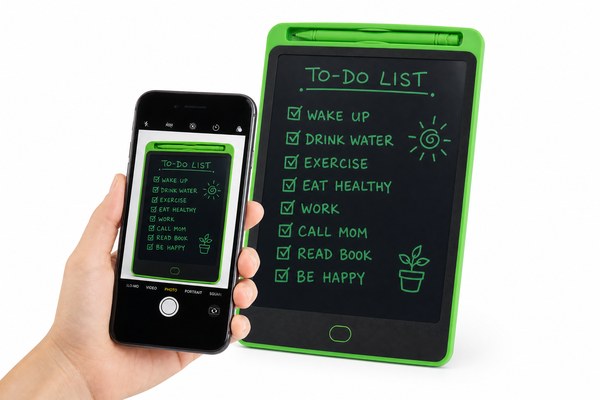
You can save notes from an LCD writing tablet in several ways. You can take a photo with your phone. You can use a smart tablet with a companion app. Or you can choose a model with built-in Bluetooth transfer. Each method works well.
I personally use the photo method every day. I write my morning task list on a small LCD tablet. Then I snap a quick photo on my phone. It takes three seconds. I have done this for over a year. It works perfectly for short notes. For longer notes, I have tested our GY-industries OEM tablets with companion apps. The app captures your drawing and saves it as an image file. I was impressed by how clean the saved image looked. Our factory in Shenzhen produces these smart models with CE, RoHS, and CPC certifications. Quality is built in from the start. See our full service options here.
Note Saving Methods Side by Side
| Method | Equipment Needed | Speed | Best For |
|---|---|---|---|
| Phone photo | Smartphone | Very fast | Quick short notes |
| Companion app | Smart LCD tablet + phone | Fast | Daily note keeping |
| Bluetooth transfer | Bluetooth-enabled tablet | Medium | Frequent users |
Choosing the Right LCD Tablet for Saving Notes
You walk into a store. Every tablet looks the same. You have no idea which one lets you save notes. That confusion is common.
When buying an LCD tablet for saving notes, look for these things. Check for a lock button that prevents accidental erasing. Look for Bluetooth or app support. Ask if the brand offers OEM customization for business needs. These features matter most.
I helped a school in Asia source tablets through GY-industries. They needed 2,000 units for students. The teachers wanted kids to save their math work. We built custom OEM tablets with companion apps for them. The app let teachers view saved student work on a shared dashboard. It was a smooth project. Our Shenzhen factory handled the full ODM process. Every unit passed CE and RoHS testing before shipping. The school was very happy with the result. This project showed me that saving notes on an LCD tablet is not just possible — it can be powerful. According to Edutopia, saving student work digitally improves learning outcomes significantly.
Key Features to Look for When Buying
| Feature | Why It Matters | Available at GY-industries |
|---|---|---|
| Erase lock button | Prevents accidental note loss | Yes |
| Bluetooth connectivity | Transfers notes to your phone | Yes on smart models |
| OEM/ODM customization | Tailored features for your brand | Yes, full factory support |
| CE/RoHS/CPC certification | Ensures product safety and quality | Yes, standard on all units |
Conclusion
Saving notes on an LCD tablet is possible. You just need the right model. Contact GY-industries today to find your perfect solution.
