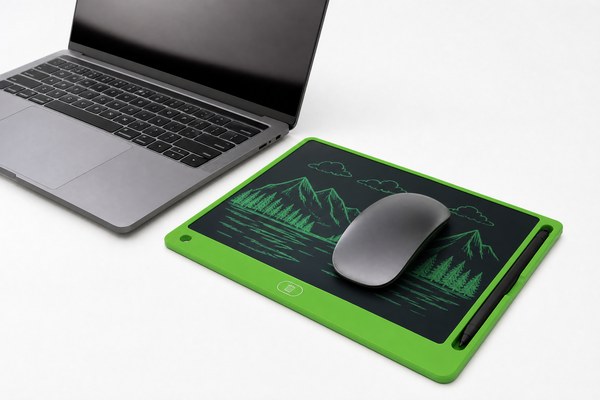
You want a clean desk. But you have too many gadgets already. Can your LCD writing tablet do double duty as a mouse pad?
You can place a mouse on an LCD writing tablet, but I do not recommend using it as a dedicated mouse pad. The surface can scratch easily, the pressure may trigger unwanted marks, and your mouse tracking may suffer on the glossy screen.
I have seen a lot of people try creative desk setups. They want fewer items taking up space. An LCD writing tablet looks flat and smooth. It seems like a perfect mouse pad replacement. But there is more going on under that surface than you might think. I want to walk you through the real risks, the surface science, and some smarter ways to use your tablet without damaging it. Let me share what I have learned from working closely with the team at GY-industries, an LCD writing tablet OEM manufacturer based in Shenzhen.
What Happens When You Use an LCD Writing Tablet as a Mouse Pad?
You rest your mouse on the tablet. It seems fine at first. But small problems start building up fast.
Moving a mouse across an LCD writing tablet causes surface scratches over time. The pressure sensor inside may also register ghost lines or smudges. This disrupts your writing experience and can permanently damage the screen layer.
I tested this myself with a basic optical mouse. I placed it on a standard LCD writing tablet for just one afternoon of work. By the end of the session, I noticed faint drag marks across the surface. The tablet still worked. But those marks did not go away. The next day, when I tried to draw clean lines, the scratched area made the lines look uneven. That was frustrating. I also noticed the cursor movement felt slightly inconsistent. The glossy surface caused the optical sensor to skip occasionally. One afternoon of use had already started to degrade both the tablet and my mouse performance.
Surface Damage Comparison
| Surface Type | Mouse Tracking Quality | Scratch Risk | Long-Term Damage |
|---|---|---|---|
| Cloth Mouse Pad | Excellent | None | Very Low |
| Hard Plastic Mouse Pad | Good | Very Low | Low |
| LCD Writing Tablet | Poor to Fair | High | High |
| Bare Wooden Desk | Fair | Medium | Medium |
How the LCD Screen Layer Works and Why It Gets Damaged
Most people do not know what is inside their tablet. They see a flat surface and assume it is tough. It is not.
An LCD writing tablet uses a pressure-sensitive liquid crystal layer just beneath a thin plastic screen. Even light repeated friction from a mouse can deform this layer. Once deformed, dead spots and permanent ghost marks appear on the display.
I have spoken with engineers at the GY-industries factory in Shenzhen many times. They explained how the layers inside the tablet are stacked very precisely. The top film is thin by design. It needs to be thin so the stylus pressure registers accurately. That same thinness makes it easy to scratch with a hard plastic or rubber mouse base. The liquid crystal layer sits just below the surface. Constant side-to-side mouse movement compresses and shifts this layer unevenly. GY-industries tablets are built to high standards and carry CE, RoHS, and CPC certifications. But even the best-built tablets are not designed for this kind of repeated lateral stress. You can learn more about build quality on the GY-industries service page.
LCD Layer Vulnerability Overview
| Layer | Function | Vulnerable to Mouse Use? |
|---|---|---|
| Top Protective Film | Protects screen from dust and light touch | Yes — scratches easily |
| Pressure-Sensitive Layer | Detects stylus input | Yes — lateral drag shifts calibration |
| Liquid Crystal Layer | Displays drawn content | Yes — deforms under repeated pressure |
| Back Panel | Structural support and battery housing | No — solid and protected |
Smarter Ways to Use Your LCD Writing Tablet at Your Desk
You bought the tablet to help you work better. You do not want to ruin it accidentally. There are smarter options.
Instead of using your LCD tablet as a mouse pad, keep it just for writing and drawing. Place it beside your mouse pad. Use it to take quick notes during calls, sketch ideas fast, or leave short messages for colleagues. This protects it and maximises its value.
I started keeping my LCD writing tablet to the left of my keyboard. My mouse pad stays on the right. That simple change made a big difference. I use the tablet constantly now. I jot down phone numbers, draw quick diagrams for clients, and leave reminder notes that I erase when done. I never worry about damage anymore. I have also seen offices where teams use GY-industries OEM tablets for shared memo boards and brainstorming sessions. The tablets hold up beautifully because they are used correctly. According to Wirecutter’s mouse pad guide, using the right surface for your mouse actually extends both mouse and surface life significantly.
Best Desk Uses for Your LCD Writing Tablet
| Use Case | Recommended? | Benefit | Notes |
|---|---|---|---|
| Writing quick notes | Yes | Fast and paperless | Core purpose of the tablet |
| Sketching diagrams | Yes | Visual communication aid | Erase and reuse instantly |
| Mouse pad replacement | No | None | Damages screen and sensor layer |
| Memo board / desk reminder | Yes | Reduces sticky note clutter | Perfect for daily task lists |
Conclusion
Do not use your LCD writing tablet as a mouse pad. Protect your investment. For custom OEM tablet solutions, contact GY-industries today.
