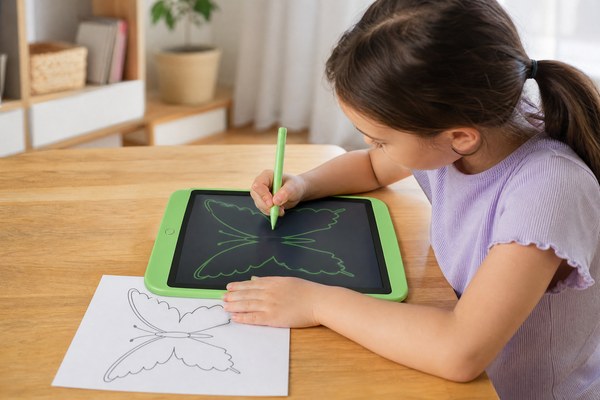
You want to trace an image. But your lightbox is broken. Paper keeps slipping. You feel stuck.
Yes, you can use an LCD writing tablet for tracing. Place your reference image under the screen or use a printed sheet on top. The flat, smooth surface and bright display make tracing easy and clean. Many artists and students already do this every day.
I was surprised the first time I saw this trick in action. A friend placed a simple sketch under her LCD tablet and traced right over it. The lines came out clean and steady. I started looking into this more. I have seen kids, designers, and calligraphy lovers all do the same thing. It turns out the LCD writing tablet is more useful than most people think. Let me break this down for you step by step.
How an LCD Writing Tablet Works for Tracing
You want a flat, smooth surface to trace on. Paper moves around. Traditional tracing paper tears easily. You need something better.
An LCD writing tablet gives you a firm, flat surface. You place your image underneath the screen. Then you trace directly on top with the stylus. The lines appear clearly. It is simple, clean, and mess-free.
I remember working with a small team at a school supply fair in Shenzhen. A teacher picked up one of our GY-industries LCD tablets. She placed a printed alphabet sheet under the screen. Her student traced each letter perfectly in seconds. The child loved it. No pencil smudges. No torn paper. The tablet surface is smooth and firm. The stylus glides easily. I have seen this same moment happen dozens of times. It works because the LCD panel sits close to the surface. Light from the screen helps you see the image below. The result is a clean, accurate trace every single time.
Surface and Stylus Comparison for Tracing
| Method | Surface Quality | Mess Level | Cost |
|---|---|---|---|
| LCD Writing Tablet | Smooth and firm | None | Low one-time cost |
| Tracing Paper | Thin and slippery | Low | Ongoing cost |
| Lightbox | Good but bulky | None | Medium to high cost |
| Carbon Paper | Messy and fragile | High | Low but wasteful |
Who Uses LCD Tablets for Tracing and Why It Helps Them
You might think tracing is just for kids. But many adults trace too. They trace maps, logos, letters, and patterns. The right tool matters a lot.
Artists, teachers, students, and designers all use LCD writing tablets for tracing. It helps them copy shapes quickly and accurately. It saves time. It saves materials. And it builds better hand skills over time.
I once visited a small design studio near our GY-industries factory in Shenzhen. A young designer was using one of our OEM LCD tablets to trace logo drafts. She would sketch a rough shape on paper. Then she would place it under the tablet. She traced and refined it with the stylus. She told me it saved her at least thirty minutes every day. I have also seen homeschool parents use our tablets to help children trace maps for geography lessons. The benefits of drawing and tracing for learning are well documented. Our CE, RoHS, and CPC certified tablets are safe for kids too. That matters a lot to parents and teachers.
Common Users and Their Tracing Needs
| User Type | What They Trace | Key Benefit |
|---|---|---|
| Young Children | Letters and numbers | Builds writing skills safely |
| Artists and Illustrators | Sketches and character designs | Fast and accurate line work |
| Teachers | Diagrams and maps | Easy classroom use |
| Graphic Designers | Logos and patterns | Saves time on rough drafts |
Tips to Get the Best Tracing Results from Your LCD Tablet
You place your image under the tablet. But the lines come out wobbly. You cannot see the reference clearly enough. You need a few simple tricks.
Use a high-contrast printed image for best results. Tape it down so it does not shift. Press the stylus gently and steadily. Choose a tablet with a thin bezel so the image sits close to the surface. Good lighting in the room also helps.
I have tested this myself many times in our Shenzhen facility. I printed a simple flower sketch in black ink. I taped it to a flat surface. Then I laid a GY-industries LCD tablet on top. The image showed through the screen very clearly. I traced each petal slowly. The stylus felt smooth and responsive. I made a clean drawing in under two minutes. One thing I noticed is that thinner tablets work better for tracing. The image sits closer to the writing surface. Our GY-industries OEM and ODM tablet designs can be customized for different thicknesses. If you are a brand looking to offer a tracing-friendly tablet, our OEM and ODM service can help you build exactly that.
Tracing Tips and Settings for Best Results
| Tip | Why It Matters | Difficulty Level |
|---|---|---|
| Use high-contrast black ink printouts | Easier to see through the screen | Easy |
| Tape your reference image down | Prevents slipping while you trace | Easy |
| Work in a well-lit room | Helps you see the image more clearly | Easy |
| Choose a thin-profile LCD tablet | Image sits closer to writing surface | Requires good product choice |
Conclusion
Tracing with an LCD writing tablet is easy, clean, and smart. It works for all ages and skill levels. Ready to explore the right tablet? Contact GY-industries today and let us help you find or build the perfect solution.
