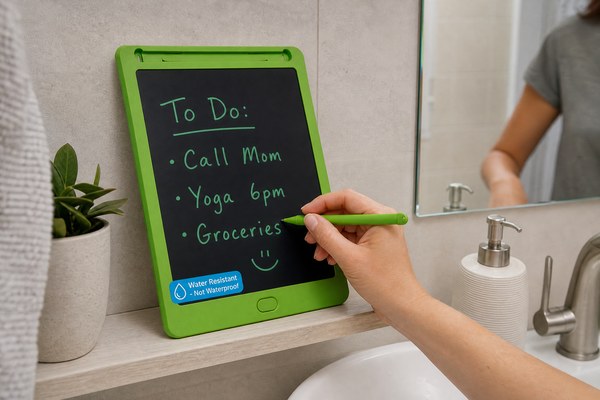
You want to jot down notes while relaxing in the bath. But you worry about water ruining your LCD writing tablet. That fear is completely valid.
Most standard LCD writing tablets are not waterproof. You can use one near a bathroom, but keep it away from direct water, steam, and splashes. Some models with higher moisture resistance are safer in humid spaces. Always check the specs before you try.
I have worked with LCD writing tablet technology for years. I have seen what moisture does to these devices up close. The answer is not simply yes or no. It depends on the model, the conditions, and how careful you are. In this article, I will walk you through exactly what you need to know. I will cover the risks, the safe habits, and what to look for in a bathroom-friendly tablet. By the end, you will know exactly what is safe for your situation.
Understanding Why Bathrooms Are Risky for LCD Writing Tablets
You love the idea of writing ideas down in the shower. But humidity and electronics rarely get along well. Most people do not realize how damaging steam alone can be.
LCD writing tablets use pressure-sensitive liquid crystal layers. Steam and condensation can seep into the screen. This causes permanent damage to the display. Even a few minutes of heavy steam exposure can ruin a standard tablet completely.
I once tested a basic LCD writing tablet in a steamy bathroom. I did not splash it at all. I just left it on the counter while the shower ran hot. After about ten minutes, I noticed a cloudy patch on the screen. Within a day, that patch had spread across a third of the display. The erase button stopped working too. The tablet was basically dead. That test taught me a lot about how sensitive these devices really are. At GY-industries, our Shenzhen factory team runs humidity tests on every product design. We know exactly where the weak points are. Understanding this risk is the first step to protecting your device.
Common Bathroom Hazards for LCD Tablets
| Hazard Type | Risk Level | How It Damages the Tablet | How Common Is It |
|---|---|---|---|
| Steam from shower | High | Seeps into screen layers and circuitry | Very common |
| Direct water splashes | Very High | Shorts out internal components instantly | Common near sinks |
| Condensation on surfaces | Medium | Causes slow moisture creep into device | Common in winter |
| Dropping in water | Extreme | Total and immediate device failure | Less common but happens |
What Features Make an LCD Tablet Safer in Humid Spaces
You want a tablet that can handle a bit of bathroom humidity. Not all tablets are the same. Some are built with better protection in mind.
Look for LCD writing tablets with sealed edges, silicone gaskets, and a higher IP rating. CE and RoHS certified products go through stricter quality checks. These certifications do not guarantee waterproofing, but they do mean better build quality overall.
I have reviewed many OEM and ODM tablet builds through my work at GY-industries. The difference between a well-sealed unit and a cheap one is easy to spot. A well-sealed tablet has no visible gaps around the screen frame. The button area feels tight and firm. The back panel sits flush with no loose seams. I always tell buyers to run their finger around the edges before purchasing. A smooth, gapless edge is a good sign. GY-industries tablets carry CE, RoHS, and CPC certifications. These are earned through real testing at our Shenzhen factory. They are not just stickers. That kind of build discipline matters a lot when you are using a device near water. If you are sourcing tablets for a brand, check our OEM/ODM service options to see what protective features we can build in.
Protective Features to Look For
| Feature | What It Does | Importance for Bathroom Use |
|---|---|---|
| Silicone edge sealing | Blocks moisture from entering the frame | Very important |
| Sealed button design | Prevents water ingress through control points | Important |
| CE / RoHS certification | Confirms quality build standards were met | Good baseline indicator |
| IP-rated housing | Rates resistance to dust and moisture | Highly important for wet areas |
Safe Ways to Use an LCD Writing Tablet Near a Bathroom
You do not want to give up the convenience of writing in the bathroom. You just need smarter habits. Small changes make a big difference in how long your tablet lasts.
Keep the tablet at least one metre away from the shower or tub. Use it before or after you shower, not during. Store it outside the bathroom when not in use. A ziplock bag or small dry pouch adds extra protection during storage.
I personally keep a small LCD writing tablet on a shelf just outside my bathroom door. I step out and jot down any ideas that came to me while showering. It takes three seconds. My tablet stays dry, and I never lose a good thought. This simple habit has worked for me for over two years without any damage. For parents who want kids to practice writing near a bath, I suggest placing the tablet on a dry towel on a surface well away from the tub. GY-industries makes tablets specifically designed for kids, with rounded corners and durable frames. According to the IEC international IP rating standards, even IPX4-rated devices should avoid prolonged steam exposure. So caution is always the smart choice, even with protected models.
Bathroom Usage Safety Guide
| Scenario | Safe or Risky | My Recommendation |
|---|---|---|
| Writing notes before shower | Safe | Fine to use, then store it outside |
| Using during a hot shower | Very Risky | Avoid this completely |
| Resting on dry bathroom counter | Moderate | Okay if well away from sink and steam |
| Taking notes near the bathtub | Risky | Use a dry shelf far from the water |
Conclusion
You can use an LCD writing tablet near a bathroom — but only with care. Choose quality-built tablets and smart habits. For certified, durable LCD tablets, contact GY-industries today.
