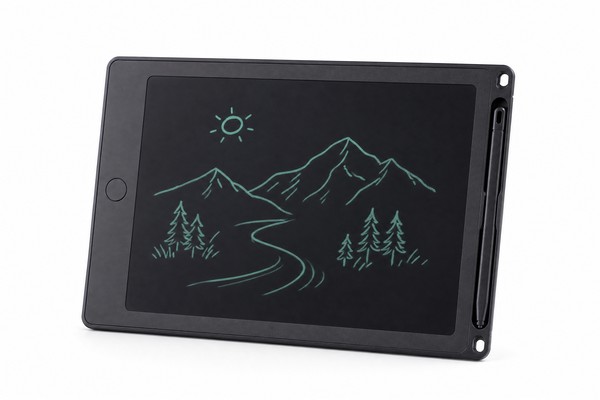
# Does Frequent Erasing Damage the Screen? The Complete Guide to LCD Writing Tablet Durability
LCD writing tablets have become one of the most popular educational tools for children, appearing in classrooms, homes, and pediatric waiting rooms around the world. They are praised for being screen-free, reusable, and easy to use — but parents, teachers, and B2B buyers frequently ask the same practical question: **does frequent erasing actually damage the screen over time?**
It is a fair concern. When a child enthusiastically presses that erase button dozens of times per hour, or when a classroom set of tablets gets wiped clean hundreds of times per week, it is natural to wonder whether the display can hold up. This article takes a deep, technically accurate look at how LCD writing tablet screens work, what happens during every erase cycle, what actually causes wear over time, and what both consumers and B2B sourcing professionals should know before purchasing or stocking these products.
—
—
How LCD Writing Tablet Screens Actually Work
Before answering whether erasing damages the screen, it helps to understand what kind of screen you are actually dealing with. LCD writing tablets do not use the same technology as a smartphone screen, a television, or a traditional LCD monitor. They operate on a fundamentally different physical principle — and that difference is the key to understanding their durability.
Cholesteric Liquid Crystal Technology
The display layer in a typical LCD writing tablet uses cholesteric liquid crystals (also called chiral nematic liquid crystals). These are special molecules that exist in two stable physical states without requiring any continuous power to maintain them.
In one state, the molecules arrange themselves into a flat, planar configuration that reflects light — this is what you see as the dark or colored mark when you write. In the other state, the molecules adopt a focal-conic arrangement that scatters light, making them appear lighter or clear.
The Layer Structure of the Display
A standard LCD writing tablet screen is a layered sandwich of materials, and understanding each layer helps explain where wear can and cannot occur. From top to bottom, a typical panel includes:
- Top protective film: A thin, flexible plastic film that forms the writing surface. This is the layer your stylus physically contacts.
- Upper transparent electrode: A conductive layer (typically indium tin oxide, or ITO) that allows electrical signals to pass through the display.
- Liquid crystal layer: The cholesteric LC material itself, sealed between the two electrode layers.
- Lower transparent electrode: Another ITO layer on the bottom substrate.
- Backplane substrate: A rigid or semi-rigid base that gives the panel structural support.
- Reflective back layer: Provides contrast and visual definition for the writing.
How Writing Creates a Visible Mark
When the stylus tip presses against the top film, it applies localized pressure. That pressure mechanically disrupts the cholesteric LC molecules in the area directly beneath the tip, forcing them from their focal-conic (clear) state into the planar (dark/reflective) state.
No electricity, no heat, no chemical reaction — just physical deformation of the molecular arrangement. The mark persists because cholesteric crystals are bistable: once disturbed into the planar state, they remain there without any energy input.
—
What Happens to the Screen During an Erase Cycle
The erase mechanism is where LCD writing tablets differ most strikingly from a chalkboard, whiteboard, or paper. There is no eraser, no friction, no physical wiping. The screen is cleared entirely by an electrical pulse — and this has profound implications for how durable the erase function actually is.
The Electrical Erase Process in Detail
When you press the erase button on an LCD writing tablet, a small circuit completes and delivers a brief low-voltage electrical pulse uniformly across the entire LCD panel. This pulse is typically generated by a small button cell battery — most commonly a CR2016 or CR2025 lithium coin cell — wired to the ITO electrode layers on either side of the liquid crystal material.
What the Battery Actually Powers
A common misconception among consumers is that the battery in an LCD writing tablet powers the display continuously, similar to a phone screen. In reality, the battery in most standard LCD writing tablets serves almost exclusively one function: powering the erase pulse. The display holds its image passively, with no battery drain, for as long as you leave it.
Partial Erasing and What It Means
Some LCD writing tablets, particularly lower-cost models with thinner battery specs or less robust circuit designs, may begin to show incomplete erase patterns over time.
A partial erase — where some marks remain visible after pressing the erase button — can result from a weakening battery, a poor electrical connection between the battery and the circuit, or in rare cases, physical damage to the ITO electrode layer.
—
How Many Erase Cycles Can an LCD Writing Tablet Handle?
This is perhaps the most direct answer to the original question. The erase mechanism itself — an electrical pulse resetting cholesteric LC molecules — is engineered to be performed repeatedly without degrading the LCD layer. The question is not really whether erasing damages the screen, but rather how many times the screen can realistically be erased before some form of performance change occurs.
Industry Standards and Typical Erase Cycle Ratings
LCD writing tablet manufacturers typically test and rate their products for erase cycle endurance as part of product qualification.
While specific numbers vary by manufacturer and product line, it is common for quality LCD writing tablets to be designed and tested for tens of thousands of erase cycles — some specifications reference figures in the range of 50,000 or more erase cycles for well-engineered panels.
Factors That Affect Erase Cycle Longevity
Not all LCD writing tablets are built equal, and several manufacturing and design variables determine how well a panel holds up over thousands of erase cycles:
- Quality of the liquid crystal material: Premium LC materials with tighter molecular weight distribution and purity specifications tend to maintain consistent switching behavior over more cycles.
- ITO electrode layer quality: The transparency and conductivity of the electrode layers must remain stable. Low-quality ITO deposition can lead to micro-delamination over time, causing patchy erase performance.
- Circuit design and voltage regulation: A well-designed erase circuit delivers a consistent voltage pulse regardless of battery charge level, which produces even erasure throughout the panel’s life. Poor circuit design results in uneven or declining erase quality as the battery ages.
- Sealing of the LC layer: Cholesteric liquid crystals are sensitive to contamination and moisture intrusion. Properly sealed panels maintain their switching characteristics for much longer than poorly sealed ones.
- Panel size: Larger panels require more voltage to erase uniformly, which can be harder on both the battery and the electrode system. Larger tablet formats require more careful circuit engineering to maintain even erase performance.
What the Battery Life Actually Limits
In practical terms, the battery is typically the first consumable to require attention — not the LC panel itself. A standard CR2025 coin cell in a small to medium LCD writing tablet (roughly 8 to 10 inches) can typically support thousands of erase cycles before voltage drops noticeably.
However, this number is highly dependent on panel size, circuit efficiency, and whether the battery compartment is sealed against moisture.
—
What Actually Causes Screen Damage — and What Doesn’t
Given everything above, it should be clear that the electrical erase process itself is not a significant source of screen damage under normal use conditions. So what does actually damage LCD writing tablet screens? And equally importantly, what behaviors parents and teachers worry about are actually harmless? This section provides a clear, honest breakdown.
Real Causes of Screen Damage
Understanding genuine risk factors helps both consumers use their tablets correctly and B2B buyers evaluate product construction for specific use environments. The following are the most common real causes of screen damage:
- Physical impact to the panel edge: Dropping a tablet on its corner or edge can create a crack in the rigid substrate or, more commonly, a pressure injury to the LC layer that appears as a permanent “shadow” or “blot” of cleared or darkened area. This is the single most common form of screen damage in child-use tablets.
- Excessive stylus pressure with a sharp or damaged tip: Normal writing pressure is designed to align the LC molecules without damaging the top film. However, pressing extremely hard with a broken stylus tip, a nail, or a pen can pierce or abrade the top film, eventually allowing moisture or contaminants to reach the LC layer below.
- Bending the panel: LCD writing tablet panels are not designed to be flexible (unless specifically built as flexible tablets, which exist as a product category). Repeatedly bending the tablet can cause micro-fractures in the ITO electrode layer or delamination of the film stack, resulting in dead zones that no longer erase or write correctly.
- Liquid exposure: While the top film provides some protection against minor spills, a significant amount of liquid entering the device — particularly around the erase button or battery compartment — can corrode the circuit board, damage the battery contacts, or in extreme cases reach the panel edges and contaminate the LC material.
- Extreme temperatures: Cholesteric liquid crystals are sensitive to temperature extremes. Leaving a tablet in a hot car or in direct sunlight for extended periods can alter the LC alignment in ways that may be difficult or impossible to fully reverse with normal erasing. Similarly, extreme cold can make the LC material sluggish or temporarily unresponsive.
Things That Do NOT Damage the Screen
Equally important is clarifying what parents, teachers, and product reviewers sometimes worry about unnecessarily:
- Frequent erasing: As established throughout this article, pressing the erase button frequently does not damage the LCD layer. The electrical reset mechanism is non-destructive and designed for exactly this purpose. A child who erases 100 times in one afternoon is not harming the panel.
- Writing over old marks before erasing: Writing over existing marks does not layer damage into the film. The top film is designed to accept stylus pressure repeatedly.
- Leaving an image on the screen for a long time: Because cholesteric LC displays are bistable, leaving an image on the screen for days, weeks, or even months does not cause burn-in or permanent marking. This is unlike OLED or traditional LCD screens, where prolonged static images can cause display degradation.
- Normal cleaning with a dry cloth: Gently wiping the writing surface with a clean, dry or lightly damp cloth does not damage the screen.
- Using fingers to write: Some children press with their fingertips to make marks. Finger pressure is generally lower than stylus pressure and is unlikely to cause meaningful wear.
How Product Design Mitigates Damage Risk
A significant portion of real-world screen damage is preventable through thoughtful product design — and this is an area where manufacturer choice matters enormously for B2B buyers. Design features that reduce damage risk in child-use tablets include:
- Thicker top film: A more robust writing surface film resists abrasion and puncture better than an ultra-thin film, at the cost of slightly higher stylus pressure required for clear marks.
- Reinforced or padded panel edges: Protective framing around the LCD panel distributes impact energy more evenly, reducing the risk of substrate cracking from drops.
- Corner protection: Rubber or TPE corner bumpers on the device housing absorb impact specifically at the corners, which are statistically the most common contact point in drops.
- Tethered stylus design: Keeping the stylus attached to the tablet prevents the use of unauthorized sharp objects as writing tools.
- Lockable battery compartment: A screw-secured battery door prevents children from accessing or damaging the battery and circuit connections.
—
What B2B Buyers and Amazon Sellers Need to Know About Durability
For importers, Amazon sellers, private-label brands, and toy wholesalers, screen durability is not just a consumer question — it is a direct commercial consideration. Return rates, product reviews, warranty claims, and brand reputation all depend on how the tablets perform over time in real-world use. This section speaks directly to the B2B perspective.
Durability Specifications to Request from Your Manufacturer
When sourcing LCD writing tablets — whether as OEM custom products or white-label items — asking the right technical questions upfront prevents costly problems downstream. Experienced manufacturers like GY-industries are accustomed to providing detailed specification documentation to brand clients. The following specifications are the most relevant to durability and erase performance:
- Erase cycle rating: Ask for the number of erase cycles the panel is tested and rated for. This should be a documented figure from the panel supplier or from in-house QC testing, not just a verbal assurance.
- Battery specification and estimated cycle life: Know the exact battery model used, its rated capacity in mAh, and the manufacturer’s estimate of how many full erase cycles it will support before replacement is needed.
- Top film thickness and material: Request the film material spec (typically PET — polyethylene terephthalate) and thickness in microns. Thicker films last longer under heavy use.
- ITO layer specification: Sheet resistance values for the ITO electrode layer are a useful proxy for coating quality. Lower sheet resistance generally indicates a more uniform, durable coating.
- Operating temperature range: Confirm the rated operating temperature range for the LC material used. Standard cholesteric LCDs typically perform reliably in the range of roughly 0°C to 50°C (32°F to 122°F), but specific ratings vary by LC formulation.
- Drop test and impact resistance: Ask whether any drop testing has been performed, and at what height and surface. While not a universally standardized spec for LCD tablets, some manufacturers offer custom drop testing for specific market requirements.
How Erase Performance Affects Amazon Reviews and Return Rates
For Amazon FBA sellers and e-commerce brands, product durability translates directly into review scores and return rates. Analysis of LCD writing tablet listings on Amazon reveals that the most common negative reviews fall into a small number of categories, and erase-related complaints are consistently among the top complaints reported. These complaints typically describe one of three scenarios:
- The tablet stopped erasing cleanly after a few weeks. This is almost always a battery failure, often caused by poor quality control on battery type selection, a pre-installed battery that was already partially discharged at time of purchase, or a battery compartment design that allows intermittent contact loss.
- The erase leaves a faint “ghost” of the previous image. Ghost images after erasing are typically caused by a weak erase pulse (often a dying battery), an out-of-spec LC material that doesn’t fully reset, or a temperature-related issue where the LC material is too cold to switch fully.
- Part of the screen no longer erases. Localized erase failure in a specific panel area usually indicates physical damage to the ITO electrode layer from an impact, or a manufacturing defect in that region.
Warranty, Returns, and Quality Assurance for B2B Buyers
Setting appropriate warranty terms for LCD writing tablets requires realistic understanding of failure modes and timelines. Given that the erase mechanism itself is not a significant failure risk, the dominant warranty concerns are:
- Battery-related erase failure: Typically manifests within the first weeks to months of use if caused by a weak battery or poor battery contact design. A 90-day warranty on erase performance, with clear battery replacement instructions, covers most of these cases.
- Physical screen damage: Drop and impact damage is generally excluded from standard toy warranties, but the product’s housing and panel construction determine how frequently this occurs. Better-built tablets produce fewer physical damage warranty claims.
- Manufacturing defects: Panel defects — dead zones, uneven erase patterns from day one
GY-industries · Factory Direct · Shenzhen
Ready to Source LCD Writing Tablets?
Get factory pricing, free samples, CE/FCC/CPC certificates, and OEM/ODM consultation. Response within 24 hours.
✓ Free samples available
✓ MOQ from 500 units
✓ CE / FCC / CPC certified
✓ 15+ years experienceReferences
- [1] U.S. Consumer Product Safety Commission. Toy Safety guidelines for children’s products. https://www.cpsc.gov/Business–Manufacturing/Business-Education/Toy-Safety
- [2] American Academy of Pediatrics. AAP guidelines on media and children. https://www.aap.org/en/patient-care/media-and-children/
LCD Writing Tablet Buyer Review Table
| Area | Buyer check | Evidence |
|---|---|---|
| Product factor | Buyer check | Evidence to request |
| Writing response | Test line clarity and pressure response | Sample review |
| Erase function | Confirm reset behavior and lock feature | Functional test |
| Durability | Review surface, stylus, and housing use case | Specification sheet |
