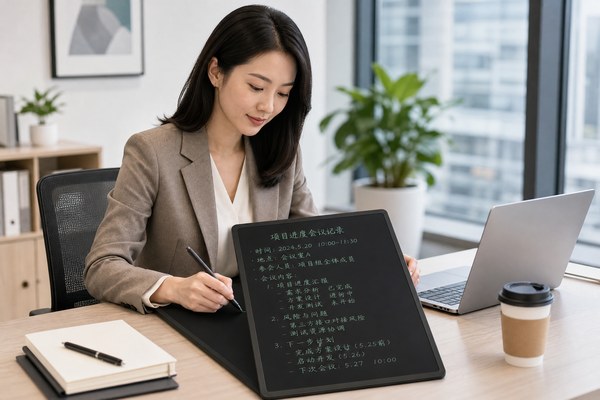
Office desks are full of paper, sticky notes, and dry-erase boards. It gets messy fast. Important notes get lost. Costs add up every month.
An LCD writing tablet can replace paper notepads, whiteboards, and sticky notes in any office. You can write, erase, and reuse it thousands of times. It saves money, reduces clutter, and keeps your workspace clean and organized every day.
I have worked closely with office buyers and business owners for years. I have seen how one small tool can change a whole workspace. When people first try an LCD writing tablet at their desk, they are surprised. It feels natural. It works instantly. There is no setup. No app. No charging required for most models. Once you see how it fits into daily office life, you wonder how you ever worked without it. Let me show you exactly how it helps.
1. Taking Quick Notes and Jotting Down Ideas
You are on a phone call. You need to write something down fast. You scramble for paper and a pen. You lose the note an hour later.
An LCD writing tablet sits on your desk and is always ready. You pick it up, write your note, and read it back instantly. One press of the erase button clears everything. No paper needed at all.
I remember talking to an office manager in a logistics company. She told me her team was using dozens of sticky notes every single day. Notes ended up on monitors, keyboards, and coffee cups. It was a mess. She switched her team to LCD writing tablets from our Shenzhen factory. Within two weeks, the sticky note orders stopped completely. Each person had one tablet on their desk. They wrote reminders, phone numbers, and quick to-do lists. They erased and rewrote all day long. She told me the desks finally looked professional. That one change made a real difference to how her office felt and functioned.
Common Office Note-Taking Uses
| Use Case | Old Method | With LCD Tablet | Benefit |
|---|---|---|---|
| Phone call notes | Paper notepad | Write directly on tablet | No paper waste |
| Quick reminders | Sticky notes | Write and keep on desk | Less clutter |
| Temporary to-do list | Whiteboard or paper | Write, erase, rewrite | Always up to date |
| Noting client details | Loose paper slips | Write on tablet, transfer later | Nothing gets lost |
2. Communicating in the Office Without Speaking
Open-plan offices are noisy. You need to pass a message to a colleague nearby. Shouting across the room is rude. Walking over breaks your focus.
An LCD writing tablet works as a silent communication tool. Write your message and hold it up. Your colleague reads it and writes back. No noise. No disruption. It is fast and surprisingly effective in a busy office.
I have seen this work especially well in customer service offices. Staff sit in rows. They handle calls all day. They cannot talk to each other freely. One team leader I spoke to started using LCD tablets to pass instructions to agents during live calls. She would write “wrap up now” or “transfer to manager” and hold the tablet up. The agent would see it and act immediately. No interruption to the call. No confusion. The team leader told me it improved her team’s call quality scores. It was such a simple solution. She ordered a set of ten tablets for her whole floor. They were CE and RoHS certified, which her company’s procurement team required.
Silent Office Communication Scenarios
| Scenario | Communication Need | How Tablet Helps | Result |
|---|---|---|---|
| Call center floor | Pass instructions during calls | Write and hold up message | No call disruption |
| Open-plan office | Quick question to colleague | Write and show silently | No noise distraction |
| Reception desk | Alert staff to incoming visitor | Write visitor name on tablet | Smooth, quiet greeting |
| Team meetings | Show a quick number or point | Write and display to group | Fast visual sharing |
3. Running Meetings and Brainstorming Sessions
Meeting rooms often have one shared whiteboard. Everyone waits to write. Ideas move slowly. The board fills up and you have no space left.
Give each person in the meeting their own LCD writing tablet. Everyone can write ideas at the same time. Erase and rework ideas freely. Meetings move faster and more people contribute when they each have their own writing space.
I spoke with a product design team at a mid-sized company. They held weekly brainstorming sessions. Their biggest complaint was that only one or two people dominated the whiteboard. Others held back. When they switched to individual LCD writing tablets for each team member, everything changed. People wrote their ideas privately first. Then they shared one by one. The facilitator told me participation doubled in the first session. Ideas came faster. People felt more comfortable contributing. According to Harvard Business Review, visual tools in meetings increase engagement and memory retention. The tablets achieved exactly that. Our OEM clients who supply corporate stationery brands have noticed growing demand for office meeting sets.
Meeting Room Uses for LCD Tablets
| Meeting Type | Tablet Function | Who Uses It | Outcome |
|---|---|---|---|
| Brainstorming | Write ideas privately first | All team members | More ideas generated |
| Sales meeting | Sketch product layout or figures | Sales manager | Clearer client pitch |
| Training session | Practice writing answers | Trainees | Active learning |
| Project planning | Draw timelines or flow charts | Project lead | Visual clarity for team |
At GY-industries, we manufacture LCD writing tablets in our Shenzhen factory for brands around the world. Our products meet CE, RoHS, and CPC certification standards. We offer full OEM and ODM services for businesses that want their own branded office tablets. Screen sizes, colors, stylus types, and packaging can all be customized to your needs.
Conclusion
An LCD writing tablet is a smart, simple tool for any office. Notes, communication, and meetings all improve. Contact GY-industries today to get started.
