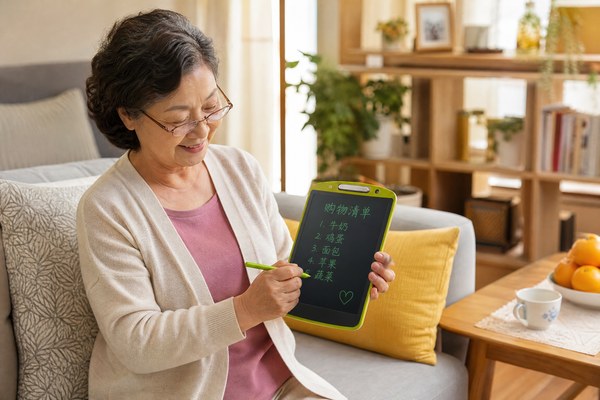
Many elderly people struggle with modern technology. Touchscreens confuse them. Apps feel overwhelming. They just want something simple to write on.
Elderly people can use an LCD writing tablet very easily. There are no apps to learn. There are no passwords. You just press the stylus to the screen and write. One button erases everything. It is that simple.
I have worked with LCD writing tablets for years at GY-industries. I have seen people of all ages pick one up and start using it right away. The elderly, especially, take to it quickly. There is nothing to charge every night. There is no glowing screen hurting tired eyes. Over the next few sections, I want to show you exactly how seniors can get real value from this humble little device every single day.
Writing Notes and Reminders the Easy Way
Forgetting things is frustrating. Paper gets lost. Phones are complicated. Seniors need something they can grab and use in seconds.
An elderly person can write reminders directly on an LCD writing tablet. They keep it on the kitchen table or nightstand. They write their note. They read it. When done, they press one button to clear it. No paper. No fuss. No tech skills needed.
I remember visiting my neighbor, who is in her late seventies. She had sticky notes everywhere on her fridge. Half of them fell off the floor. She missed doctor appointments twice because the notes kept getting lost. I gave her one of our GY-industries LCD writing tablets to try. Within five minutes, she was writing her grocery list on it. She loved that the screen was clear and easy to read. Now she keeps it right next to her kettle. She writes her daily reminders every morning. She has not missed an appointment since. That small change made a big difference for her confidence and independence.
Common Reminder Uses for Seniors
| Use Case | How They Use It | Benefit | Difficulty Level |
|---|---|---|---|
| Doctor appointments | Write date and time on tablet | Never miss a visit | Very easy |
| Medication times | Write pill schedule each morning | Stay on top of health | Very easy |
| Grocery lists | Write items before shopping | No forgotten items | Very easy |
| Daily tasks | Write a short to-do list | Feel organised and calm | Very easy |
Communicating When Speaking Is Difficult
Some seniors lose their voice after surgery or illness. Others have hearing problems. Communication becomes painful and isolating for them.
An LCD writing tablet gives elderly people a fast, silent way to communicate. They write a word or sentence. They show the screen to a family member or nurse. No noise is needed. No phone required. It works perfectly in hospitals, care homes, and quiet environments.
I have heard from care home managers who order our GY-industries tablets in bulk. One manager told me about a resident named George. He had throat surgery and could not speak for several weeks. His family felt helpless during visits. They tried writing on paper, but the sheets piled up everywhere. Then the care home introduced our LCD tablets. George wrote short messages to his grandchildren during visits. He drew simple sketches to make them laugh. The grandchildren wrote back on the same screen. That back-and-forth brought the family closer. The manager told me it was one of the most touching things she had witnessed. Our tablets carry CE, RoHS, and CPC certifications, making them safe for use in medical and care environments.
Communication Scenarios in Care Settings
| Situation | Who It Helps | What They Write | Result |
|---|---|---|---|
| Post-surgery recovery | Patients who cannot speak | Needs, feelings, questions | Less stress and anxiety |
| Family visits | Hard-of-hearing seniors | Conversation back and forth | Stronger family bond |
| Nursing requests | Mobility-limited residents | Simple needs like water or pain | Faster care response |
| Group activities | All care home residents | Games, drawing, messages | More social engagement |
Staying Sharp With Daily Brain Exercises
Mental decline worries every senior and their family. Staying mentally active is important. But many brain games require phones, tablets, or internet connections.
Elderly people can use an LCD writing tablet for simple brain exercises every day. They can practice handwriting. They can draw shapes or patterns. They can play word games with grandchildren. Research shows that handwriting keeps the brain active. It is a low-cost, no-tech way to stay sharp.
I find this use case especially exciting. At GY-industries, we manufacture our LCD tablets at our Shenzhen factory with different screen sizes. Larger screens, like our 12-inch or 15-inch models, work really well for seniors. The writing surface is big enough for shaky hands. The stylus is pressure-sensitive, so you do not need to press hard. I spoke with an occupational therapist who recommended our tablets to her elderly clients. She told me she gives them a daily writing challenge. They copy a short sentence. They draw a simple object from memory. She said her clients look forward to it every morning. It gives them a sense of purpose. It also helps maintain fine motor skills. Alzheimer’s Society research supports keeping the brain engaged as a key prevention strategy.
Brain Exercise Ideas Using an LCD Tablet
| Exercise | How to Do It | Skill It Trains | Who Can Help |
|---|---|---|---|
| Handwriting practice | Copy a favourite quote daily | Memory and motor skills | Senior alone |
| Drawing from memory | Draw a fruit, animal, or place | Visual recall and focus | Senior alone or with carer |
| Word games | Write as many words from one letter as possible | Language and speed | With grandchild or friend |
| Number puzzles | Write simple sums to solve | Logic and concentration | With family or carer |
Conclusion
LCD writing tablets are perfect for elderly people. They are simple, safe, and useful every day. Contact GY-industries today to find the right model for your needs.
