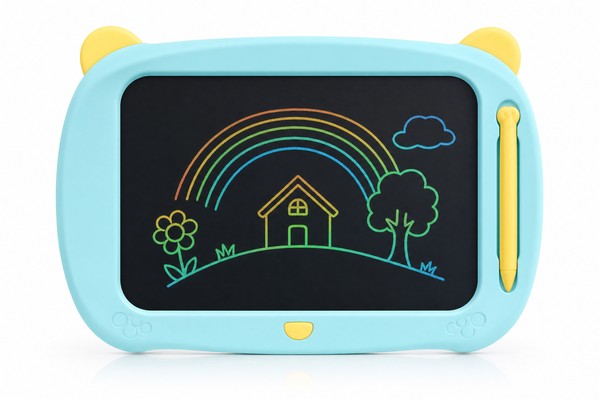
Why LCD Writing Tablets Need a Battery — and What It Actually Powers
The Surprising Truth About How LCD Writing Tablets Work
Most people assume the battery in an LCD writing tablet powers the display — the same way a smartphone or e-reader screen requires constant electricity to show an image. In reality, the technology works very differently, and understanding it helps you understand exactly what the battery is for.
What the Battery Actually Does: Powering the Erase Function
So what does the battery do? The answer is simple: it powers the erase button.
When you press the erase or “clear” button on the tablet, a small electrical current is sent through the entire liquid crystal layer simultaneously, using a built-in transparent electrode.
This uniform electrical charge resets all of the liquid crystal molecules back to their default unaligned state — effectively wiping the screen clean in a fraction of a second. That electrical pulse requires a power source, which is the battery.
Lock Switch vs. Dead Battery: An Important Distinction
Before you start looking for a replacement battery, it’s worth ruling out one other possibility: the lock switch . Most LCD writing tablets — including models produced by manufacturers like GY-industries — include a small physical lock switch, usually on the side or back of the tablet.
This switch is designed to prevent accidental erasure, particularly useful in classrooms or when a child has drawn something they want to keep.
Other quick checks worth doing first:
- Press the erase button firmly and hold it for a full second — some tablets require sustained pressure
- Inspect the erase button for physical damage or a stuck mechanism
- Check whether the tablet is extremely cold (liquid crystals can respond sluggishly at low temperatures)
If none of these resolve the issue, a battery replacement is the appropriate next step.
Identifying the Battery Type in Your LCD Writing Tablet
The Most Common Battery Types Used in LCD Writing Tablets
LCD writing tablets are not standardized across the industry, and different manufacturers use different battery formats depending on the tablet’s size, design, and price point. However, the vast majority of tablets on the market fall into one of three battery categories:
- CR2032 coin cell battery: By far the most common type found in LCD writing tablets, particularly for tablets in the 8.5-inch to 12-inch size range. The CR2032 is a 3V lithium coin cell, 20mm in diameter and 3.2mm thick. It’s widely available at pharmacies, supermarkets, hardware stores, and online retailers worldwide.
- CR2025 coin cell battery: Similar to the CR2032 but slightly thinner (2.5mm). It offers somewhat less capacity but fits in slimmer tablet designs. Some manufacturers use the CR2025 to keep the overall tablet profile as thin as possible.
- AAA alkaline batteries (one or two): Less common in standard tablet designs but found in some larger-format tablets (15 inches and above) or in models with additional features such as LED backlighting, sound effects, or Bluetooth connectivity. AAA batteries provide more total energy but require a larger battery compartment.
How to Find the Correct Battery for Your Specific Tablet
There are several reliable ways to identify the correct battery for your specific LCD writing tablet:
5. Contact the manufacturer: If you purchased a tablet from a dedicated manufacturer such as GY-industries or received it under a white-label brand, the manufacturer’s support team can confirm the battery specification within minutes. Contact details are typically on the packaging or the manufacturer’s website.
Never assume that because two tablets look similar, they use the same battery. Internal component choices can vary between product generations, size variants, and OEM configurations.
Buying Replacement Batteries: Quality and Safety Considerations
Once you know the battery type, sourcing a replacement is straightforward — but a few quality considerations are worth noting, especially for children’s products.
For CR2032 and CR2025 coin cells , stick with established brands such as Panasonic, Sony, Maxell, Energizer, or Duracell. These manufacturers produce batteries to consistent quality standards, with reliable voltage output and low self-discharge rates.
Generic or unbranded coin cells from unknown sources can have inconsistent voltage, which may cause the erase function to work erratically or fail prematurely.
Step-by-Step Guide to Replacing the Battery
What You’ll Need Before You Start
Battery replacement in an LCD writing tablet is a simple procedure that most parents can complete in under five minutes. Before you begin, gather the following:
- The replacement battery (correct type, as identified in Section 2)
- A small Phillips-head screwdriver — typically a #00 or #0 size for coin cell compartments, or a standard #1 for larger AAA battery compartments. The size of the screw on the battery door is usually very small, so a precision screwdriver set is ideal.
- A flat fingernail or a non-conductive pry tool (optional, for lifting the old coin cell out of its holder)
- A clean, flat, well-lit surface to work on
You do not need any specialized electronics tools, soldering equipment, or technical knowledge. This is a user-serviceable component designed to be replaced by the end consumer. If a tablet’s battery replacement requires tools beyond a standard screwdriver, that is a design flaw worth noting when leaving product feedback or communicating with the supplier.
Step-by-Step: Replacing a Coin Cell Battery (CR2032 / CR2025)
The following steps apply to the majority of LCD writing tablets on the market, including most standard models in the 8.5-inch to 12-inch category.
Step 3: Remove the battery compartment cover. Lift or slide the cover off the tablet. Set it aside.
Step-by-Step: Replacing AAA Batteries
For larger tablets or feature-rich models that use AAA batteries, the process is very similar but generally even simpler, as AAA battery compartments are larger and more accessible.
Step 1: Turn the tablet over and locate the battery compartment, which is typically a larger rectangular door on the back.
Step 2: Remove the screw (if present) or release the snap-fit tab.
Step 3: Remove the old AAA batteries. Note that AAA batteries have a clear positive end (the small nub) and a negative end (flat).
Step 5: Insert fresh AAA batteries following the polarity diagram.
Step 6: Test the erase function, then replace the cover.
Troubleshooting After Battery Replacement
The Erase Button Still Doesn’t Work After Replacing the Battery
In most cases, a fresh battery resolves the problem immediately. But occasionally, the issue persists. Here is a systematic troubleshooting approach:
Check the battery contacts for corrosion. If the old battery was in place for a very long time or was a low-quality battery that leaked, you may see a white or greenish residue on the metal contacts inside the battery holder. This is typically potassium carbonate (from alkaline battery leakage) or lithium compounds.
This residue is electrically insulating and prevents proper contact. Use a cotton swab lightly dampened with white vinegar or isopropyl alcohol to gently clean the contacts, allow them to dry completely, then reinsert the new battery.
The Screen Doesn’t Erase Completely After Battery Replacement
A different and less common issue is when the erase button works — the screen reacts — but the image doesn’t fully clear. Ghost lines or partial images remain on the screen.
This issue is usually not battery-related. Incomplete erasure typically indicates one of the following:
- Damage to the liquid crystal layer: Excessive pressure with a sharp or hard stylus can permanently deform the liquid crystal film, leaving visible marks that won’t erase. This is a physical, irreversible damage issue.
- Delamination: If the tablet has been exposed to extreme heat or has been flexed repeatedly, the layers of the display may have begun to separate. This causes irregular areas that don’t respond properly to the erase pulse.
- Very low voltage battery: If you accidentally installed a battery that is nearly depleted (possible with unbranded or improperly stored batteries), the erase pulse may be too weak to fully reset all liquid crystals. Replace with a fresh battery from a trusted brand.
If the problem is physical damage to the display layer, the tablet typically needs to be replaced rather than repaired, as the liquid crystal film is not a user-serviceable component. This is worth keeping in mind when evaluating build quality during B2B sourcing — the thickness and protective coating of the writing surface is a meaningful quality differentiator between manufacturers.
How to Extend Battery Life in an LCD Writing Tablet
Given that the battery only activates during erasure, extending battery life is largely a matter of erasing less frequently. But there are a few practical habits worth adopting:
- Use the lock switch when the tablet is not in use or when the child wants to preserve a drawing. This prevents accidental presses of the erase button.
- Store the tablet at room temperature. Lithium coin cells perform poorly in very cold environments, and while heat doesn’t drain them faster, extreme temperatures over time can reduce overall battery lifespan.
- Use a quality original battery when replacing. Higher-capacity batteries in the same form factor (some CR2032 variants have slightly higher mAh ratings) will last proportionally longer.
- Avoid pressing the erase button repeatedly in rapid succession — though this is a minor consideration given the low power draw per erase cycle.
For B2B buyers sourcing tablets for institutional or classroom use, it’s worth asking manufacturers like GY-industries about the rated battery life (typically expressed in number of erase cycles at rated load) for each product line. Higher-end designs may use more efficient circuits that extend battery life considerably compared to budget options.
B2B Buyer’s Guide: Battery Design, Sourcing, and What to Ask Your Manufacturer
Why Battery Design Matters in B2B and OEM Sourcing
For importers, Amazon FBA sellers, educational toy brands, and retail buyers, the battery design of an LCD writing tablet is not a minor detail — it has direct implications for product safety compliance, customer satisfaction, return rates, and regulatory approvals in different markets.
Here is why battery design deserves attention during the sourcing and product development phase:
Battery inclusion policy. Decide early in the sourcing process whether to include a battery in the packaging. Including a battery adds a small cost but meaningfully improves the out-of-box experience — the product works immediately.
However, shipping lithium batteries (even coin cells classified as UN3090 or contained in equipment as UN3091) has specific carrier and customs requirements. Amazon FBA has its own specific policies around lithium battery products. Discuss battery inclusion and logistics implications with your manufacturer early in the process.
GY-industries · Factory Direct · Shenzhen
Ready to Source LCD Writing Tablets?
Get factory pricing, free samples, CE/FCC/CPC certificates, and OEM/ODM consultation. Response within 24 hours.
✓ MOQ from 500 units
✓ CE / FCC / CPC certified
✓ 15+ years experience
References
- [1] U.S. Consumer Product Safety Commission. Button battery safety guidelines. https://www.cpsc.gov/Safety-Education/Safety-Education-Centers/Button-Cell-Coin-Battery-Information-Center
- [2] International Electrotechnical Commission. International standards for electronic components. https://www.iec.ch/
Related Articles
LCD Writing Tablet Buyer Review Table
| Area | Buyer check | Evidence |
|---|---|---|
| Product factor | Buyer check | Evidence to request |
| Writing response | Test line clarity and pressure response | Sample review |
| Erase function | Confirm reset behavior and lock feature | Functional test |
| Durability | Review surface, stylus, and housing use case | Specification sheet |
