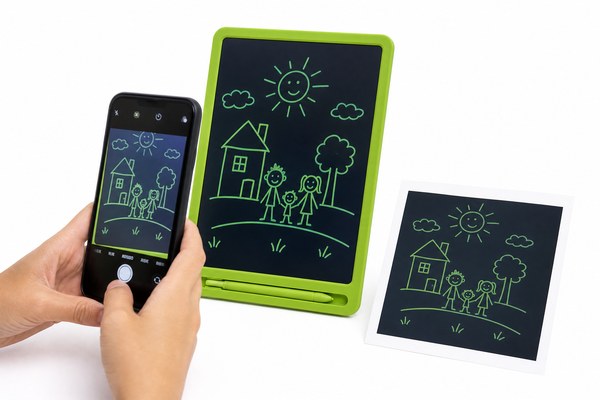
You finish a great drawing on your LCD writing tablet. Then you realize — it will vanish the moment you press erase. That hurts.
To save a drawing from an LCD writing tablet, you need to photograph it, use a companion app, or choose a tablet model with built-in save functions. Most standard LCD tablets erase with one button press. Acting fast before that happens is the key.
I have helped many people understand this problem. LCD writing tablets are designed to be simple and reusable. That is their whole point. But “reusable” can mean “losable” if you are not careful. I want to walk you through every method that works. Some methods are dead simple. Others need a little setup. By the end, you will know exactly how to keep your work safe — no matter which tablet you own.
Method 1: Use Your Smartphone Camera to Capture the Screen
You drew something important. The erase button is right there. One wrong touch and everything disappears forever.
The fastest way to save a drawing from an LCD writing tablet is to photograph it with your smartphone. Hold the phone steady above the screen. Make sure the lighting is good. Take the shot before you do anything else.
I remember the first time I watched someone lose a full mind map. They had been working on it for twenty minutes. Their hand brushed the erase button by accident. Everything was gone in half a second. After that, I always told people: phone first, everything else second. It sounds too simple. But it works every single time. I keep my phone within arm’s reach whenever I use a tablet now. I take a photo the moment I finish anything worth keeping. I then save it to a dedicated folder. It takes maybe five seconds. That is a very cheap price for peace of mind. The photo quality on modern smartphones is more than good enough to read even small handwriting clearly.
Smartphone Camera Tips for LCD Tablet Photography
| Tip | What To Do | Why It Helps | Common Mistake |
|---|---|---|---|
| Lighting | Use natural daylight or a lamp | Reduces glare on the screen | Using flash directly |
| Angle | Hold phone directly above the tablet | Avoids distortion | Shooting from the side |
| Steadiness | Rest your elbows on the table | Prevents blurry images | Holding phone one-handed |
| Storage | Save to a named folder immediately | Easy to find later | Leaving photos scattered in gallery |
Method 2: Choose an LCD Tablet With a Built-In Save or Lock Feature
Not all LCD tablets are equal. Some erase everything with one tap. Others let you lock the screen so nothing is lost.
Many modern LCD writing tablets come with a screen lock function. This stops accidental erasing. Some higher-end models connect to apps that digitally save your drawings. Choosing the right tablet from the start makes saving work much easier and less stressful.
I have seen this firsthand working with tablet designs at GY-industries. Our Shenzhen factory produces LCD writing tablets for brands all over the world through OEM and ODM programs. One of the most requested features from buyers is the erase lock button. Parents want it for their kids. Teachers want it for classrooms. Office workers want it for meetings. When I look at the product lineup, the tablets with lock functions clearly get better reviews. All GY-industries tablets meet CE, RoHS, and CPC certifications, which tells me the build quality is solid too. A well-built tablet with a lock feature is simply a smarter tool. You can learn more about GY-industries product services and OEM options here.
LCD Tablet Feature Comparison for Saving Drawings
| Feature | Basic Tablet | Mid-Range Tablet | Advanced Tablet |
|---|---|---|---|
| Erase Lock Button | No | Yes | Yes |
| App Connectivity | No | Sometimes | Yes |
| Digital Save Function | No | No | Yes |
| Best For | Casual doodling | Kids and daily notes | Professional use |
Method 3: Use a Companion App to Digitally Transfer Your Drawing
You want your drawing on your computer or phone as an actual digital file. A photo is good. A clean digital copy is even better.
Some LCD writing tablets pair with dedicated apps via Bluetooth or USB. These apps capture your drawing as a digital file in real time. You can then edit, share, or store it anywhere you like. This method gives you the cleanest and most flexible result.
I tried this myself with a Bluetooth-enabled LCD tablet. I downloaded the companion app on my phone. I drew a simple flowchart during a meeting. The app captured every stroke as I drew it. When I finished, I had a clean digital version ready to share by email. No photo needed. No guessing about image quality. The whole process felt natural after just a few minutes. I will be honest — not every tablet supports this. But the market is moving in that direction fast. Digital drawing technology has advanced greatly in recent years, and LCD tablets are catching up quickly with smarter save features built right in.
Popular App-Based Save Methods for LCD Tablets
| Method | Connection Type | File Output | Skill Level Needed |
|---|---|---|---|
| Companion Mobile App | Bluetooth | PNG or PDF | Beginner |
| PC Software Transfer | USB Cable | Vector or image file | Intermediate |
| Cloud Sync App | Wi-Fi | Cloud-stored image | Beginner |
| Screenshot + Edit App | Camera + app | Edited image file | Beginner |
Conclusion
Saving a drawing from an LCD writing tablet is easy once you know your options. Use a photo, a lock feature, or a save app. Want a tablet built to make saving simple? Contact GY-industries today for custom OEM solutions.
