“`html
You just got a Xiaomi LCD writing tablet. But now you cannot find a good place to keep the stylus. It keeps rolling off the desk and getting lost.
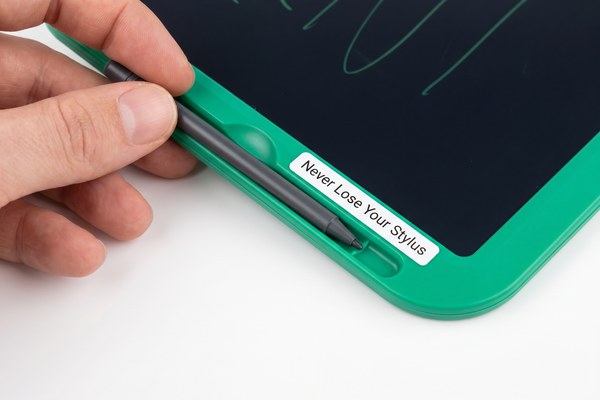
Most Xiaomi LCD writing tablets store the stylus in one of three ways: a side slot, a magnetic attachment point, or a tether loop. The method depends on your exact model. Check the edge of the tablet first. Many models have a small slot or magnet built right in.
I have helped many people figure this out. It sounds like a small problem. But losing a stylus is really frustrating. Once it is gone, the tablet becomes useless. I want to walk you through every storage option. I will also share tips I have picked up from working with LCD writing tablet designs every day. At our Shenzhen factory, GY-industries, we build tablets for many brands. I know these designs inside and out. Let me help you sort this out quickly.
1. Does Your Xiaomi Tablet Have a Built-In Stylus Slot?
You look at your tablet and see nothing obvious. You flip it over. Still nothing. Now you are worried there is no storage at all.
Many Xiaomi LCD writing tablets include a thin slot on the side or back of the frame. Slide the stylus in cap-first. It should click or fit snugly. This keeps it secure and ready to use anytime.
I remember the first time I tested a tablet with a side slot. I almost missed it completely. The slot was narrow and blended into the frame. Once I found it, the stylus snapped in perfectly. It did not rattle or fall out. At GY-industries, I have seen many OEM designs with this same built-in slot feature. We use it on several of our own LCD writing tablet models. It is one of the most popular features our clients request. It makes the tablet feel complete and professional. If your Xiaomi tablet has one, use it every single time.
Common Stylus Slot Styles on LCD Writing Tablets
| Slot Type | Location on Tablet | Stylus Fit | Best For |
|---|---|---|---|
| Side channel slot | Left or right edge | Friction fit | Everyday home use |
| Back panel slot | Bottom of rear face | Snap-in fit | Kids and school use |
| Cap-end slot | Top edge of frame | Push-in fit | Travel and portability |
| Integrated groove | Along the spine | Slide-in fit | Office and desk use |
2. Can You Use a Magnet to Hold the Stylus?
Your tablet has no visible slot. You feel stuck. You do not want to leave the stylus loose on your desk again.
Some Xiaomi LCD writing tablets use a small magnet on the frame to hold the stylus. Touch the stylus to the edge of the tablet. If it sticks, you found the magnetic storage point. This is a clean and simple solution.
I tried this on a kids’ tablet model we were reviewing for a client. I honestly did not expect the magnet to be strong enough. I was wrong. The stylus held firmly to the side of the frame. It did not slide down or drop off. I even tilted the tablet at a sharp angle. The stylus stayed put. At GY-industries, we have started adding stronger magnets to our newer LCD writing tablet designs. Our clients love this feature. It looks sleek. It is fast to use. And it works especially well for children who always seem to lose their stylus. If your Xiaomi model has this, it is the easiest storage method of all.
Magnetic vs. Non-Magnetic Stylus Storage Options
| Storage Method | Ease of Use | Hold Strength | Risk of Loss |
|---|---|---|---|
| Magnetic side attach | Very easy | Medium to strong | Low |
| Physical side slot | Easy | Strong | Very low |
| No built-in storage | Manual effort needed | None | High |
| Tether cord/loop | Moderate | Secure | Very low |
3. What If Your Xiaomi Tablet Has No Built-In Stylus Storage?
You have checked every edge and corner. There is no slot. There is no magnet. Now what do you do with the stylus?
If your Xiaomi LCD writing tablet has no built-in storage, use a silicone pen loop, a small pen pouch, or a cable tie tether. Stick a pen loop to the back of the tablet. It holds the stylus tight and keeps everything together.
I had a customer once who used a large Xiaomi writing tablet for meetings. Her stylus had no home. She kept losing it inside her bag. I told her to get a self-adhesive silicone pen loop from any stationery shop. She stuck it to the back of the tablet. Problem solved in two minutes. She told me it changed everything for her. I have seen this simple fix work dozens of times. Not every LCD writing tablet comes with built-in storage. According to RTINGS.com’s drawing tablet research, stylus storage is still a missing feature on many budget devices. At GY-industries, we push our OEM clients to include it. But when it is not there, a pen loop or pouch is the best backup plan.
DIY Stylus Storage Solutions That Actually Work
| Solution | Cost | How to Apply | Works Best When |
|---|---|---|---|
| Silicone pen loop sticker | Very cheap | Peel and stick to back | You travel with the tablet |
| Small zip pen pouch | Low cost | Clip to bag or case | You carry multiple items |
| Cable tie tether loop | Almost free | Thread through corner hole | Kids use the tablet |
| Elastic band on case | Free or very cheap | Add to any protective case | You use a tablet cover |
Conclusion
Storing your stylus does not need to be hard. Check the slot, try the magnet, or add a pen loop. Want to learn more about well-designed LCD writing tablets? Explore GY-industries’ full range of OEM LCD writing tablets or contact our team in Shenzhen today for expert advice.
“`
