“`html
Most drawing tablets for kids look boring. A plain black line on a green screen gets old fast. I have watched children lose interest in minutes.
Multi-color LCD writing tablets change everything. They produce bright, rainbow-colored lines with every stroke. Children stay engaged far longer. I have seen it happen over and over again at GY-industries.
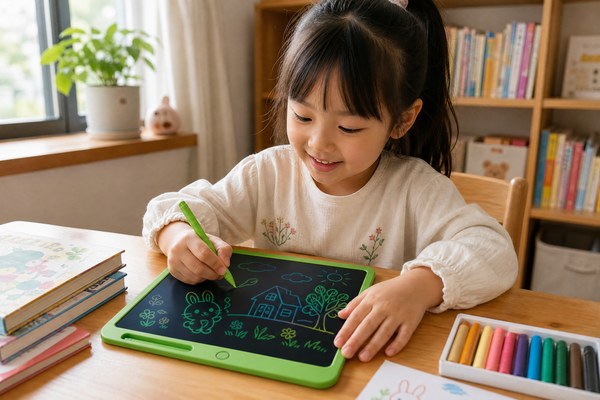
I have been writing about GY-industries products for a long time. I know what makes children light up. The first time a child picks up the stylus on a multi-color tablet, something clicks. They draw a line. It bursts into color. Their eyes go wide. They draw another line immediately. Then another. They do not want to stop. I have watched this happen with kids of all ages. It is one of the most satisfying things I have seen in this industry. In this article, I want to explain exactly how this technology works and why it matters for young learners.
What is the difference between a monochrome and a multi-color LCD writing tablet?
Kids get bored with plain screens. A single color feels flat and dull. Parents want something that holds attention longer.
A monochrome tablet draws only one color, usually a green or black line. A multi-color tablet draws several colors at once. The lines look like a rainbow. This simple difference makes drawing feel like a completely new experience for children.
I tell every buyer about this difference right away. At GY-industries, we make both types. Our monochrome tablets produce a clean, single green or black line. They are great for writing practice and simple sketching. But when I show parents the multi-color version, their reaction changes completely. The multi-color LCD tablet uses a layered panel that creates vivid rainbow-colored strokes. It comes in three sizes: 8.5 inches, 12 inches, and 16 inches. There is no backlight on either version. This means zero blue light emission. Both tablets are completely safe for long drawing sessions. But the colors on the multi-color version make it feel like magic.
How do monochrome and multi-color tablets compare side by side?
| Feature | Monochrome Tablet | Multi-Color Tablet | Child Engagement Level |
|---|---|---|---|
| Line Color | Single green or black | Rainbow multi-color | Higher with multi-color |
| Screen Type | Standard LCD panel | Layered cholesteric LCD | More visually stimulating |
| Blue Light | Zero emission | Zero emission | Safe for both |
| Available Sizes | 8.5″, 12″, 16″ | 8.5″, 12″, 16″ | Flexible for all ages |
| Best Use | Writing, note-taking | Drawing, creative play | Multi-color wins for fun |
How does the rainbow color effect actually work on the screen?
Parents always ask me this. They see the colors and wonder how a simple tablet does that. It seems complicated from the outside.
The secret is a layered cholesteric LCD panel. This panel has multiple color layers stacked together. When the stylus applies pressure, different layers respond. Each layer shows a different color. Together they create the rainbow line effect automatically.
I love explaining this part. The cholesteric LCD panel inside GY-industries’ multi-color tablet is built with several color layers. These layers sit on top of each other. When I press the stylus down, the pressure activates the layers at different depths. Each depth shows a different color. The result is a smooth rainbow stroke every single time. There is no ink, no battery in the stylus, and no backlight needed. The whole screen runs without any light source behind it. This keeps blue light at zero. I can let a child draw on the 16-inch version for an hour and feel completely comfortable about their eye safety.
What happens inside the screen during each stroke?
| Layer Level | Color Produced | Triggered By | Visible Result |
|---|---|---|---|
| Top layer | Yellow / green | Light stylus pressure | Bright accent color |
| Middle layer | Blue / cyan | Medium stylus pressure | Cool mid-tone color |
| Lower layer | Red / orange | Firm stylus pressure | Warm base color |
| Combined activation | Full rainbow blend | Natural drawing motion | Vivid multi-color line |
Which age groups benefit most from the multi-color drawing experience?
Not every product works the same for every child. I get asked about age ranges all the time. Parents want to know if it suits their specific child.
Children from ages 3 to 12 benefit most. Toddlers love the instant color reaction. School-age kids use it for creative projects. Older children use it for sketching and design practice. The tablet grows with the child across multiple stages.
I think about a parent I spoke with recently. Her daughter was four years old. She bought the 8.5-inch multi-color tablet from GY-industries. It was small enough for tiny hands. Her daughter drew on it every single day. No mess, no ink, no paper waste. Then I spoke with another parent. His son was ten. He used the 12-inch version for drawing cartoon characters. The bigger screen gave him more room. For teenagers exploring art, I often recommend the 16-inch size. It offers a proper canvas feel. All sizes share the same zero blue light design. I feel good recommending them for daily use at every age. You can always explore our full service options to find the right fit for your child’s age and needs.
Which tablet size works best for each age group?
| Age Group | Recommended Size | Why It Works | Key Benefit |
|---|---|---|---|
| Ages 3 to 5 | 8.5-inch | Light weight, small grip area | Easy for small hands |
| Ages 6 to 9 | 8.5-inch or 12-inch | More drawing space as skills grow | Encourages creativity |
| Ages 10 to 12 | 12-inch | Comfortable for detailed work | Supports school projects |
| Ages 13 and up | 16-inch | Full canvas feel for serious drawing | Develops artistic skills |
| All ages | All sizes | Zero blue light, no backlight | Safe for prolonged use |
Conclusion
Multi-color LCD tablets make drawing genuinely exciting for children. I believe every child deserves that experience. Contact GY-industries today and request a free sample.
“`
