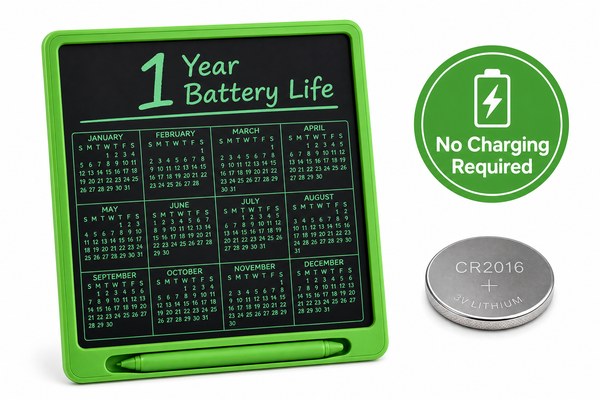
You grab your LCD writing tablet. You press the button. Nothing happens. The battery is dead — again. This is frustrating, especially mid-meeting or mid-lesson.
Most LCD writing tablets run on a single CR2025 or CR2032 coin cell battery. That one battery can last anywhere from 1 to 3 years with normal daily use. The exact time depends on how often you use it and which features it has.
I have worked with LCD writing tablet designs for years at our Shenzhen factory. I have seen tablets last one year and tablets last three. The difference is not luck. It comes down to real, knowable factors. In the next few sections, I will walk you through what drains a battery fast, what makes it last longer, and how to pick a tablet that gives you the best battery life for your money. Let me break it all down clearly.
Why Some Batteries Die So Fast
You buy a new tablet. Six months later, the battery is gone. You wonder what went wrong. This happens more often than people think.
Batteries in LCD writing tablets drain fast when the tablet has a backlight, auto-lock problems, or low-quality internal components. A cheap coin cell in a poorly designed board can lose power in under six months. Good circuit design makes all the difference.
I remember testing a batch of tablets at our factory early in my career. One design had a faulty sleep circuit. The screen never fully powered down. The battery was dead in less than four months. We caught it during our quality check process. That experience taught me how much the internal board design matters. A well-designed tablet should draw almost zero power when you are not writing on it. At GY-industries, our OEM and ODM products go through strict circuit testing before they leave our Shenzhen production line. We hold CE, RoHS, and CPC certifications, which means every component meets a real standard. A bad circuit is the number one hidden battery killer I have seen in this industry.
Battery Drain Factors at a Glance
| Factor | Effect on Battery Life | How Bad Is It? | Fix |
|---|---|---|---|
| No sleep mode / faulty circuit | Constant power draw | Very high impact | Choose a well-tested design |
| Built-in backlight / LED | Extra power consumption | High impact | Limit backlight use |
| Cheap coin cell included | Lower starting capacity | Medium impact | Replace with a name-brand cell |
| Frequent erase button presses | Slight power spike each time | Low impact | Normal use is fine |
What Normal Battery Life Actually Looks Like
People ask me all the time what “normal” means for battery life. They want a real number. It is a fair question and I have a real answer.
In normal daily use, one CR2032 or CR2025 coin cell battery lasts about 1 to 3 years in a standard LCD writing tablet. Light users often see 3 years. Heavy users in classrooms or offices may see closer to 12 to 18 months. Backlighting shortens this range noticeably.
I track customer feedback from our OEM and ODM clients around the world. One client sells our tablets as kids’ drawing boards in Europe. Their customers report around two years of use before needing a battery swap. Another client sells to corporate offices. Their users erase dozens of times a day. Those see about 14 months average. Both results are normal. According to Energizer’s coin battery data, a CR2032 holds about 225 milliamp hours. LCD tablet circuits draw very little power per use. That is why the batteries last so long compared to other electronics.
Expected Battery Life by Use Type
| User Type | Daily Use Level | Backlight Used? | Estimated Battery Life |
|---|---|---|---|
| Casual home user | Low — a few notes per day | No | 2.5 to 3 years |
| Student | Medium — school and homework | Sometimes | 1.5 to 2 years |
| Office professional | High — meetings and notes all day | Sometimes | 12 to 18 months |
| Young child | Very high — drawing and erasing constantly | No | 12 to 20 months |
How to Make Your Battery Last as Long as Possible
You want to squeeze every last month out of your battery. Who doesn’t? A few simple habits can add six months or more to your tablet’s battery life.
To get the most from your LCD tablet battery, store it away from heat, avoid leaving it in direct sunlight, and choose a tablet with a proper auto-sleep circuit. Replacing a dying battery early also protects the tablet’s screen layer from potential leakage damage.
I always tell our OEM clients to think about the end user experience. A tablet that needs a battery every six months feels cheap. A tablet that runs for two or three years feels premium. It is the same product — the difference is design quality and user habits. At GY-industries, we design our LCD writing tablets with low-power circuits from the start. Our factory in Shenzhen tests every board for standby draw. We also help our ODM clients choose the right battery size for their target market. If your customers are kids, you want a battery that is harder to access for safety. If your customers are office workers, you want easy replacement. These details matter. You can learn more about our customisation and service options here.
Battery-Saving Tips for LCD Writing Tablets
| Tip | Why It Helps | Difficulty |
|---|---|---|
| Keep tablet away from heat | Heat drains coin cells faster | Easy |
| Avoid leaving in direct sunlight | Same as heat — speeds up drain | Easy |
| Use backlight only when needed | Backlight is the biggest power draw | Easy |
| Replace battery at first sign of fading | Prevents leakage damage to circuit | Easy |
Conclusion
One battery in an LCD writing tablet can last one to three years. Good design makes it last longer. Want a tablet built to last? Contact GY-industries today and let us help.
