“`html
What Is an LCD Writing Tablet and How Does It Actually Work?
Before deciding whether a tool is useful for homeschooling, it’s worth understanding what it actually does at a technical level. LCD writing tablets are frequently misunderstood — many people assume they work like digital tablets connected to a screen, when in reality the technology is quite different, and that difference matters for how and where they’re used.
The Core Technology: Pressure-Sensitive LCD Layers
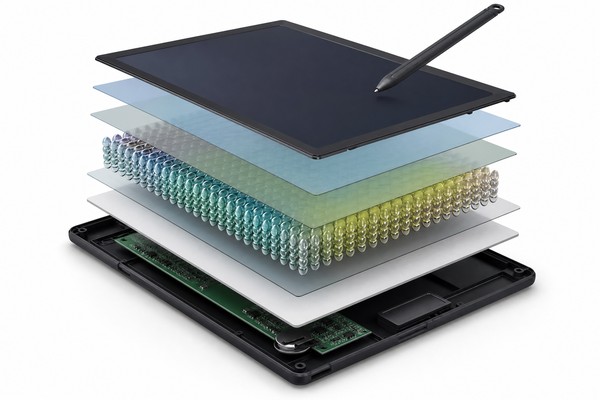
An LCD writing tablet uses a stack of thin film layers to create a writing surface that responds to physical pressure. The core of the device consists of a liquid crystal layer sandwiched between two films. In the resting state, the liquid crystals are aligned in a way that makes the screen appear light or slightly colored.
When you press on the surface with a stylus or even a fingernail, the pressure locally disrupts this alignment, causing those crystals to scatter light differently — producing the dark marks you see as writing or drawing.
Screen Colors, Sizes, and Variants
Modern LCD writing tablets come in several visual configurations. The most common is a green-on-dark display (similar in appearance to a classic chalkboard), but manufacturers now produce tablets in blue, yellow, and multicolor gradient formats.
The multicolor versions typically use a layered color film beneath the LCD surface, so different pressure zones produce different colors — usually three or four bands of color arranged horizontally across the screen. This variant is particularly popular for children because the results are visually engaging without any additional power draw.
What LCD Writing Tablets Are Not
It’s equally important to be clear about what these devices cannot do. An LCD writing tablet does not save content digitally — when you erase, that information is gone unless you photograph it first. It does not connect to a computer, sync with apps, or display pre-loaded lessons.
It does not have a speaker, a touchscreen interface, or any interactive software layer. For some parents considering a technology-rich learning environment, this may seem like a limitation. In practice, for many homeschool scenarios, the absence of these features is actually a strength — the device is distraction-free by design.
GY-industries produces both standard and lock-button-enabled models to address the most common classroom and home learning use cases, and their product line reflects a clear understanding that simplicity is a feature, not a compromise.
How LCD Writing Tablets Support Homeschool Learning Across Age Groups
The usefulness of any educational tool depends heavily on whether it fits the developmental stage of the learner. LCD writing tablets have a broader age range of applicability than many parents initially assume. Here’s how they translate into real educational value at each stage of a child’s development.
Early Childhood (Ages 2–5): Prewriting and Fine Motor Development
For toddlers and preschoolers, the primary educational value of an LCD writing tablet lies in fine motor development. Before a child can write letters, they need to develop the pincer grip, hand-eye coordination, and controlled pressure application that make writing possible.
Drawing freely on an LCD surface — tracing shapes, making dots, following lines — exercises exactly these muscles and neural pathways.
Elementary Age (Ages 6–12): Writing Practice, Math, and Daily Lessons
This is where LCD writing tablets deliver their most consistent and well-documented educational value in a homeschool setting. Elementary-age children are actively learning to write letters, form words, practice arithmetic, and engage with new concepts daily — all of which involve a high volume of low-stakes practice work that doesn’t need to be permanently recorded.
Middle School and Beyond (Ages 12+): Study Tools and Supplemental Use
For older homeschool students, the LCD writing tablet transitions from a primary writing tool to a supplemental study aid. At this age, students are doing more written work that needs to be preserved — essays, research notes, long-form answers — and that work typically still happens on paper or digitally. But LCD tablets continue to serve several valuable functions in the older homeschool context.
LCD Writing Tablets vs. Other Homeschool Writing Tools: An Honest Comparison
To understand the true value of an LCD writing tablet for homeschooling, it’s useful to compare it directly with the alternatives. Every tool has trade-offs, and the best homeschool families make deliberate choices based on their children’s needs, their teaching approach, and their practical circumstances.
LCD Writing Tablets vs. Paper and Pencil
Paper and pencil remain the foundational writing tools for a reason: they are universal, intuitive, and produce a permanent record that can be reviewed, corrected, graded, and stored. For homeschooling, this permanence is genuinely valuable — a parent can review completed work, track a child’s progress over time, and build a portfolio.
Paper also has no battery, no moving parts, and no potential for technical failure during a lesson.
LCD Writing Tablets vs. Whiteboards
A dry-erase whiteboard serves some of the same functions as an LCD writing tablet — reusable surface, instant erase, low ongoing cost — but the form factor is meaningfully different. A whiteboard is a fixed surface mounted on a wall or propped on an easel. It requires dry-erase markers, which dry out and need replacing.
The surface can stain over time, especially if erasure is not done promptly. Markers have a smell that some children find irritating. And a whiteboard doesn’t travel.
LCD Writing Tablets vs. Digital Drawing Tablets and iPads
This is perhaps the most important comparison for modern homeschool families navigating a technology-rich world.
Digital tablets — whether a dedicated iPad, Android tablet, or a drawing tablet connected to a laptop — offer capabilities that an LCD writing tablet fundamentally cannot match: saving work, accessing educational apps, video lessons, typing, internet research, and more.
For families who already own a digital tablet, it’s a fair question whether an LCD writing tablet adds value.
Comparison Table: LCD Writing Tablet vs. Common Homeschool Writing Tools
| Feature / Criteria | LCD Writing Tablet | Paper & Pencil | Dry-Erase Whiteboard | iPad / Digital Tablet |
|---|---|---|---|---|
| Reusable surface | ✅ Yes — tens of thousands of cycles | ❌ Single use per page | ✅ Yes — with markers | ✅ Yes — digital |
| Saves written work | ❌ No (photograph to save) | ✅ Yes — permanent record | ❌ No | ✅ Yes — digital storage |
| Screen time / blue light | ✅ None — fully analog display | ✅ None | ✅ None | ❌ Yes — backlit screen |
| Portability | ✅ Highly portable, lightweight | ✅ Portable | ⚠️ Limited — wall/easel-mounted | ✅ Portable |
| Ongoing supply cost | ✅ Minimal (occasional battery) | ❌ Regular paper & pencil cost | ⚠️ Marker replacement needed | ⚠️ Apps, accessories, updates |
| Distraction risk | ✅ None — single-function device | ✅ None | ✅ None | ❌ High — notifications, apps |
| Upfront cost | ✅ Low ($15–$50 typically) | ✅ Very low | ⚠️ Moderate ($20–$80+) | ❌ High ($300–$800+) |
| Durability for young children | ✅ Resistant to drops, no glass screen | ⚠️ Paper tears; pencils break | ⚠️ Markers dry out; surface stains | ❌ Glass screen; expensive to replace |
| Educational app support | ❌ None — analog only | ❌ None | ❌ None | ✅ Extensive |
| Works without charging | ✅ Writing requires no power; erase uses small coin cell battery | ✅ Yes | ✅ Yes | ❌ Requires regular charging |
| Best use in homeschool | Practice work, drills, math scratch, sketching, daily planning | Final outputs, assessments, portfolios | Whole-group instruction, demonstration | Multimedia learning, research, typing |
What to Look for When Buying an LCD Writing Tablet for Homeschooling
Not all LCD writing tablets are created equal, and the market includes a wide range of quality levels. For a homeschool context specifically — where the device will be used daily, by children, over an extended period — making an informed purchase decision requires understanding which features genuinely matter and which are primarily cosmetic.
Screen Size and Writing Area
Screen size is the first variable to consider and it matters more than many buyers initially realize. A 4.4-inch tablet is appropriate for a toddler practicing basic marks and shapes, but it will feel cramped for a 10-year-old working through math problems or practicing handwriting.
For elementary-age children doing substantive practice work, a screen size of at least 8.5 inches is recommended. Tablets in the 10-inch to 12-inch range provide a writing area broadly comparable to a sheet of standard paper, which makes them intuitive for children already familiar with notebook or worksheet formats.
Build Quality, Stylus Design, and Pressure Sensitivity
The stylus that comes with an LCD writing tablet varies considerably in quality. Entry-level tablets often include a thin, lightweight plastic stylus with a hard tip. Better-quality tablets include a stylus with a rounded or slightly textured tip that writes more smoothly and requires less pressure.
For young children, a stylus that is easy to grip and requires minimal pressure to produce clear marks is particularly important — excessive pressure requirements can be frustrating and can also develop incorrect grip habits.
Pressure sensitivity across the screen surface should be consistent. On lower-quality tablets, the corners and edges of the screen may require noticeably more pressure than the center, leading to uneven line weight or missed marks. This is a manufacturing quality issue related to the uniformity of the LCD film layer.
Testing a tablet across its full writing area before purchase (or reviewing detailed product feedback) is worthwhile.
Reputable OEM manufacturers like GY-industries implement quality control checks on pressure uniformity as part of their production process, which is one of the practical differences between established manufacturers and low-cost generic products.
Safety Certifications and Material Standards
For homeschooling families, safety certifications are non-negotiable, particularly for children under 8 years old. The key certifications to look for include:
- ASTM F963 — The primary toy safety standard in the United States, covering mechanical hazards, flammability, electrical safety, and chemical content
- EN71 — The European toy safety standard, with particularly rigorous requirements for chemical content in materials children might contact
- CE marking — Required for products sold in the European Economic Area; indicates compliance with applicable EU directives
- CPSC compliance / CPC (Children’s Product Certificate) — Required in the US for children’s products, demonstrating testing by a CPSC-accepted third-party laboratory
- RoHS compliance — Restricts the use of specific hazardous materials in electronic equipment, relevant because LCD tablets contain electronic components (the erase circuit)
For B2B Buyers: Sourcing LCD Writing Tablets for the Homeschool Market
GY-industries · Factory Direct · Shenzhen
Ready to Source LCD Writing Tablets?
Get factory pricing, free samples, CE/FCC/CPC certificates, and OEM/ODM consultation. Response within 24 hours.
✓ MOQ from 500 units
✓ CE / FCC / CPC certified
✓ 15+ years experience
References
- [1] U.S. Consumer Product Safety Commission. Toy Safety guidelines. https://www.cpsc.gov/Business–Manufacturing/Business-Education/Toy-Safety
- [2] American Academy of Pediatrics. AAP guidelines on children’s media. https://www.aap.org/en/patient-care/media-and-children/
