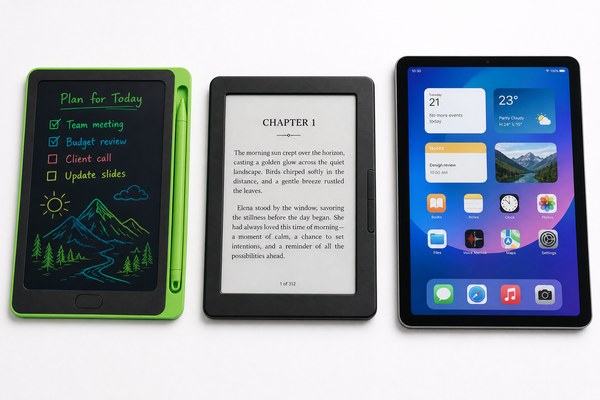
People mix these two products up all the time. I understand why. Both look like writing pads. Both are thin and light. But they work in very different ways.
No, an LCD writing tablet is not the same as an e-ink tablet. An LCD writing tablet uses a pressure-sensitive liquid crystal layer. An e-ink tablet uses electronic ink particles. They differ in cost, use case, battery life, and how you erase or save your notes.
I have seen this confusion cause real problems. Someone buys the wrong product for their child or their office. They feel disappointed. I want to clear this up once and for all. By the end of this article, you will know exactly what sets these two products apart. You will also know which one fits your needs best. Let me walk you through the key differences right now.
How Each Screen Actually Works
Most people never think about what happens inside a writing tablet. Then they buy the wrong one. Understanding the basic technology saves you time and money.
An LCD writing tablet has a liquid crystal layer between two plastic sheets. You press with a stylus or your finger. The pressure changes the crystals. This creates visible lines. An e-ink tablet stores ink particles in tiny capsules. An electric charge moves those particles to show an image.
I remember the first time I held an LCD writing tablet from our Shenzhen factory floor. I pressed the stylus down. The line appeared instantly. There was no lag at all. It felt just like writing on paper. That immediate response comes from the pressure layer reacting physically. There is no power needed to hold the image. The writing stays visible until you press the erase button. E-ink screens need a small charge to rearrange particles. They are brilliant for reading and long-form note-saving. But they are a completely different beast under the hood.
Technology Comparison at a Glance
| Feature | LCD Writing Tablet | E-Ink Tablet |
|---|---|---|
| Display Technology | Liquid crystal pressure layer | Electronic ink capsules |
| Writing Input | Physical pressure from stylus | Electromagnetic or active stylus |
| Image Retention | Stays until erased manually | Stays until refreshed by charge |
| Backlight | No backlight needed | Some models have a front light |
Cost, Battery Life, and Everyday Use
Budget matters. So does how long the battery lasts. Many buyers get surprised by the big price gap between these two products. I have seen it catch people off guard many times.
LCD writing tablets are far more affordable. A good LCD tablet can cost just a few dollars. E-ink tablets with writing features can cost hundreds of dollars. LCD tablets also use almost no power. One small battery can last months or even years with normal daily use.
At GY-industries, I work closely with buyers who need writing tablets for schools, hospitals, and offices. Most of them need something simple. They want their staff or students to jot down notes quickly. Then clear them. They do not need to save files or connect to Wi-Fi. For these buyers, our LCD writing tablets are the perfect answer. They are cost-effective. They are durable. They pass CE, RoHS, and CPC certifications. And because we manufacture them in our own Shenzhen factory, we can offer very competitive OEM and ODM pricing. One buyer ordered 5,000 units for a school district. The per-unit cost was very low. The kids loved them.
Cost and Battery Breakdown
| Category | LCD Writing Tablet | E-Ink Tablet |
|---|---|---|
| Typical Price Range | $3 – $30 USD | $100 – $500+ USD |
| Battery Life | Months to years (coin cell) | Days to weeks (rechargeable) |
| Best For | Quick notes, kids, offices | Long reading, saving documents |
| Charging Needed | Rarely | Regularly |
Saving Notes and Smart Features
Some people need to save what they write. Others just need a reusable scratch pad. Choosing the wrong type here leads to real frustration. I have seen it happen.
E-ink tablets can save your handwritten notes as files. Some sync to the cloud. LCD writing tablets do not save notes in the traditional way. Some advanced LCD models include a save-to-app or lock feature. But most are designed purely for temporary writing and instant erasing.
I spoke with a product designer last year. She wanted a tablet for her team to use during brainstorming sessions. They needed to sketch fast and erase fast. They did not need to save everything. Our LCD writing tablet was the right fit. It was simple. No app needed. No Wi-Fi needed. Just write, think, and clear. That said, I always tell buyers to be honest about their needs. If you need to keep records of your handwriting, e-ink or a digital notepad app is better. You can learn more about how e-ink technology works on Wikipedia if you want to go deeper. For most everyday writing and erasing tasks, LCD wins on simplicity and price every single time.
Smart Features Side by Side
| Feature | LCD Writing Tablet | E-Ink Tablet |
|---|---|---|
| Save Notes Digitally | Limited or none | Yes, as files or PDFs |
| Cloud Sync | No (most models) | Yes (most premium models) |
| App Connectivity | Some models only | Yes, built-in OS usually |
| Erase Speed | Instant (one button) | Slower (screen refresh needed) |
Conclusion
LCD writing tablets and e-ink tablets are very different tools. Choose based on your needs and budget. For OEM orders, contact GY-industries today. You can also explore our OEM and ODM services here.
