—
How LCD Writing Tablets Actually Use Their Batteries
Before you can make an informed decision about battery removal, you need to understand what the battery in an LCD writing tablet actually does — and what it doesn’t do. The answer might surprise you, because LCD writing tablets work very differently from smartphones, tablets, or even traditional LCD calculators.
The Pressure-Sensitive Display: Writing Without Power
Most LCD writing tablets sold today — including the full range manufactured by companies like GY-industries in Shenzhen — use a pressure-sensitive liquid crystal display technology. When you press a stylus or your fingernail against the surface, you’re mechanically deforming a thin layer of liquid crystals sandwiched between two flexible substrates.
The pressure aligns the crystals in a way that changes how they reflect ambient light, creating a visible dark mark. This process requires no electrical power whatsoever .
What the Battery Actually Powers: The Erase Function
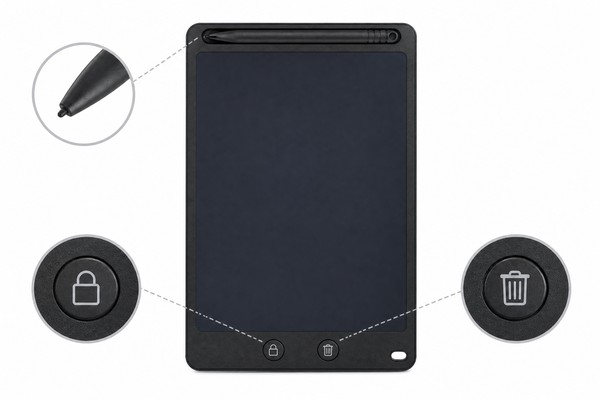
The battery in an LCD writing tablet has one primary job — powering the erase mechanism. When you press the erase button, a small electrical current flows through a transparent conductive layer (typically indium tin oxide, or ITO) built into the display stack.
This current generates a brief electrostatic field that uniformly realigns all the liquid crystals back to their resting, transparent state, clearing the screen in one smooth sweep.
Does the Display State Drain the Battery During Storage?
No. This is one of the most common misconceptions about LCD writing tablets. Whether the screen is completely blank or covered in writing, the battery is not being used to maintain that image. The liquid crystal orientation is maintained mechanically by the structure of the display layers. There is no “refreshing” or “holding” current required the way there might be in a volatile memory display.
—
Battery Chemistry and Why Long-Term Storage Is Risky
The question of whether to remove a battery is ultimately a question of chemistry. Different battery types behave very differently during storage, and the type of battery your LCD writing tablet uses should directly inform your decision.
CR2032 Lithium Coin Cells: The Well-Behaved Option
Many smaller LCD writing tablets — particularly those with screens in the 4.4-inch to 8.5-inch range — use a CR2032 or similar lithium coin cell. These are lithium manganese dioxide (Li-MnO₂) primary batteries with a nominal voltage of 3V. Lithium chemistry is exceptionally stable during storage.
The self-discharge rate of a CR2032 is extremely low — typically around 1% per year or less at room temperature. Manufacturers generally rate CR2032 batteries with shelf lives of 10 years when stored unused.
Alkaline AAA and AA Batteries: The High-Risk Category
Larger LCD writing tablets — typically those with 10-inch, 12-inch, or larger screens — often require more voltage or current for their wider erase electrodes. These models frequently use AAA or AA alkaline batteries, sometimes two cells in series to achieve the required voltage.
Alkaline battery chemistry is fundamentally different from lithium, and its behavior during storage presents a much more serious concern.
Battery Contact Corrosion: The Slow, Silent Problem
Even when batteries don’t catastrophically leak, there’s a subtler long-term issue: electrochemical corrosion at the battery contacts.
Metal-to-metal contact between the battery terminal and the spring or plate contacts in the device creates a microenvironment where moisture (even atmospheric humidity) and slight electrochemical differentials can cause oxidation over time.
This is especially relevant in environments with higher humidity — coastal regions, tropical climates, or improperly climate-controlled warehouses.
—
The Case For — and Against — Removing the Battery
Now that we understand the underlying technology and chemistry, we can build a clear, evidence-based framework for the decision. The answer is not universally “always remove it” or “never bother” — it depends on several specific factors.
When You Should Definitely Remove the Battery
Remove the battery from your LCD writing tablet before storage if any of the following conditions apply:
- Storage period exceeds 3-6 months: This is the key threshold. For short storage (a few weeks to a couple of months), the risk from leaving a battery in is low for most battery types. Once you’re looking at storage beyond three to six months, the cumulative risk of leakage, especially with alkaline batteries, increases enough to justify the two minutes it takes to remove them.
- The device uses alkaline (AAA, AA, or C) batteries: As discussed above, alkaline chemistry carries meaningfully higher leakage risk during extended storage than lithium. For alkaline-powered models, removal before any significant storage period is the right call.
- Storage environment is warm or has variable temperature: Heat accelerates battery self-discharge and dramatically increases leakage probability. Any environment that gets warmer than approximately 25-30°C regularly — a garage, a storage unit, a shipping container, or even a car — raises the risk profile substantially.
- Storage environment has elevated humidity: Moisture in the air interacts with battery terminals and contributes to both contact corrosion and the conditions that encourage alkaline leakage. Tropical climates or unsealed storage areas should always prompt battery removal.
- The device is going into long-term retail inventory: If you’re an Amazon FBA seller or importer stocking inventory that may sit in a fulfillment center for months, removing batteries before shipping (or sourcing devices without installed batteries) protects your product quality and reduces returns.
- You’re storing multiple devices and cannot monitor them: A single leaked battery is an inconvenience. Ten leaked batteries in a storage bin can mean ten damaged devices and potentially damage to surrounding products as well. The larger the quantity and the less oversight you have, the stronger the case for removal.
When Leaving the Battery In Is Acceptable
There are genuinely scenarios where leaving the battery installed is a reasonable choice:
- Short storage of 4-8 weeks with a CR2032 cell: A high-quality lithium coin cell in a temperate, dry environment poses minimal risk over a period of a few weeks.
- The device will be accessed and used intermittently: If “storage” really means “tucked away but used every few weeks,” the chemistry has little time to work against you. Regular use also means you’ll notice any battery issues early.
- The manufacturer has explicitly rated the device for stored-battery shelf life: Some manufacturers specify tested shelf life with battery installed under defined conditions. If your supplier provides this data and the conditions match your storage environment, that rating is meaningful.
- The device uses a lithium rechargeable cell with protection circuitry: Some premium LCD tablets include a small lithium polymer rechargeable battery with a built-in protection circuit that prevents deep discharge. These are engineered specifically for long-term reliability. Check your device’s specifications.
The Middle Ground: Partial Discharge Before Storage
For rechargeable lithium-based batteries specifically (not primary cells like CR2032), there’s an additional consideration from battery longevity science. Lithium-ion and lithium polymer cells stored for long periods ideally should be stored at a partial state of charge — typically around 40-60% — rather than fully charged or fully depleted.
Storing a lithium battery fully charged for many months causes a form of calendar aging that permanently reduces capacity. Storing it completely empty risks deep discharge that can damage the cell.
—
Practical Storage Guidelines for Every Scenario
Theory is useful, but most people reading this article want concrete, actionable guidance. This section breaks down exactly what to do based on your specific situation, covering individual consumer storage, family and classroom use, and larger-scale storage scenarios.
The Right Way to Prepare an LCD Tablet for Long-Term Storage
Whether you’re storing a single device as a parent or preparing a batch as a retailer, the process is essentially the same — only the scale differs. Follow these steps for best results:
- Clear the screen before storage. Press the erase button to return all liquid crystals to their resting state. A cleared screen is marginally better for the display material over very long periods, and it also lets you verify the erase function is working correctly before storage.
- Remove the battery (or batteries). Open the battery compartment — typically secured by a small Phillips screw or a sliding cover on most consumer-grade tablets. Remove the battery and set it aside.
- Inspect the battery contacts. Before closing the compartment, look at the metal springs and plates that contact the battery terminals. They should be shiny and free of white powder, green tinge, or any crusty deposits. If you see oxidation, clean it gently with a dry cotton swab or a swab lightly dampened with isopropyl alcohol (90% or higher). Allow to dry completely before closing.
- Store the battery separately. Keep the removed battery in a small zip-lock bag labeled with the device it belongs to. Store it at room temperature, away from direct sunlight and metal objects that could short-circuit it. If the battery is a lithium coin cell, it can be stored in its original packaging if you still have it.
- Store the tablet in a cool, dry location. Ideal storage conditions are approximately 15-25°C (59-77°F) with relative humidity below 60%. Avoid attics, garages, or storage units that experience temperature extremes. A closet shelf inside a climate-controlled home is ideal for single devices.
- Protect the screen surface. The writing surface of an LCD tablet can be scratched by hard objects. Store the device in its original packaging if available, or slip it into a protective sleeve or between two pieces of clean cardboard. Avoid stacking heavy objects on top.
- Label and date the storage. This sounds trivial but saves time later. A small label with the storage date tells you at a glance whether the battery you find in the bag is still likely to be at full capacity or whether you should install a fresh one when retrieving the device.
Classroom, Daycare, and Educational Institution Storage
LCD writing tablets are widely used in educational settings, and schools or daycares often store sets of 10, 20, or more tablets over summer breaks or between academic terms. This scenario deserves specific attention because the risks compound with quantity and the storage conditions are often less controlled than a home environment.
A practical approach for classroom sets:
- Remove all batteries and store them in a single labeled container or zip-lock bag
- Number each tablet and number the corresponding battery to make reassembly fast
- Store tablets face-down (screen facing down on a clean soft surface) or in their individual sleeves to protect the writing surface
- Stack no more than 3-4 tablets high to avoid pressure on the display panels
- Place the storage container in an interior storage closet rather than an exterior room that may experience greater temperature swings
Long-Term Storage: 12 Months or More
Truly long-term storage — a year or more — applies most often to B2B inventory scenarios (discussed in detail in the next section), but it can also apply to consumers who purchase a device as a gift in advance, retailers with slow-moving inventory, or individuals storing devices for a child who is temporarily using something else.
—
What B2B Buyers and Amazon Sellers Need to Know About Battery Storage at Scale
For importers, Amazon FBA sellers, toy distributors, and brand owners sourcing LCD writing tablets in bulk, battery storage is not just a product care question — it’s a supply chain quality management issue. Getting this wrong at scale means returns, negative reviews, and potential safety documentation complications. Getting it right is a competitive advantage.
Factory-to-Fulfillment Center: Understanding the Timeline Risk
Consider the typical supply chain timeline for an imported LCD writing tablet: production at the factory, quality control and packaging, ocean freight (typically 3-5 weeks from Shenzhen to US or European ports), customs clearance, domestic freight to fulfillment center, potential time in fulfillment center inventory, and finally customer delivery.
From the moment a battery is installed at the factory to the moment the customer first uses the device, it’s not uncommon for 3-6 months to have elapsed — sometimes more.
Amazon FBA Warehouse Conditions and Battery Implications
Amazon’s fulfillment centers are generally climate-controlled, but “climate-controlled” in a large warehouse context means roughly 60-80°F (15-27°C) with humidity management. These are acceptable conditions for battery storage. The more significant variable is dwell time — how long your inventory sits in the FBA warehouse before selling through.
For fast-moving ASIN listings with high sales velocity during peak season (back-to-school, Q4 holiday), dwell time may be measured in weeks. For slower-moving products or listings launched outside of peak season, inventory can sit for many months.
Amazon also charges long-term storage fees for inventory over 365 days, which creates a financial incentive to manage inventory turns — GY-industries · Factory Direct · Shenzhen Ready to Source LCD Writing Tablets? Get factory pricing, free samples, CE/FCC/CPC certificates, and OEM/ODM consultation.
Response within 24 hours. 📄 Get Free Quote 📱 WhatsApp Us ✉ Email Us ✓ Free samples available ✓ MOQ from 500 units ✓ CE / FCC / CPC certified ✓ 15+ years experience References [1] U.S. Consumer Product Safety Commission.
Button battery safety guidelines. https://www.cpsc.gov/Safety-Education/Safety-Education-Centers/Button-Cell-Coin-Battery-Information-Center [2] International Electrotechnical Commission. International standards for electronic components. https://www.iec.ch/ Related Articles Why Choose a Professional OEM/ODM Manufacturer for LCD Writing Tablets?
Are LCD Writing Tablets Truly Safe for Children’s Eyes? What Customization Options Are Available for LCD Writing Tablets? How Does GY-industries Ensure Every Tablet Passes Safety Testing?
LCD Writing Tablet Buyer Review Table
| Area | Buyer check | Evidence |
|---|---|---|
| Product factor | Buyer check | Evidence to request |
| Writing response | Test line clarity and pressure response | Sample review |
| Erase function | Confirm reset behavior and lock feature | Functional test |
| Durability | Review surface, stylus, and housing use case | Specification sheet |
Explore the LCD writing tablet product catalog to compare relevant product configurations for this sourcing decision.
For independent background guidance, buyers can consult ISO quality-management guidance and confirm the requirements that apply to their exact product and market.
