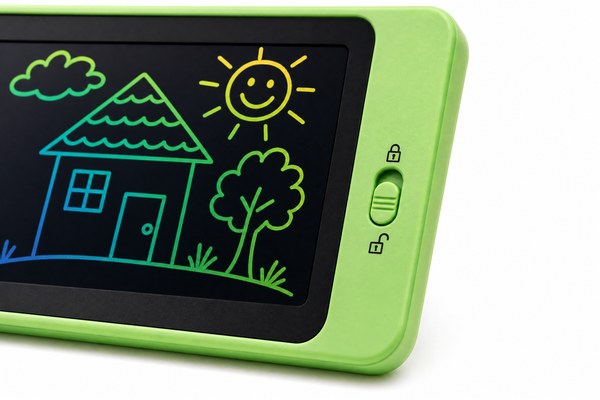
Have you ever pressed a button on your LCD writing tablet and nothing happened? That is frustrating. Many people do not know what the lock switch does.
The lock switch on an LCD writing tablet prevents accidental erasing. When the lock is on, pressing the erase button does nothing. Your drawing or writing stays safe on the screen until you turn the lock off.
I have worked with LCD writing tablets for years at GY-industries in Shenzhen. I have seen so many users confused by this small switch. Some think their tablet is broken. Others ignore it completely. But once you understand what the lock switch does, you will use your tablet in a whole new way. It is one of the most useful features on any writing tablet. Let me walk you through everything I know about it.
How the Lock Switch Works on an LCD Writing Tablet
You press the erase button and nothing happens. Your work stays on the screen. You wonder if the tablet is broken. It is not broken at all.
The lock switch is a small physical toggle. It sits on the side or top of the tablet. When you slide it to the locked position, the erase button is disabled. Your content cannot be wiped by accident.
I remember a customer from a school supply store. They ordered a batch of LCD writing tablets from our factory here in Shenzhen. A teacher called them saying the tablets were faulty. The erase button was not working. I asked one simple question: is the lock switch turned on? It was. Once the teacher slid it off, everything worked perfectly. That small moment taught me a big lesson. The lock switch is misunderstood more than any other feature I have seen. At GY-industries, we now include a printed guide with every OEM tablet order. It explains the lock switch clearly right away.
Lock Switch Positions at a Glance
| Switch Position | Erase Button Status | Content on Screen | Best Use Case |
|---|---|---|---|
| Locked (ON) | Disabled | Protected and stays visible | Saving notes, showing work to others |
| Unlocked (OFF) | Enabled | Can be erased instantly | Normal writing and drawing sessions |
| Mid-position (some models) | Partially active | May not respond fully | Transition state, not recommended for use |
Why the Lock Switch Matters for Kids and Classrooms
A child works hard on a drawing. Then another child hits the erase button. The drawing is gone in one second. That happens more than you think.
The lock switch protects work from being deleted by accident. In classrooms and homes with young children, this feature is essential. It keeps important writing or drawings safe until an adult decides to clear the screen.
I have a personal example here. My own daughter used one of our GY-industries LCD writing tablets at home. She was only five years old. She spent twenty minutes drawing her favorite cartoon character. Her little brother walked over and pressed the erase button. Everything was gone in a flash. She cried for a long time. After that, I always slide the lock switch on before I give her the tablet. Now her work stays safe. I tell every parent who asks me about our tablets: use the lock switch. It is a simple habit. It saves a lot of tears. Our CE and RoHS certified tablets are designed with kids in mind, and that little lock switch is a big part of that.
Lock Switch Benefits by User Type
| User Type | Main Concern | How Lock Switch Helps | Recommended Setting |
|---|---|---|---|
| Young children | Accidental erasing | Keeps drawing safe from curious hands | Always locked |
| Teachers | Class disruption | Students cannot erase a shared display | Locked during lessons |
| Office workers | Losing quick notes | Notes stay visible during meetings | Lock when taking calls |
| Artists and designers | Losing sketch work | Protects draft sketches from being wiped | Lock between review sessions |
Common Problems People Have With the Lock Switch
Your tablet seems broken. Nothing erases. Or it erases when you do not want it to. You feel confused and annoyed. This is very common.
Most lock switch problems come from not knowing what position the switch is in. A stuck switch, a worn toggle, or a misaligned slider can also cause issues. Checking the switch first saves time before assuming the tablet is faulty.
At our Shenzhen factory, I have reviewed quality reports from our OEM and ODM clients around the world. The number one complaint about LCD writing tablets is actually related to the lock switch. Either it feels loose, or it does not click clearly into place. This is why at GY-industries we test every lock switch before shipping. Our CPC certified products for the US market go through strict child safety testing too. A good lock switch should feel firm and move cleanly. If it wiggles or feels spongy, that is a sign of poor build quality. I always tell our ODM clients to check this detail in their product specs. You can learn more about our quality standards and services here. A reliable lock switch makes users trust the product more. That trust builds your brand.
According to Consumer Reports, small physical controls on children’s products must be easy to use and clearly labeled. The lock switch fits right into that standard.
Troubleshooting the Lock Switch
| Problem | Likely Cause | Simple Fix | When to Contact Supplier |
|---|---|---|---|
| Erase button does not work | Lock switch is turned on | Slide the switch to unlocked position | Only if fix does not help |
| Lock switch feels loose | Poor build quality or wear | Check if still in correct position | Yes, request replacement |
| Content erases even when locked | Faulty switch mechanism | Try toggling the switch off and on | Yes, report to manufacturer |
| Switch is hard to move | Debris or tight tolerance | Gently clean around the switch | If problem continues, contact supplier |
Conclusion
The lock switch is small but powerful. It protects your work every single day. Want a reliable LCD writing tablet? Contact GY-industries today for custom OEM and ODM solutions.
