You need a simple way to write, draw, or take notes. Paper gets messy. Screens hurt your eyes. There has to be a better tool.
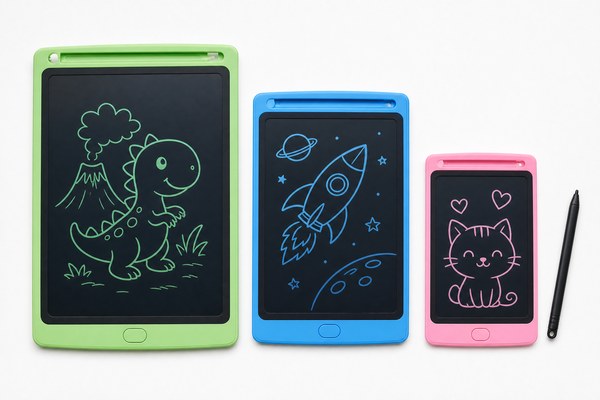
An LCD writing tablet is a flat, reusable writing board. It uses liquid crystal display technology. You write on it with a stylus or your finger. One button erases everything instantly. No paper, no ink, no battery charging needed in most models.
I have been working with LCD writing tablets for years now. I have watched them go from a niche gadget to a daily essential. Parents use them. Teachers love them. Office workers keep one on their desk. Once you understand what this tool really is and how it works, you will wonder how you ever lived without it. Let me walk you through everything I know.
How Does an LCD Writing Tablet Actually Work?
Most people pick one up and just start using it. But they have no idea what is happening inside. That mystery can make people hesitant to trust the product.
An LCD writing tablet works by using pressure-sensitive liquid crystal layers. When you press on the surface, the crystals align and show your mark. When you press the erase button, a small electrical charge resets the crystals. Your writing disappears in one second.
I remember the first time I saw one of these tablets at a trade show in Shenzhen. A customer picked it up and started drawing. Then they hit the erase button. Their eyes went wide. It felt like magic. I explained the science behind it. The top layer is a protective sheet. Below that is the liquid crystal layer. Below that is a reflective backing. No backlight is needed. The whole thing runs on a tiny coin battery just for the erase function. That is why the display never drains power. I have seen units last years on a single battery. At GY-industries, our factory in Shenzhen has refined this layer stack over many product generations. The result is a smooth, clear writing surface that feels natural every single time.
LCD Writing Tablet Layer Breakdown
| Layer | Material | Function | Notes |
|---|---|---|---|
| Top Sheet | Soft plastic film | Protects the surface | Scratch-resistant on quality units |
| LCD Layer | Liquid crystals | Displays your writing | Reacts to pressure instantly |
| Reflective Backing | Metallic film | Makes writing visible | No power needed to display |
| Circuit Board | PCB with battery | Powers the erase function | Single coin cell lasts years |
Who Uses an LCD Writing Tablet and Why?
You might think this is just a toy for kids. I used to hear that all the time. But that view misses the huge range of people who rely on these tablets every single day.
LCD writing tablets are used by children learning to write, students taking quick notes, teachers explaining ideas, office workers jotting reminders, and people with speech difficulties who use them to communicate. They replace sticky notes, whiteboards, and scrap paper in many situations.
I spoke with a school supply buyer from Europe last year. She told me her teachers were tired of buying whiteboard markers every week. The cost added up fast. She tried our GY-industries tablets in a classroom trial. The teachers loved them. Kids loved the erase button. Nobody lost a marker cap. Nobody had to wait for the board to dry. That one conversation stuck with me. It showed me that the real value is not the technology. It is the daily convenience. I have also seen hospitals use these tablets for patients who cannot speak easily. I have seen cafes use them for daily specials boards. The use cases keep growing. According to Statista’s global tablet market research, demand for writing and drawing devices continues to climb year over year.
Common Users and Their Main Benefits
| User Type | Main Use | Key Benefit |
|---|---|---|
| Children | Drawing and learning letters | Safe, reusable, no mess |
| Students | Quick notes in class | Silent, distraction-free writing |
| Office Workers | Reminders and to-do lists | Replaces sticky notes entirely |
| Healthcare Settings | Patient communication | Easy to clean and reuse |
What Should You Look For in a Quality LCD Writing Tablet?
Not all LCD writing tablets are the same. Some feel cheap. Some break fast. Some erase unevenly and leave ghost marks behind. Buying the wrong one wastes your money.
A quality LCD writing tablet should have a clear, pressure-sensitive screen, a reliable erase button, a lock function to prevent accidental erasing, a comfortable stylus, and safety certifications like CE, RoHS, and CPC for consumer markets.
I have inspected hundreds of tablet samples over the years at our Shenzhen factory. The differences are easy to spot when you know what to look for. A good screen erases cleanly every time. There are no leftover shadow marks. The writing pressure feels smooth and even across the whole surface. The erase lock button is something I always check first. Without it, a child or a clumsy hand can wipe hours of notes in one accidental touch. At GY-industries, every product goes through strict quality checks. Our tablets carry CE, RoHS, and CPC certifications. Those are not just stickers. They mean the product has been tested for safety and environmental standards. Our OEM and ODM services also let brands put their own logo on a certified, tested product. You can learn more about our capabilities on our OEM/ODM service page. That level of trust matters to buyers worldwide.
Key Features Compared Across Quality Tiers
| Feature | Budget Tier | Mid Tier | Quality Tier (e.g. GY-industries) |
|---|---|---|---|
| Erase Quality | Ghost marks common | Usually clean | Full clean erase every time |
| Erase Lock | Often missing | Sometimes included | Standard on all models |
| Safety Certifications | None or unknown | Partial | CE, RoHS, CPC certified |
| OEM/ODM Option | Not available | Limited | Full custom branding available |
Conclusion
An LCD writing tablet is a simple, powerful tool for writing, drawing, and note-taking without paper or ink. If you want reliable, certified tablets for your brand, contact GY-industries today.
