“`html
You design a logo. You send it to the factory. You wait. Then the samples arrive — and something looks wrong. The color is off. The finish feels cheap. The brand you worked hard to build looks like an afterthought on the product.
Adding your logo to an LCD writing tablet is not complicated — but it is easy to get wrong. The right method, material knowledge, and file prep make the difference between a product that sells and one that embarrasses.
I have spent years watching this process up close. I have seen logos that looked perfect on screen and terrible on the physical product. The gap between a digital mockup and a real result is where most branding projects fall apart. In this article, I will walk you through every method we use at GY-Industries. I will show you how to choose the right one. And I will help you avoid the mistakes I see most often from first-time OEM buyers.
1. Which Logo Application Method Produces the Most Durable and Premium Result?
Most buyers pick a logo method based on price. That is a mistake. The wrong method can look great in photos and fall apart in real use.
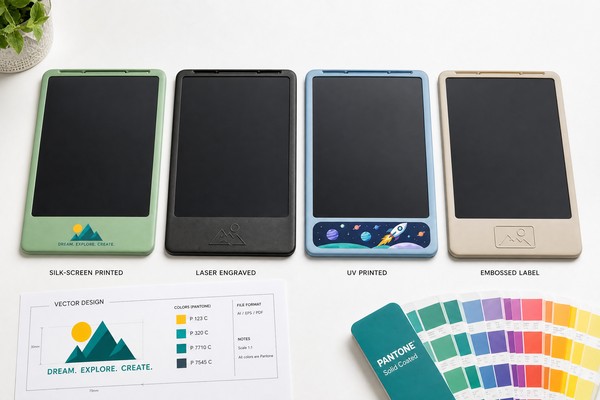
There are four main logo methods for LCD writing tablets. Each has a different look, feel, and lifespan. Choosing the right one depends on your brand positioning, not just your budget. Here is what each method actually delivers in production.
I remember a client who wanted a sleek, minimal look for a premium kids’ writing tablet. They almost chose a full-color UV print. I asked them to hold a laser-engraved sample first. They did. They switched immediately. The engraved version felt expensive. It matched their brand perfectly. The lesson was simple: touch the sample before you decide.
I always tell clients the same thing. A logo method is not just visual. It is tactile. It communicates quality before the customer even turns the product on. Each method I recommend comes from real production experience — not just a catalog.
Logo Method Comparison
| Method | Color Options | Durability | Best For | Cost Level |
|---|---|---|---|---|
| Silk Screen | 1–4 Pantone colors | High | Simple logos, large runs | Low–Medium |
| Laser Engraving | No color (material tone) | Permanent | Premium minimal brands | Medium |
| UV Printing | Full color, photographic | Medium–High | Detailed artwork, gradients | Medium–High |
| Embossed Label | Material finish only | High (adhesive-dependent) | Luxury, tactile branding | High |
Silk screen is my most recommended starting point. It is cost-effective. It is durable. It works well for clean, bold logos with up to four colors. For brands that want a no-compromise finish, laser engraving is permanent and impossible to fake. UV printing wins on visual complexity. Embossed labels add a 3D raised quality that feels genuinely premium in hand.
2. How Does the Shell Material Affect Which Branding Technique You Should Choose?
Many buyers send logo files without asking about the shell. That is a problem. The surface of the tablet determines what is physically possible.
The shell material of your LCD writing tablet is not just a structural choice. It directly controls which logo methods will bond, cure, or engrave correctly. Getting this wrong means re-runs, delays, and extra costs.
A client came to me with a beautiful embossed metal label design. It looked stunning in the mockup. The problem was their chosen tablet had a soft-touch rubberized coating. The label adhesive did not bond well to that surface. We had to redesign the approach entirely. That cost them two weeks and an extra sample round. I want you to avoid that exact situation.
At GY-Industries, our LCD writing tablets use ABS plastic shells as standard. ABS is one of the most branding-friendly materials available. It accepts all four logo methods cleanly. It holds ink. It engraves crisply. It bonds labels securely. But the surface finish — matte, gloss, or soft-touch — still matters for the final result.
Surface Finish vs. Logo Method Compatibility
| Shell Finish | Silk Screen | Laser Engraving | UV Printing | Embossed Label |
|---|---|---|---|---|
| Matte ABS | Excellent | Excellent | Very Good | Good |
| Gloss ABS | Very Good | Good | Excellent | Excellent |
| Soft-Touch Coating | Good | Not Recommended | Good | Use Caution |
My advice is always to confirm your shell finish before finalizing your logo method. A gloss surface makes UV printing colors pop brilliantly. A matte surface makes laser engraving look sharp and intentional. These are small decisions. But they shape how customers perceive your brand every single time they pick up the product.
3. What File Formats and Specifications Does a Factory Need to Apply Your Logo Correctly?
Wrong files cause delays. I see this every week. A buyer sends a PNG from a website. The factory cannot use it. Production stops.
Factories do not work from any file you send. They need specific formats, resolutions, and color references to apply your logo accurately. Sending the wrong file is one of the most common and most avoidable reasons a branding project gets delayed.
I once received a logo file that was a screenshot from a PowerPoint presentation. The client was confused about why we could not just “print it.” I explained that silk screening requires a vector path to separate each color layer cleanly. A low-resolution image has no paths. It has pixels. The factory has to trace it manually — or ask you to start over. I always send a file spec checklist to new clients now before anything else.
Here is exactly what our production team needs. For silk screen, we require a vector file in AI or EPS format. Every color must be on a separate layer. For UV printing, we accept high-resolution PNG or PDF files at minimum 300 DPI. For all methods, Pantone color codes help us match your brand precisely. Our minimum logo size is 15mm in any direction. Anything smaller risks loss of detail in production.
Logo File Requirements by Method
| Logo Method | Accepted Formats | Minimum Resolution | Color Reference | Minimum Logo Size |
|---|---|---|---|---|
| Silk Screen | AI, EPS (vector) | Vector (scalable) | Pantone (PMS) | 15mm |
| Laser Engraving | AI, EPS, DXF | Vector (scalable) | N/A (no color) | 15mm |
| UV Printing | PNG, PDF, AI | 300 DPI minimum | CMYK or Pantone | 15mm |
| Embossed Label | AI, EPS (vector) | Vector (scalable) | Material finish spec | 15mm |
One more thing I always emphasize. Sample approval is not optional. It is standard practice at GY-Industries. We produce a physical sample with your logo applied before any mass production run begins. This step exists because screens lie. Colors shift. Sizes feel different in hand than on a monitor. The sample is your insurance policy. Never skip it.
If you want to review our full branding and customization capabilities, visit our services page for detailed information.
Final Thoughts
Branding your LCD writing tablet well is not luck. It is preparation, the right method, and good files. Let us help you get it right — contact GY-Industries today.
“`
