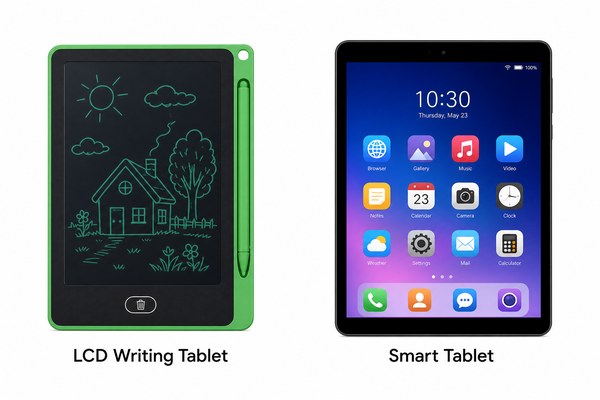
You want a simple tablet for drawing or writing. But there are so many options. It is hard to know which one is right for you.
An LCD writing tablet uses pressure-sensitive liquid crystal technology to let you write and erase instantly. A regular tablet is a full computing device with a screen, apps, and internet access. They serve very different purposes and budgets.
I have worked closely with the team at GY-industries in Shenzhen. I have seen both types of devices up close. I want to help you understand the real differences. This is not just about specs. It is about how you actually use these things every day. The right choice can save you money and frustration. Let me walk you through what I have learned.
How Each Device Actually Works
You press a stylus to the screen. Nothing happens the way you expect. You feel confused because you do not understand the technology inside.
An LCD writing tablet works with pressure on a liquid crystal layer. No power is needed to keep your writing visible. A regular tablet uses a glass touchscreen powered by a battery and a processor running an operating system.
I remember the first time I held an LCD writing tablet from GY-industries. I pressed the stylus down and a clean line appeared instantly. I lifted the stylus and the line stayed there without any battery drain. I was surprised by how simple it felt. Then I picked up a regular tablet next to it. It was heavier. It needed to be unlocked first. It needed Wi-Fi. It needed updates. The LCD tablet just worked. No setup. No waiting. I handed it to my young nephew. He started drawing right away. That moment told me everything about how different these two devices really are. The simplicity of the LCD tablet is its biggest strength.
Technology Comparison at a Glance
| Feature | LCD Writing Tablet | Regular Tablet |
|---|---|---|
| Display Type | Liquid crystal pressure layer | IPS or OLED touchscreen |
| Power Needed to Display | No (only to erase) | Yes, constant power required |
| Input Method | Stylus with pressure | Finger touch or active stylus |
| Operating System | None | Android, iOS, or Windows |
Cost, Battery Life, and Eye Comfort
You stare at your regular tablet for hours. Your eyes hurt. Your battery dies fast. You feel tired even after a short session.
LCD writing tablets are much cheaper than regular tablets. Their batteries last weeks or even months. The screen produces no backlight, so it is much easier on the eyes during long use sessions.
I have spent many afternoons testing products at GY-industries. I once used an LCD writing tablet for a full day of note-taking at a trade show. My eyes felt fine at the end of the day. I did not charge it once. The battery indicator barely moved. A colleague next to me was using a popular brand-name regular tablet. He charged it twice. He also complained about eye strain by lunchtime. I have seen this pattern repeat many times. GY-industries LCD tablets are built with eye-friendly screens. They carry CE, RoHS, and CPC certifications. These certifications show the products meet safety and quality standards. For kids especially, the low eye strain benefit is a real advantage. According to the American Academy of Ophthalmology, reducing screen light exposure helps protect children’s eye health.
Cost and Usability Comparison
| Factor | LCD Writing Tablet | Regular Tablet |
|---|---|---|
| Average Price Range | $10 – $60 | $150 – $1,000+ |
| Battery Life | Weeks to months | 4 to 12 hours |
| Eye Strain Risk | Very low (no backlight) | Higher (bright backlit screen) |
| Best For | Writing, drawing, kids, notes | Streaming, apps, work tasks |
Use Cases and Who Each Device Is For
You buy a device thinking it will do everything. Then it does not fit your real daily needs. You waste money and feel let down.
LCD writing tablets are ideal for kids, students, artists, and anyone who wants a simple writing or drawing tool. Regular tablets are for people who need apps, video, and internet access on the go.
I have talked to many buyers at GY-industries. Some are retailers who sell to schools. Others are parents buying for toddlers. One customer ordered a large OEM batch for a hospital. Doctors used the tablets to write quick notes at bedsides. They did not need apps. They needed something fast, simple, and easy to wipe clean. The LCD tablet was perfect. I have also talked to people who made the wrong choice. They bought a regular tablet for their three-year-old. The child cracked the screen in a week. An LCD writing tablet is tougher for everyday rough use. GY-industries offers OEM and ODM options too. Brands can customize size, color, and logo. That flexibility makes the LCD tablet useful across many industries and age groups. You can learn more about custom solutions on the GY-industries service page.
Who Should Use Which Device
| User Type | Best Device | Main Reason |
|---|---|---|
| Young Children (2–6 years) | LCD Writing Tablet | Durable, safe, no screen glare |
| Students Taking Notes | LCD Writing Tablet | Lightweight, no distractions |
| Remote Workers | Regular Tablet | Needs apps, video calls, email |
| Artists and Sketchers | LCD Writing Tablet | Natural feel, instant erase |
Conclusion
Both devices have their place. But now you know which one fits your needs. Ready to explore LCD writing tablets? Contact GY-industries today for expert guidance.
