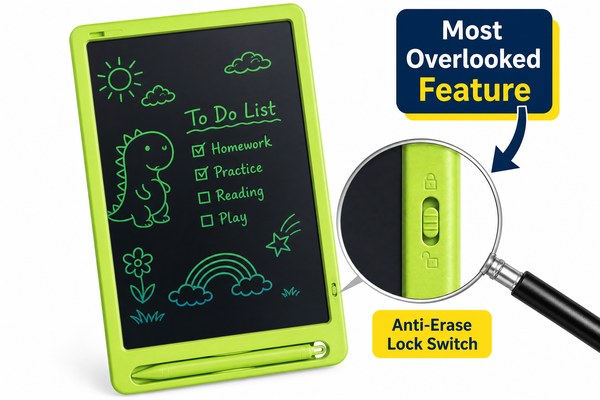
You finally buy an LCD writing tablet. It looks great in photos. But after a week, you hate using it. Sound familiar?
The most commonly overlooked feature when buying an LCD writing tablet is pressure sensitivity. Most buyers focus on screen size and color. They ignore how the tablet actually feels to write on. Pressure sensitivity controls line thickness and writing comfort. Getting this wrong ruins the whole experience.
I have worked with buyers from all over the world at our Shenzhen factory. I see the same mistake again and again. People compare prices and screen sizes. They never ask about writing feel. Then they come back with complaints. By then, it is too late. The order is done. I want to help you avoid that. Let me walk you through the three most overlooked features. Get these right and you will love your tablet.
1. Pressure Sensitivity — The Feature Everyone Ignores
You pick up the stylus. You press down. Nothing changes. The line is always the same thin scratch. Frustrating, right?
Pressure sensitivity means the tablet responds to how hard you press. Press softly and get a thin line. Press hard and get a thick line. Without this, writing feels stiff and unnatural. It is the single most overlooked spec in the whole buying process.
I remember one buyer from a European school supply brand. They ordered 5,000 units for kids. They wanted something fun and easy to use. They chose based on screen size and price. They never asked about pressure levels. When the product landed, teachers complained immediately. Writing felt like scratching plastic. Kids stopped using them within days. The buyer came back to us at GY-industries’ product service page asking for a redesign. We fixed it on the next run. But that first batch was a costly lesson. Always test the writing feel before you commit to volume.
Pressure Sensitivity Comparison by Use Case
| Use Case | Recommended Pressure Level | Why It Matters | Risk If Ignored |
|---|---|---|---|
| Kids drawing | High sensitivity | Light touch, small hands | Kids lose interest fast |
| Office note-taking | Medium sensitivity | Consistent everyday use | Writing feels robotic |
| Artists and designers | Very high sensitivity | Needs line variation | Artwork looks flat |
| Toddler scribbling | Low sensitivity fine | Heavy pressure naturally | Minimal risk here |
2. Erase Speed and Partial Erase — Nobody Asks About This
You write a full page. You only need to fix one word. You hit erase. The whole screen goes blank. Now you rewrite everything. Painful.
Erase speed and partial erase capability are almost never discussed before purchase. Full erase takes under one second on quality tablets. Partial erase lets you remove just one section. These two features decide how useful the tablet really is in daily life.
I once worked with a retail buyer sourcing tablets for a gift chain. They wanted fast erase as a selling point. They assumed all tablets erased the same way. They did not ask about partial erase at all. We manufacture both versions here at our Shenzhen OEM factory. I showed them side by side. The look on their face was priceless. They immediately upgraded their order spec. According to Consumer Reports, small usability details like these drive repeat purchases more than price does. I believe that completely. I see it in buyer feedback every single month.
Erase Feature Breakdown
| Erase Type | How It Works | Best For | User Satisfaction |
|---|---|---|---|
| One-button full erase | Clears entire screen instantly | Quick note clearing | High for simple users |
| Partial erase stylus | Rubs out selected area | Editing and corrections | Very high for professionals |
| Slow full erase | Takes 2-3 seconds | Basic budget tablets | Low, causes frustration |
| Lock erase button | Prevents accidental wipe | Kids and classrooms | High for parents and teachers |
3. Safety Certifications — The Most Dangerous Oversight of All
Your product arrives. A retailer asks for safety documents. You have none. Your whole shipment gets rejected. That is a nightmare scenario.
CE, RoHS, and CPC certifications are overlooked by most first-time buyers. These are not just paperwork. They prove the product is safe. They are required by many retailers and markets. Skipping them can block your entire sale or get your product recalled.
I have seen this break deals more than once. A buyer in the US wanted to sell through a large toy retail chain. They sourced tablets from a factory with no CPC certification. The retailer refused the shipment at the warehouse door. The buyer lost the season. At GY-industries, every LCD writing tablet we produce carries CE, RoHS, and CPC certifications. These come standard from our Shenzhen factory. I always tell new buyers this upfront. Certifications are not extras. They are your entry ticket to serious retail markets. Do not skip this conversation when sourcing.
Key Certifications and What They Mean
| Certification | What It Covers | Required Market | Risk Without It |
|---|---|---|---|
| CE | Electrical and product safety | Europe | Cannot legally sell in EU |
| RoHS | Restricts harmful materials | Global, especially EU/US | Product recall risk |
| CPC | Child product compliance | United States | Retailer rejection, fines |
| ASTM F963 | Toy safety standard | United States | Legal liability issues |
Conclusion
Do not make the same mistakes I have seen hundreds of buyers make. Check pressure sensitivity, erase features, and certifications first. Contact GY-industries today and get it right from the start.
