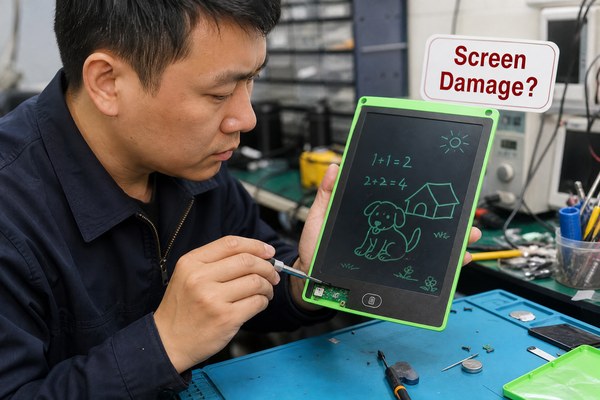
You changed the battery. You expected the erase button to finally work. But nothing happened. That is so frustrating.
If your LCD writing tablet still won’t erase after a battery replacement, the problem is usually not the battery at all. It could be a faulty erase button, a damaged flex cable, a bad LCD layer, or a firmware issue. You need to check each part one by one to find the real cause.
I have seen this exact situation many times. Customers think a dead battery is the only reason a tablet stops erasing. They replace the battery and feel hopeful. Then the same problem shows up again. It is confusing and disappointing. But the good news is that most of these issues have a clear cause. Once you know where to look, you can fix it or get the right support. Let me walk you through everything I know about this problem.
1. The Erase Button Itself Might Be the Real Problem
You fixed the battery. The erase still does not work. What if the button was broken all along?
The erase button on an LCD writing tablet is a small tactile switch. It can wear out, get stuck, or lose its electrical connection over time. If pressing the button feels mushy or makes no click sound, the button itself is likely the issue. This is one of the most common causes I see.
I remember a customer who bought a batch of LCD tablets from a different supplier. After a few months, several units stopped erasing. They assumed bad batteries and replaced them all. Still no fix. When I looked at the units at our Shenzhen factory, I noticed the erase buttons had worn out from heavy use. The internal tactile switch had lost its spring. The button was not sending any signal. We replaced the switch components and every unit worked again. It took one extra step to find the real problem. A simple button press test could have saved them a lot of time.
Erase Button Fault Diagnosis Guide
| Symptom | What It Means | What to Do | Difficulty Level |
|---|---|---|---|
| Button feels soft with no click | Tactile switch is worn out | Replace the tactile switch | Medium |
| Button feels stuck or jammed | Debris or physical damage inside | Open and clean the button area | Easy |
| Button clicks but nothing happens | Electrical connection is broken | Check button solder points | Medium |
| Button is physically broken | Cracked or detached button cap | Contact manufacturer for parts | Low |
2. The Flex Cable or Internal Connection May Be Damaged
The button works fine. The battery is new. But the tablet still refuses to erase. Something deeper is wrong.
Inside every LCD writing tablet, a thin flex cable connects the erase button to the main circuit board. If this cable is bent, torn, or disconnected, no signal ever reaches the board. The erase command simply never gets sent. I have found that flex cable damage is a very common hidden cause of this problem.
One of my colleagues here at GY-industries was testing a returned OEM tablet. The battery was fine. The button clicked perfectly. But the erase never triggered. We opened the unit carefully. The flex cable had a tiny tear near the fold point. It was almost invisible. That small tear was breaking the circuit. This kind of damage often happens when a tablet is dropped or bent too hard. It can also happen during a rough battery replacement if the cable gets pulled. Our CE and RoHS certified tablets use reinforced cable routing to reduce this risk. But older or cheaper units are very vulnerable to this kind of internal damage.
Flex Cable Damage Checklist
| Cable Condition | Likely Cause | Visible Sign | Repair Option |
|---|---|---|---|
| Torn or cracked cable | Drop impact or bending stress | Visible break in cable body | Replace flex cable |
| Cable pulled loose from connector | Rough battery replacement | Cable sits outside its slot | Re-seat the cable carefully |
| Corroded cable contacts | Moisture or age | Green or dark spots on contacts | Clean or replace cable |
| Kinked cable | Improper assembly | Sharp fold or crease visible | Straighten and re-route cable |
3. The LCD Layer or Circuit Board Might Be Faulty
You checked the button. You checked the cable. Everything looks fine. But the tablet still will not erase. Now what?
The LCD layer in a writing tablet uses a special pressure-sensitive cholesteric liquid crystal display. If this layer gets damaged or the circuit board controlling it fails, the erase function can stop working completely. No battery or button fix will solve a hardware failure at this level. You need a professional assessment.
I worked with a school supply company that ordered a large batch of LCD tablets for students. After six months of daily use, some units stopped erasing even with full battery power. We ran a full diagnostic at our GY-industries facility in Shenzhen. The LCD layers on the affected units had developed micro-cracks from constant pressure and rough handling. The erase voltage pulse could not spread evenly across a cracked layer. According to Electronics Tutorials, electrical signal failures in display circuits often come from physical layer degradation. Our OEM and ODM clients now request our ruggedized tablet designs for school and commercial use. These have stronger outer frames to protect the LCD layer better.
LCD and Circuit Board Fault Summary
| Fault Type | Common Cause | Symptoms You Will See | Recommended Action |
|---|---|---|---|
| Cracked LCD layer | Impact or excessive pressure | Partial or no erase, screen marks | Replace LCD module |
| Failed erase circuit on board | Electrical surge or age | No response from erase button | Professional board repair |
| Moisture damage to board | Water exposure | Erratic behavior, no erase | Dry out, clean, or replace board |
| Poor solder joint on board | Factory defect or vibration | Intermittent erase failure | Re-solder or replace board |
If you are a business sourcing LCD writing tablets and want to understand our quality and repair support process, visit our GY-industries service page for full details. We back every unit with proper after-sales support.
One more thing I want to mention before the conclusion. Always check whether your tablet is still under warranty before opening it yourself. Opening a unit can void the warranty. If you bought through an OEM or ODM channel, contact the original supplier first. Our CPC-certified tablets for the US market and CE and RoHS certified units for Europe all come with clear warranty terms. Knowing your warranty status can save you money and effort.
Also, always use the correct battery type. An incorrect replacement battery can deliver the wrong voltage. This may power the screen but not the erase circuit. Check the original battery label. Match the voltage and capacity exactly. This is a small thing but I have seen it cause big confusion.
If you have tried every step and the tablet still will not erase, do not keep guessing. Contact the manufacturer directly. At GY-industries, we have a full technical team at our Shenzhen factory. We can diagnose the issue remotely or ask you to ship the unit for inspection. We deal with this kind of fault regularly. We know exactly what to look for.
Conclusion
A tablet that still won’t erase after a battery swap needs a deeper look. Check the button, cable, and LCD layer. Contact GY-industries for expert support today.
