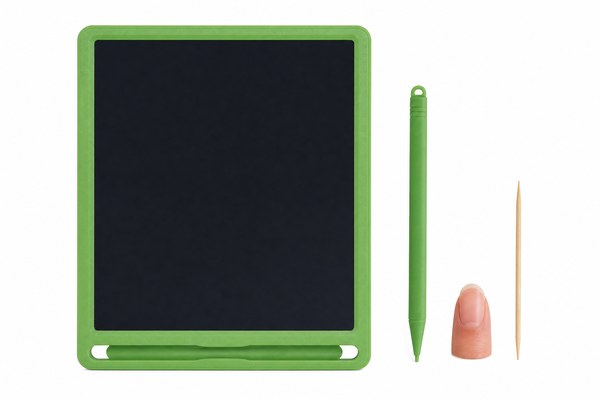
You reach for your stylus. It is gone. Your LCD writing tablet is now just a useless slab. This happens more than you think.
If you lose the stylus for your LCD writing tablet, do not panic. You can find a replacement stylus online, use a compatible alternative, or contact your manufacturer directly. Most LCD writing tablets use simple pressure-based styluses that are easy to replace cheaply and quickly.
I have seen this happen to so many people. They lose the stylus and think the whole tablet is ruined. But that is not true at all. There are several smart steps you can take. Some cost nothing. Some cost very little. I want to walk you through each option clearly. By the end, you will know exactly what to do next. Let me share what I have learned working closely with LCD tablet production here in Shenzhen.
1. Check if Your Tablet Stylus Can Be Replaced Easily
You lost the stylus. Now you feel stuck. But replacing it might be simpler than you expect.
Most LCD writing tablet styluses are not electronic. They work using physical pressure only. This means many styluses are interchangeable. You do not need a special branded stylus in most cases. A basic pressure stylus from any supplier will likely work just fine with your tablet.
I work closely with our production team at our Shenzhen factory. I see thousands of LCD writing tablets leave our facility every month. One thing I notice is that almost all of our standard styluses use the same simple pressure tip design. We build tablets for many brands through our OEM and ODM programs. The stylus shape might look different on the outside. But the tip mechanism is nearly always the same. I have personally tested dozens of third-party styluses on our GY-industries tablets. Almost all of them worked perfectly. You just need to check the tip size and shape before buying.
Common Stylus Types and Compatibility
| Stylus Type | How It Works | Compatibility | Average Cost |
|---|---|---|---|
| Standard Pressure Stylus | Physical tip pressure only | Works with most LCD tablets | $1 – $5 |
| Magnetic Stylus | Magnet tip erases as you write | Only works with magnetic LCD models | $3 – $8 |
| Capacitive Stylus | Uses electrical charge | Does NOT work on LCD writing tablets | $5 – $15 |
| OEM Replacement Stylus | Same as original | Perfect match guaranteed | $2 – $10 |
2. Use Everyday Objects as a Temporary Stylus
You need to write something right now. You have no stylus at all. You need a fast solution today.
You can use everyday objects as a temporary stylus for your LCD writing tablet. A ballpoint pen cap, a rounded pencil eraser, or even a blunt toothpick can work. These objects apply the pressure needed to activate the LCD screen. This is a good short-term fix while you get a proper replacement.
I tried this myself one afternoon in our Shenzhen office. I lost my test stylus during a product demo. I grabbed a pen cap from my desk. It worked surprisingly well on our 8.5-inch LCD tablet. The lines were a little thicker than normal. But I could still write clearly. I also tried a rubber pencil eraser tip. That worked even better. I have read that some users even use a rounded chopstick tip. The key is that the object must be firm and rounded. It must not scratch or pierce the screen surface. Always be gentle.
Everyday Objects That Can Work as a Temporary Stylus
| Object | Works Well? | Risk to Screen | Best For |
|---|---|---|---|
| Ballpoint pen cap | Yes, fairly well | Low if smooth | Quick notes |
| Pencil eraser tip | Yes, very well | Very low | Drawing and writing |
| Rounded chopstick | Yes, reasonably | Low if rounded | Emergency writing |
| Sharp pencil tip | No, avoid | High – can scratch | Do not use this |
3. Contact Your Manufacturer or Supplier for a Replacement
You tried temporary fixes. They are not good enough. You want a proper stylus that works perfectly every time.
The best solution is to contact your manufacturer or supplier for an official replacement stylus. If your tablet is from an OEM brand, contact the brand directly. If you bought a GY-industries product, reach out through our support page. We keep replacement styluses in stock for all our LCD tablet models.
I always tell our B2B clients this same thing. When you source LCD writing tablets from us at GY-industries, we make the process easy. We are an OEM and ODM factory based in Shenzhen. We supply tablets to brands all over the world. All our products carry CE, RoHS, and CPC certifications. Our after-sales service includes stylus replacements and spare parts support. I have personally helped several clients source bulk replacement styluses for their retail customers. It is a simple process. You just need to know your tablet model number. That number is usually on the back of the device. Once we have that, we can match the right stylus quickly.
According to Consumer Reports, keeping track of your device’s model number is one of the most useful habits for quick product support. I completely agree with that advice.
How to Get a Replacement Stylus From Your Manufacturer
| Step | What To Do | Where To Look | Time Needed |
|---|---|---|---|
| 1 | Find your tablet model number | Back of the device | 1 minute |
| 2 | Contact the manufacturer or brand | Website, email, or support page | 5 minutes |
| 3 | Confirm stylus tip size and type | Product manual or spec sheet | 5 minutes |
| 4 | Place your replacement order | Manufacturer store or supplier | 10 minutes |
Conclusion
Losing your stylus is not the end. You have real options right now. For help finding the right replacement, contact GY-industries today.
