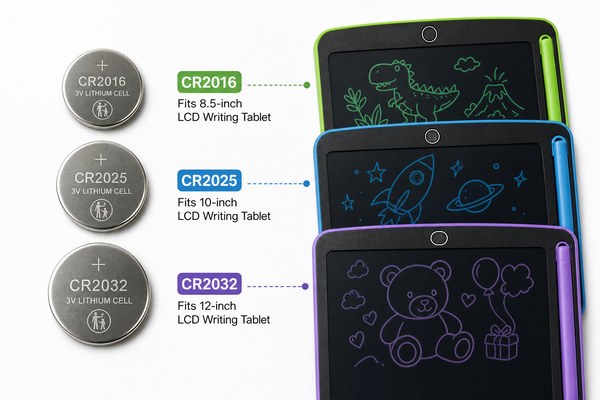
You just bought an LCD writing tablet. The battery dies fast. You have no idea what type it even uses.
Most LCD writing tablets use a small coin cell battery — usually a CR2025 or CR2032 lithium button battery. Some larger tablets use AAA batteries instead. The battery only powers the erase function. Writing and drawing use zero power from the battery.
I know this confuses a lot of people. They think the screen needs constant power. It does not. The LCD pressure-sensitive layer works without any electricity at all. The battery only fires when you press the erase button. That one small detail changes everything about how you shop for, use, and replace the battery in your tablet. Let me break it all down for you right now.
What Type of Battery Does an LCD Writing Tablet Actually Use?
You open the box and cannot find where the battery even goes. The manual is confusing. You feel stuck before you even start.
Almost all standard LCD writing tablets use a CR2032 coin cell battery. Smaller models may use a CR2025. A few tablet designs use one or two AAA batteries. The type depends on the tablet size and how the erase circuit was designed by the manufacturer.
I have worked closely with our team at GY-industries in Shenzhen for years. I have seen hundreds of tablet designs come through our factory floor. The most common battery we spec into our OEM and ODM tablet builds is the CR2032. It is cheap, widely available, and lasts a long time. A CR2032 is about the size of a small button. You can find it at any convenience store or pharmacy. When a school district orders a bulk run of tablets from us, they almost always ask us to standardize on CR2032. It makes replacement simple for teachers and parents. Our tablets all carry CE, RoHS, and CPC certifications, so the battery compartment design meets strict safety standards too.
Common Battery Types by Tablet Size
| Tablet Size | Common Battery Type | Battery Life (Approx.) | Notes |
|---|---|---|---|
| Small (4.4 to 6 inch) | CR2025 or CR2032 | 1 to 2 years | Most popular in kids’ tablets |
| Medium (8 to 10 inch) | CR2032 | 1 to 3 years | Standard in most OEM builds |
| Large (12 inch and up) | AAA x1 or x2 | 6 to 12 months | More erase power needed |
| Toddler / Toy style | AAA x2 | 3 to 6 months | Often includes lock switch |
Why Does the Battery Only Power the Erase Button?
Many buyers assume the battery runs the whole screen. When it dies, they panic and think the tablet is broken. It is not.
The LCD layer in a writing tablet is bistable. It holds an image without any power. The battery only sends a small pulse to clear the screen when you press erase. This is why battery life on these tablets is incredibly long compared to normal digital devices.
I always explain this to new retail clients who come to our factory for product sourcing visits. They are always surprised. One buyer from Europe told me he thought the tablet was solar powered because the battery lasted so long. I had to laugh. The truth is simpler than that. The writing surface is a pressure-sensitive LCD film. Press it and the crystals align to show your mark. Press erase and the battery sends a tiny electric pulse to reset all those crystals at once. According to HowStuffWorks, LCD technology uses liquid crystals that react to electric signals — and in writing tablets, that signal only comes at the moment of erasing. That is the whole secret.
Battery Use Comparison: Writing Tablet vs. Other Devices
| Device | Battery Type | Battery Powers | Typical Battery Life |
|---|---|---|---|
| LCD Writing Tablet | CR2032 / AAA | Erase function only | 1 to 3 years |
| Drawing Tablet (digital) | Built-in lithium | Full screen and input | 4 to 8 hours per charge |
| E-reader | Built-in lithium | Display and backlight | 2 to 6 weeks per charge |
| Kids’ Learning Pad | AAA x3 or x4 | Screen, sound, and light | 2 to 4 weeks |
How Do You Replace the Battery in an LCD Writing Tablet?
The battery finally dies. You press erase and nothing happens. You do not know how to open the tablet or which battery to buy.
Flip the tablet over and look for a small sliding cover or screw-on cap on the back. Pop it open and swap the old battery for a matching new one. Make sure the positive side faces the right way. Most tablets show a small plus sign inside the slot to guide you.
I have helped many of our OEM clients design better battery compartments. A bad compartment design leads to customer complaints. I always push our engineers at our Shenzhen factory to make the cover easy to open without tools. Some of our GY-industries tablet models use a simple sliding tray. Others use a soft rubber plug. The goal is always the same — make it easy for a parent or teacher to replace the battery in under a minute. I once reviewed a competitor product where you needed a tiny screwdriver and five screws just to get to the battery. That is a terrible design. Our OEM service process includes ergonomic testing for exactly this reason. Good battery access is part of a good product.
Step-by-Step Battery Replacement Guide
| Step | What To Do | Common Mistake | Tip |
|---|---|---|---|
| 1 | Flip tablet face down | Pressing buttons while flipping | Place on a soft cloth first |
| 2 | Find the battery cover | Looking on the wrong edge | Usually near the bottom corner |
| 3 | Slide or unscrew the cover | Forcing it the wrong way | Check for an arrow direction mark |
| 4 | Insert new battery correctly | Installing it upside down | Match the plus side to the diagram |
Conclusion
Now you know exactly what battery your LCD writing tablet uses and why. Ready to source quality tablets? Contact GY-industries today for OEM and ODM solutions.
