—
How LCD Writing Tablets Are Built — and Why That Affects Replacement Timing
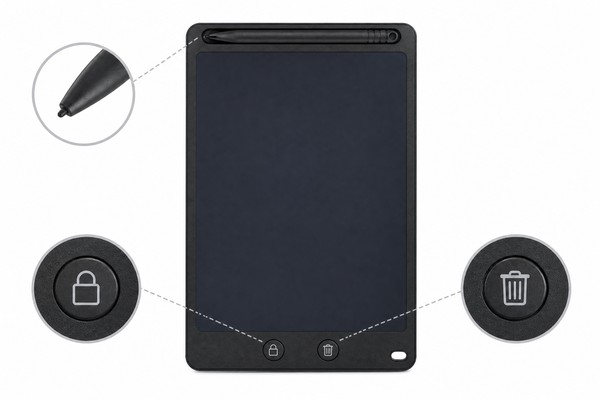
To understand when to replace an LCD writing tablet, you first need to understand what’s actually inside one. The term “LCD writing tablet” can be slightly misleading — these devices don’t display video content or connect to the internet.
Instead, they use a specialized layered structure that responds mechanically to pressure to create visible marks, and then clears electronically when a voltage is applied. That architecture has very specific failure characteristics that parents and buyers should understand.
The Core Technology: Pressure-Sensitive Liquid Crystal Layers
An LCD writing tablet is built around a thin film of cholesteric liquid crystal (CLC) — sometimes also called bistable liquid crystal — sandwiched between two flexible transparent electrodes and a rigid or semi-rigid backing layer.
When you press on the surface with the stylus or a finger, the mechanical pressure locally deforms the crystal structure, creating a visible, high-contrast mark. When you press the erase button, a brief electrical pulse from the battery causes all the liquid crystals to realign uniformly, making the marks disappear.
Manufacturers like GY-industries, based in Shenzhen, build their writing tablets with multiple protective laminate layers precisely to delay these failure modes. Understanding the construction helps you recognize when a failure has occurred and how serious it is.
Battery Systems and Electronic Components
Most LCD writing tablets use a single CR2025 or CR2016 coin cell battery — a small, flat lithium button cell — to power the erase function only. No power is required to hold an image; the written marks are mechanically stable at rest. This means the battery typically lasts months to years under normal use, with some manufacturers claiming up to three years of typical use on a single cell.
Frame, Stylus, and Structural Integrity
The frame of an LCD writing tablet — typically ABS plastic — provides structural rigidity that protects the display layers underneath. The stylus, usually attached via a tethered cord or inserted into a built-in holder, is the primary writing instrument.
Both of these components wear independently from the display layer, and their degradation can contribute to safety concerns that are separate from display failure.
—
Physical Damage Signs That Mean It’s Time to Replace
Physical damage is the most visible and most commonly understood reason to replace a product. For LCD writing tablets, however, it’s important to distinguish between cosmetic damage (scratches on the back cover, minor scuffs on the frame) and structurally or functionally significant damage that creates a genuine safety or usability problem.
This section covers the damage types that cross that threshold.
Screen Layer Cracks, Bubbles, and Delamination
The display surface of an LCD writing tablet is not glass — it is a flexible film assembly. This means it doesn’t shatter the way a smartphone screen does, but it can crack, crease, or delaminate in ways that are both unsafe and permanent.
A crease in the film from being bent sharply will typically appear as a permanent dark line or a permanent light patch that cannot be erased. More importantly, a significant crease or crack in the laminated film stack may compromise the seal that contains the liquid crystal material.
Frame and Corner Damage
The ABS plastic frame of an LCD writing tablet is designed to absorb and distribute impact energy, protecting the more fragile display layers inside. When a child drops the tablet repeatedly, or when a tablet is stored under heavy objects in a backpack, the frame can crack — particularly at the corners, which are the highest stress points during impact.
A frame crack that exposes a sharp edge is a laceration hazard. A crack that runs through the body of the tablet near the display may allow the display layers to flex more than designed, accelerating delamination.
Stylus and Cord Damage
The stylus is a frequently overlooked component in safety assessments, but it is the part of the tablet most directly in contact with the child during use, and it is subject to its own pattern of wear and failure. The tip of the stylus — typically a smooth, rounded plastic or silicone cap — wears down over time.
A worn tip that becomes rough or jagged can scratch the display surface more aggressively than intended, potentially accelerating film damage. A tip that breaks entirely can expose a narrower, harder interior structure that can puncture the display film if the child presses firmly.
—
Safety-Critical Failure Modes That Require Immediate Replacement
Some failure modes sit in a category of their own — not “monitor and consider replacing” situations, but immediate stop-use-and-replace situations. These are conditions where continued use creates a specific, identifiable safety risk to the child. Parents sometimes hesitate because the tablet “still works,” but functional continuity does not override safety when the hazard is concrete and present.
Battery Compartment Compromise
As discussed in Section 1, the battery compartment securing mechanism is a safety-critical component in any toy that contains a coin cell battery. The 2021 update to ASTM F963 and ongoing revisions to EN71 have tightened requirements around coin cell battery accessibility in children’s products following documented ingestion incidents.
A swallowed coin cell battery is a genuine medical emergency — button batteries can cause severe internal burns through an electrochemical reaction with tissue, even when they are not fully charged.
Erase Button Failure and Forced Pressure Use
A less obvious but genuinely important safety scenario arises when the erase button fails. In a properly functioning LCD writing tablet, the erase button triggers a brief electrical pulse that clears the screen.
When this mechanism fails — either because the battery is depleted or because the internal circuitry or button mechanism has failed — the screen can only be cleared by applying extremely heavy pressure uniformly across the surface, a technique that some older users resort to informally.
Chemical Exposure Scenarios
As noted in Section 2, the liquid crystal material inside the display layer is sealed and not normally accessible during use.
However, in cases of significant display layer damage — visible wet patches, chemical smell from the display area, visible fluid between layers — the possibility of chemical exposure must be taken seriously and the tablet should be removed from the child’s access immediately.
—
Performance Degradation: When the Tablet Still Works But Shouldn’t Be Used
Not all replacement triggers are dramatic failures. Some are gradual performance changes that, on their own, might seem minor but which collectively indicate that the product has aged beyond its useful and safe life. This section covers performance-based signals that often get ignored but shouldn’t be.
Persistent Ghost Images and Display Contamination
Over time and with heavy use, LCD writing tablets can develop what users often describe as “ghost images” — faint marks that remain visible even after the erase function is used. This is a well-documented characteristic of cholesteric liquid crystal displays at end of life.
The liquid crystal material has a defined number of switching cycles, and after enough use, individual areas of the display may no longer reset completely to the uniform resting state, leaving faint residual marks.
Writing Surface Deterioration
The writing surface of an LCD writing tablet should feel smooth and create consistent, high-contrast marks with normal stylus pressure. Over time and with heavy use, several surface changes can occur. The surface may develop visible micro-scratches from the stylus, particularly if the stylus tip became worn or damaged at any point.
These scratches are not just cosmetic — they can reflect ambient light differently, making marks harder to read in certain lighting conditions.
Structural Loosening and Moving Parts Wear
The mechanical components of an LCD writing tablet — the erase button, the stylus holder or storage slot, any hinged components, and the battery compartment cover — all undergo wear with repeated use.
A button that begins to feel “sticky,” catch, or require disproportionate force to activate may eventually jam in the depressed position, potentially delivering repeated electrical pulses to the display that can affect the display material. More practically, a stuck erase button can confuse young users and lead to misuse behaviors.
—
B2B and Brand Perspective: Managing Product Lifecycle and Replacement Policies
For importers, Amazon sellers, toy brands, and institutional buyers, the question of when it is safer to replace a tablet has dimensions beyond individual product safety. It affects product design specifications, warranty policy, returns management, compliance documentation, and ultimately brand reputation. This section addresses those professional considerations.
Defining Expected Lifespan in Product Specifications
When sourcing LCD writing tablets from a manufacturer, one of the most important — and most frequently overlooked — specification points is the stated expected lifespan. Lifespan in LCD writing tablets can be measured in several ways: calendar time, number of erase cycles, or number of writing cycles.
Different manufacturers use different metrics, and some do not publish this information at all, which is itself a signal about their quality management practices.
Warranty Policy Design and Replacement Triggers
How a brand handles warranty replacements communicates its values and risk tolerance to consumers. For LCD writing tablets, a sound warranty policy should identify specific replacement triggers rather than relying solely on a time-based warranty period.
Replacement triggers that are explicitly covered under warranty create clarity for customers and reduce subjective disputes about what constitutes a “defective” product.
Recommended warranty replacement triggers for a professionally written LCD writing tablet warranty policy include:
- Erase function failure within the warranty period after confirming battery is charged
- Battery compartment locking mechanism failure
- Significant delamination or display layer separation under normal use conditions
- Stylus tip failure within a defined period from purchase
- Frame structural failure (cracking, not cosmetic scratching) under normal use
Compliance Documentation and Safety Standards for Market Entry
The replacement timing question has a regulatory dimension for B2B buyers that is worth addressing explicitly. In the United States, children’s products must comply with CPSC regulations and, for toys, with ASTM F963. In the European Union, EN71 compliance is required.
Both standards include requirements relevant to LCD writing tablet safety: battery accessibility, small parts (for products intended for children under three), materials safety, and mechanical and physical hazard testing.
Compliance with these standards at the time of manufacture does not automatically guarantee that a product remains compliant throughout its entire use life — this is a nuance that many brands and importers do not fully appreciate. A battery compart GY-industries · Factory Direct · Shenzhen Ready to Source LCD Writing Tablets?
Get factory pricing, free samples, CE/FCC/CPC certificates, and OEM/ODM consultation. Response within 24 hours. 📄 Get Free Quote 📱 WhatsApp Us ✉ Email Us ✓ Free samples available ✓ MOQ from 500 units ✓ CE / FCC / CPC certified ✓ 15+ years experience References [1] U.S. Consumer Product Safety Commission.
Toy Safety guidelines for children’s products. https://www.cpsc.gov/Business–Manufacturing/Business-Education/Toy-Safety [2] American Academy of Pediatrics. AAP guidelines on media and children. https://www.aap.org/en/patient-care/media-and-children/ Related Articles Why Choose a Professional OEM/ODM Manufacturer for LCD Writing Tablets?
Are LCD Writing Tablets Truly Safe for Children’s Eyes? What Customization Options Are Available for LCD Writing Tablets? How Does GY-industries Ensure Every Tablet Passes Safety Testing?
LCD Writing Tablet Buyer Review Table
| Area | Buyer check | Evidence |
|---|---|---|
| Buyer review area | What to clarify | Evidence to keep |
| Product scope | Confirm the final model and use case | Approved specification |
| Commercial terms | Agree responsibilities and milestones | Written purchase terms |
| Quality control | Define key acceptance checks | Inspection record |
Explore the LCD writing tablet product catalog to compare relevant product configurations for this sourcing decision.
For independent background guidance, buyers can consult ISO quality-management guidance and confirm the requirements that apply to their exact product and market.
