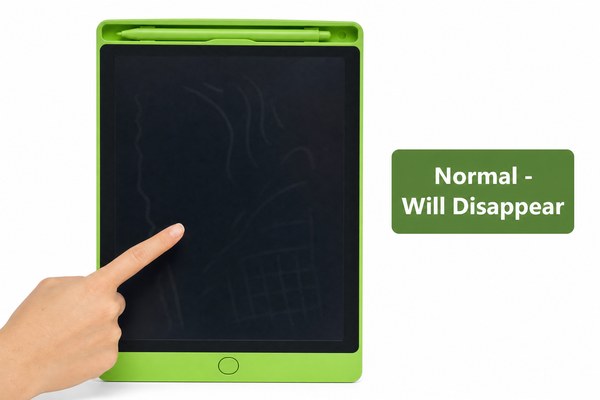
You just unboxed a brand new LCD writing tablet. But something looks wrong. There are strange marks or patterns on the screen. That is frustrating.
Those marks are almost always caused by pressure, temperature changes, or trapped air during shipping and storage. They are not permanent damage in most cases. A simple rest period or light pressure fix solves the problem most of the time. The screen is still fully functional.
I have seen this happen hundreds of times at our Shenzhen factory. Customers panic when they see it. They think the product is broken. But most of the time, it is not. Understanding why this happens will save you a lot of worry. It will also help you know when to act and when to simply wait. Let me walk you through everything I know about this issue from years of hands-on experience in LCD tablet manufacturing.
Pressure Marks: The Most Common Cause
You open the box and see cloudy patches or dark spots. You feel cheated. But wait — pressure is almost certainly the reason.
LCD writing tablets use a liquid crystal layer between two thin panels. When pressure is applied to that layer, the crystals shift. This creates visible marks or patterns. It happens during packaging, stacking, or tight shipping. It is not a defect in most cases.
I remember a batch of our OEM LCD tablets heading to a retailer in Europe. The shipping boxes were stacked too high inside the container. By the time they arrived, a number of units had visible pressure marks near the corners. The retailer called us right away. I told them to lay the tablets flat and wait 24 to 48 hours. Almost every single unit recovered on its own. The liquid crystals simply needed time to resettle. We now advise all our clients to include a handling note inside every box. A little awareness goes a long way. Since our tablets carry CE and RoHS certifications, we know the materials meet strict standards. The issue was purely physical, not a product quality failure.
Types of Pressure Marks and What Causes Them
| Mark Type | Appearance | Likely Cause | Will It Go Away? |
|---|---|---|---|
| Corner clouding | Hazy patches near edges | Stacking weight during shipping | Yes, usually within 48 hours |
| Fingerprint shadows | Swirl-like marks | Handling during packaging | Yes, rests away on its own |
| Center blotches | Large dark or light patch | Heavy object placed on top | Often yes, may need gentle pressure |
| Line patterns | Thin straight lines | Packaging insert pressing on screen | Yes, disappears after unpacking |
Temperature Changes During Shipping
The tablet looked fine at the factory. Now it has strange ripple patterns. You did nothing wrong. Temperature is the hidden culprit here.
LCD panels are sensitive to heat and cold. When a tablet moves through different climates during shipping, the liquid crystal layer can shift. This creates ripple marks or uneven color patches on the screen. Letting the tablet sit at room temperature for a few hours normally fixes this completely.
I have tested our LCD writing tablets at our Shenzhen factory under temperature stress conditions. We simulate cold warehouse storage followed by warm retail environments. In some cases, the screen shows temporary banding or wave-like patterns. It looks alarming. But after the tablet adjusts to room temperature, the screen clears up completely. This is why I always tell our OEM and ODM clients to include acclimatization instructions with their products. A simple note saying “allow the tablet to rest at room temperature for two hours before use” prevents so many unnecessary returns. Our factory ships globally, and we have learned that climate-controlled packaging helps reduce these cases significantly. DisplayMate’s LCD research also confirms that temperature directly affects liquid crystal performance.
Temperature Effects on LCD Screens by Condition
| Temperature Condition | Visual Symptom | Recovery Time | Action Needed |
|---|---|---|---|
| Very cold (below 0°C) | Sluggish or dark patches | 1 to 3 hours | Rest at room temperature |
| Warm to cold shift | Ripple or wave patterns | 30 to 60 minutes | Leave flat at room temperature |
| High humidity exposure | Foggy or blurred areas | 2 to 4 hours | Place in dry, warm room |
| Direct heat exposure | Uneven color patches | Up to 24 hours | Move away from heat source |
Manufacturing Film Layers and Optical Interference
Some marks look like rainbow colors or faint grid patterns. They do not go away after waiting. You start wondering if this is normal. It might be.
LCD writing tablets have multiple protective film layers on the screen. These layers can create optical interference patterns that look like rainbows or faint grids. This is sometimes called Newton’s rings. It is a known optical effect. It does not affect how the tablet writes or erases. It is not a defect.
At our factory, we use precision-laminated film layers on our LCD tablets. This helps protect the screen and improve writing feel. But occasionally, the air gap between layers creates a visible interference pattern. I have seen this most often on tablets with a glossy protective film. When I first noticed it years ago, I thought something was wrong with our production line. Our quality team explained it to me clearly. It is purely optical. The tablet still writes perfectly. It still erases cleanly. Our tablets meet CPC certification standards for child safety, which means these films are tested and safe. We now explain this to our OEM clients during product briefings so they can set correct expectations with their end customers. Knowing the cause removes all the worry. You can learn more about our quality process here.
Film Layer Patterns: Normal vs. Abnormal
| Pattern Type | How It Looks | Normal or Abnormal | What To Do |
|---|---|---|---|
| Rainbow rings | Colorful circular rings | Normal optical effect | Nothing — it is harmless |
| Faint grid lines | Light mesh pattern | Normal from pixel structure | Nothing — part of screen design |
| Permanent dark spot | Black spot that stays fixed | Abnormal — possible damage | Contact supplier for replacement |
| Spreading discoloration | Growing colored patch | Abnormal — liquid crystal leak | Stop use and report immediately |
Conclusion
Most marks on a new LCD writing tablet are harmless and temporary. Now you know why they happen. Have questions? Contact GY-industries today for expert support.
