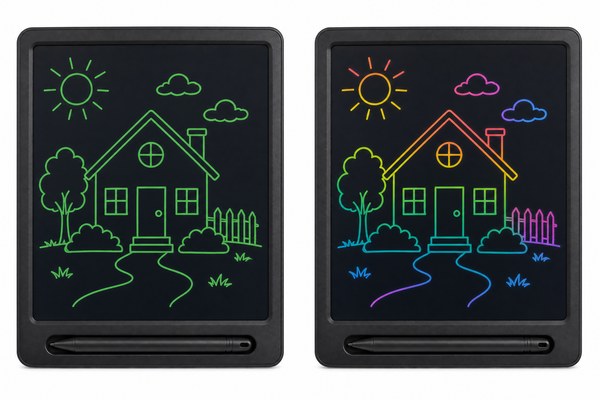
You picked up a colorful LCD writing tablet. But your old one only showed green on black. You wonder why. What makes some tablets display colors?
Some LCD writing tablets display colors because they use multi-layer pressure-sensitive film technology. Each layer reacts to different pressures and reflects different light wavelengths. The result is a tablet that shows lines in blue, green, red, or mixed tones depending on how hard you press.
I have seen a lot of confusion about this topic. Many parents buy a colorful tablet thinking it works like a color screen on a phone. It does not. The color comes from the film layers inside, not from pixels or a backlight. Understanding this helps you choose the right tablet. It also helps you explain the product to your customers. Let me walk you through the real reasons behind color LCD writing tablets. I will break it down simply.
1. It All Starts With the LCD Film Inside
Most people see “LCD” and think of a TV screen. But LCD writing tablets work very differently. The film inside is what creates the color.
LCD writing tablets use a special pressure-sensitive liquid crystal film. When you press down, the crystals in the film align and reflect light. Different film formulas reflect different colors. This is why some tablets show one color and others show multiple colors.
I remember visiting our Shenzhen factory floor for the first time. I watched the production line closely. The workers were layering thin films inside the tablet frames. Some tablets got a single green-tinted film. Others got a stack of films in different shades. I asked the engineer which one was harder to make. He smiled and pointed at the colorful stack. “That one needs much more precision,” he said. The layers have to align perfectly. Even a small shift causes uneven color lines. I walked away with a much better understanding of why colorful tablets cost a bit more. The materials and the process are simply more complex. That experience stuck with me.
How LCD Film Types Affect Color Output
| Film Type | Color Output | Common Use | Complexity Level |
|---|---|---|---|
| Single-layer standard film | Green on black or blue on black | Basic writing tablets | Low |
| Dual-layer film | Two-tone color lines | Kids drawing tablets | Medium |
| Multi-layer gradient film | Rainbow or multicolor lines | Premium colorful tablets | High |
| Tinted background film | Colored background only | Decorative writing pads | Low to Medium |
2. Pressure Level Changes the Color You See
You press hard and get one color. You press softly and get another. Many people do not realize that pressure controls color on these tablets. This surprises them every time.
On a multi-layer LCD writing tablet, the pressure you apply determines which film layer activates. Light pressure hits the top layer only. Heavy pressure reaches deeper layers. Each layer has a different color. So the harder you press, the more colors appear in your line.
I gave one of our colorful OEM tablets to my young nephew last year. He is five years old. He started drawing with very light strokes. All his lines came out blue. Then he got excited and pressed really hard. Suddenly his lines turned green and then yellow. He screamed with joy. He thought it was magic. I laughed and explained it to him in simple words. “The harder you push, the deeper you go, and different colors wake up,” I told him. He spent the next hour testing every pressure level he could. That moment showed me how powerful this feature is for children. It turns a simple drawing tool into a discovery toy. It also showed me why our OEM clients love ordering colorful versions for kids’ product lines.
Pressure Levels and Their Typical Color Results
| Pressure Level | Film Layer Activated | Typical Color Seen | Best For |
|---|---|---|---|
| Very light touch | Top layer only | Blue or light purple | Fine details and thin lines |
| Medium pressure | Top and middle layers | Green or teal | Normal writing and sketching |
| Heavy pressure | All layers including bottom | Red, orange, or yellow | Bold lines and filling shapes |
3. The Design of the Tablet Frame Also Plays a Role
Some people think only the film matters. But the frame and cover design also affect how colors look. I have seen this make a big difference in the final product.
The protective cover layer above the LCD film can be tinted or clear. A tinted cover shifts the overall color of the display. Clear covers let the true film color show through. Manufacturers like GY-industries choose cover materials carefully to match the target color output for each product.
I was working on a custom OEM order for a European client. They wanted a tablet that showed warm sunset colors when kids drew on it. We started with a standard multi-layer film. The colors looked cool but not warm. Our engineering team in Shenzhen suggested adding a very lightly tinted amber cover layer. We tested a sample. The colors shifted beautifully toward orange and gold tones. The client was thrilled. This small design choice made a huge impact. It taught me that color output is not just about the film. Every layer in the stack contributes. This is also why our CE, RoHS, and CPC certified tablets go through strict quality checks. Every material we use gets tested. We do not want any layer causing safety issues for children. The full design matters from top to bottom.
Frame and Cover Layer Effects on Color Display
| Cover Layer Type | Effect on Color | Common Application |
|---|---|---|
| Clear transparent cover | No shift — true film color shows | Standard colorful tablets |
| Light amber tint cover | Shifts colors toward warm orange-gold | Sunset-theme kids tablets |
| Light blue tint cover | Shifts colors toward cool blue tones | Ocean or sky-theme tablets |
| Frosted matte cover | Softens and diffuses all colors | Pastel-look drawing tablets |
According to ScienceDirect’s overview of liquid crystal display technology, the alignment and properties of liquid crystal layers are key factors in determining light reflection and color output. This supports exactly what I see in our products every day at GY-industries.
Conclusion
Now you know why LCD writing tablets display colors. It comes down to film layers, pressure, and cover design. Want to explore colorful tablet options for your brand? Contact GY-industries today and let’s build something great together.
