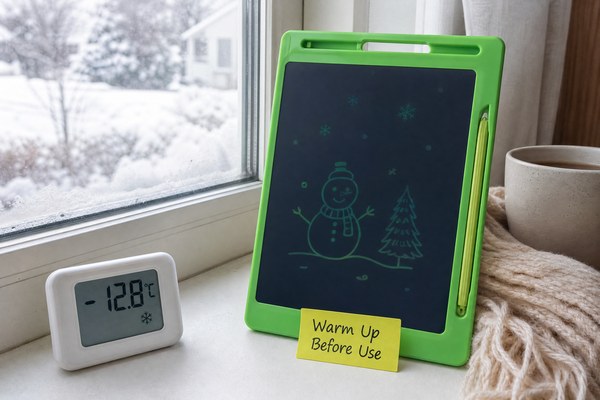
You pull out your LCD writing tablet on a cold morning. The screen looks dim and washed out. Something feels wrong.
Cold weather makes the liquid crystal layer inside your LCD writing tablet slow down. The crystals stop responding as fast. This makes the screen look dim, faded, or slow to clear. It is a physics problem, not a broken screen.
I have seen this question come up again and again from parents, teachers, and retail buyers. They worry their tablet is damaged. Most of the time, it is not. Understanding why this happens helps you use your tablet better. It also helps you pick a tablet built to handle temperature changes. Let me walk you through exactly what is going on inside that little screen, and what you can do about it.
What Liquid Crystals Actually Do Inside Your Tablet
Most people have no idea what is inside an LCD writing tablet. They just press and write. But when cold hits, the inside tells the whole story.
LCD stands for liquid crystal display. The crystals inside are a special material. They act like both a liquid and a solid. Cold temperatures thicken them up. Thick crystals move slowly. Slow crystals make a dim, sluggish screen.
I remember visiting our Shenzhen factory floor during a product test cycle. We were testing a batch of LCD writing tablets destined for a European retail client. The quality team put sample units into a cold chamber. The screens came out looking pale and slow. It was not a defect. It was the crystals responding to cold exactly as physics says they should. We track this in every product run. At GY-industries, we test our LCD tablets across a range of temperatures before they ship. That way, our OEM and ODM clients know the real-world limits of every unit they order. Knowing the science helps us build better products and set honest expectations.
How Temperature Affects Liquid Crystal Behavior
| Temperature Range | Crystal Behavior | Screen Appearance | User Experience |
|---|---|---|---|
| Above 20°C (68°F) | Crystals move freely | Clear and bright | Normal writing and erasing |
| 5°C to 20°C (41–68°F) | Crystals slow slightly | Slightly muted | Noticeable but still usable |
| Below 5°C (41°F) | Crystals become thick | Dim and washed out | Slow erase, faint lines |
| Below -10°C (14°F) | Crystals nearly freeze | Almost no image | Tablet may stop working |
Why Cold Also Affects the Erase Function
A dim screen is one issue. But cold weather does something else too. The erase button stops working properly. This confuses a lot of users.
When you press erase on an LCD writing tablet, an electric charge resets the crystals. In cold weather, the crystals resist that charge. They are too stiff to snap back into place quickly. Your screen clears slowly or only partially. This is normal cold-weather behavior.
I spoke with a school supply distributor in Canada last winter. She told me her customers were returning LCD writing tablets in large numbers. They thought the erase function was broken. I asked her what the classroom temperatures were. Some rooms were kept very cool to save on heating costs. That was the whole problem. I sent her a one-page cold-weather guide to share with her customers. Returns dropped almost immediately. This is exactly why I believe product education matters as much as product quality. At GY-industries, our after-sales service team helps clients handle these kinds of real-world questions every day.
Erase Performance at Different Temperatures
| Temperature | Erase Speed | Erase Quality | Recommended Action |
|---|---|---|---|
| Room temperature (20°C+) | Instant | Full and clean | No action needed |
| Cool room (10–20°C) | 1–2 seconds | Mostly clean | Wait a moment before rewriting |
| Cold environment (0–10°C) | 3–5 seconds | Partial ghosting possible | Warm the tablet in your hands |
| Very cold (below 0°C) | Very slow or none | Poor | Bring indoors to warm up first |
How to Fix a Dim LCD Writing Tablet in Cold Weather
So your tablet looks dim and slow. You are outside or in a cold room. You need it to work right now. What do you do?
The fix is simple. Warm the tablet up. Hold it in your hands for a few minutes. Bring it indoors. Keep it close to your body. Once the crystals warm up, they move freely again. The screen returns to normal. No repair is needed in most cases.
I always tell this story when someone asks about cold-weather performance. My nephew took his LCD writing tablet on a camping trip in autumn. The next morning, he messaged me saying the screen was almost invisible. I told him to put it inside his jacket for ten minutes. He thought I was joking. He tried it anyway. Ten minutes later, the screen was perfectly bright again. He was amazed. I was not. I have worked with LCD technology long enough to know that warmth is the cure. Our tablets at GY-industries are made with materials that meet CE, RoHS, and CPC certifications. They are designed to recover cleanly after cold exposure without lasting damage.
Quick Fix Guide for Cold-Weather LCD Tablet Problems
| Problem | Likely Cause | Quick Fix | Time Needed |
|---|---|---|---|
| Dim or faded screen | Cold crystals | Warm the tablet by hand or indoors | 5–15 minutes |
| Slow or partial erase | Stiff crystals resisting charge | Warm up, then press erase again | 5–10 minutes |
| Ghosting after erasing | Incomplete crystal reset | Warm tablet, erase twice | 5–10 minutes |
| Screen looks frozen | Temperature below -10°C | Bring fully indoors, wait 20 minutes | 20–30 minutes |
It is also worth noting that liquid crystal materials are well-documented in materials science. Their sensitivity to temperature is a known physical property. It applies to all LCD devices, not just writing tablets.
Conclusion
Cold weather dims LCD writing tablets because crystals slow down. Warmth fixes it every time. Want reliable tablets built for real-world conditions? Contact GY-industries today for OEM and ODM solutions.
