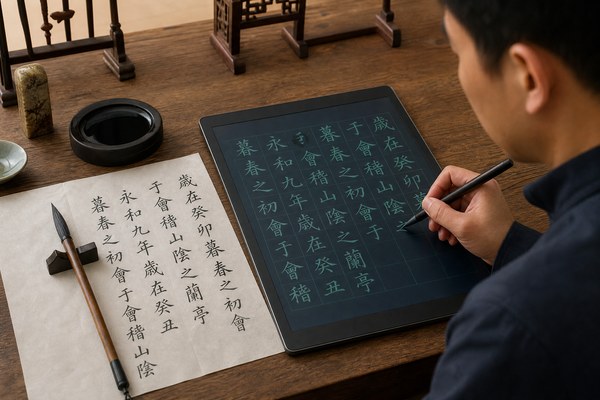
Many people want to improve their handwriting. But they do not know where to start. Paper and ink can get expensive fast.
Yes, you can absolutely use an LCD writing tablet to practice handwriting and calligraphy. It gives you a smooth, pressure-sensitive surface. You can write, erase, and repeat as many times as you want. No paper waste. No mess. Just pure practice.
I have spent a lot of time looking at how people use LCD writing tablets. I have seen kids trace letters for the first time. I have seen adults rediscover a love for brush calligraphy. The results always surprise people. These little tablets do more than most folks expect. They are not just for doodling or leaving notes. They can be a real training tool. Keep reading. I will show you exactly how this works and what to look for.
How the Surface of an LCD Tablet Feels for Handwriting Practice
Writing on paper feels natural. But switching to a screen feels cold and slippery. That friction matters a lot when you are learning letter shapes.
A good LCD writing tablet has a slightly textured surface. It gives just enough resistance. This resistance helps you control your strokes. It feels closer to paper than you might think. Pressure sensitivity also plays a big role in stroke quality.
I remember the first time I handed one of our GY-industries tablets to a calligraphy student. She was skeptical. She picked up the stylus and made a few strokes. Then she went quiet. After a minute, she looked up and said, “This actually works.” The surface gave her the feedback she needed. She could feel the difference between a light stroke and a heavy one. That pressure response is built into the LCD panel itself. It is not a software trick. It is real, physical feedback. She practiced her letter joins for an hour without stopping. No ink. No wasted paper. Just focused repetition.
Surface Feel Comparison for Handwriting Practice
| Writing Surface | Friction Level | Pressure Feedback | Good for Beginners? |
|---|---|---|---|
| Regular paper | Medium | Yes, natural | Yes |
| Glass tablet screen | Very low | Limited | Not ideal |
| LCD writing tablet | Medium-low | Yes, responsive | Yes |
| Whiteboard | Low | No | No |
Why Repetition Without Waste Makes LCD Tablets Perfect for Practice
Handwriting takes hundreds of repetitions to improve. Burning through notebook after notebook is not realistic. Most people give up before they see real progress.
An LCD writing tablet lets you erase and start over instantly. One press of a button wipes the screen clean. You can repeat a single letter stroke fifty times in five minutes. This kind of focused repetition is exactly how handwriting skills are built fast.
I have seen teachers in schools use our tablets during handwriting drills. One teacher in particular had her students practice the letter “a” in cursive over and over. With paper, she had to ration how many sheets each child used. With LCD tablets, that problem disappeared. Every student could fill the screen, erase, and go again. According to Reading Rockets, repeated motor practice is one of the most important parts of learning good handwriting. That is exactly what these tablets enable. No interruptions. No running out of space. Just clean, repeated practice every single time.
Practice Repetition: Paper vs LCD Tablet
| Practice Method | Cost Per Session | Reps Per Hour | Mess Level |
|---|---|---|---|
| Notebook and pen | Medium | Limited by pages | Ink smudges possible |
| Calligraphy paper and brush | High | Low | High |
| LCD writing tablet | Near zero | Very high | None |
Choosing the Right LCD Tablet Size and Stylus for Calligraphy
Not every LCD tablet works the same way for calligraphy. A tiny screen limits your stroke range. A poor stylus kills your control.
For calligraphy practice, I recommend a tablet that is at least 8.5 inches. The stylus should feel balanced in your hand. A wider writing area lets you practice larger letterforms. Stylus tip quality directly affects how fine your lines come out on the surface.
At GY-industries, we manufacture LCD writing tablets in a range of sizes from our Shenzhen factory. I have personally tested the difference between a 6-inch and a 12-inch tablet for brush-style lettering. The larger tablet wins every time for calligraphy. You need room to move your whole hand, not just your fingers. Our OEM and ODM clients often ask us to customize stylus weights and tip shapes for specific use cases. We can do that. All our tablets carry CE, RoHS, and CPC certifications. That means the materials are safe. That matters especially when children are practicing. You can learn more about our custom manufacturing services here.
Tablet Size Guide for Handwriting and Calligraphy
| Tablet Size | Best For | Stroke Freedom | Portability |
|---|---|---|---|
| Under 6 inches | Kids, basic letters | Limited | Very high |
| 8.5 inches | General handwriting | Good | High |
| 10–12 inches | Calligraphy, brush work | Excellent | Medium |
| Over 12 inches | Advanced calligraphy | Maximum | Low |
Conclusion
An LCD writing tablet is a smart, affordable tool for handwriting and calligraphy practice. Ready to find the right one? Contact GY-industries today and let us help you.
