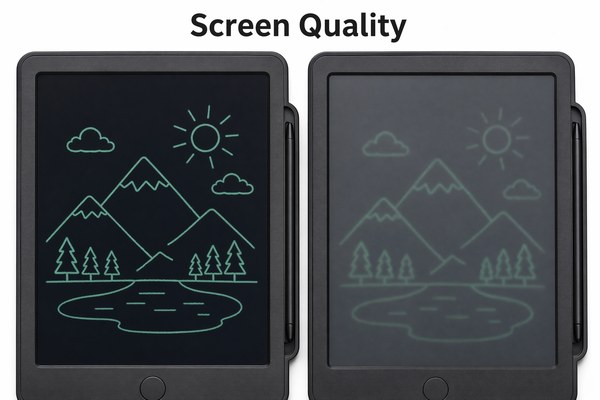
You want to buy an LCD writing tablet. But how do you know if the screen is actually good? Bad screens frustrate users fast.
To evaluate the screen quality of an LCD writing tablet, check five things: writing clarity, pressure sensitivity, erase speed, screen layers, and color consistency. These factors tell you everything about how the tablet will perform in real daily use.
I have tested hundreds of LCD writing tablets over the years at our Shenzhen factory. I have seen screens that look great in photos but fail in real use. I have also seen budget tablets with surprisingly solid screens. The difference always comes down to knowing what to look for. Let me walk you through exactly what I check — and what you should check too — before trusting any screen.
1. Writing Clarity and Line Quality
You press the stylus down. The line looks blurry or uneven. That is a bad sign. Poor writing clarity ruins the whole experience.
Writing clarity depends on the screen’s LCD layer quality and the pressure distribution of the stylus tip. A good screen produces clean, sharp lines. A weak screen shows feathered edges, ghost marks, or uneven ink trails that break your focus.
I remember testing a batch of tablets early in my career. They looked fine on the shelf. But when I wrote a simple sentence, the lines had a fuzzy edge. The LCD layer was too thin. The pressure was spreading unevenly across the surface. We rejected that batch immediately. At our GY-industries facility, we test writing clarity on every production run. We use both fine-tip styli and blunt tips to stress-test the lines. A screen that holds clean lines under both conditions passes. A screen that struggles with fine tips fails. I always tell buyers: write the letter “S” in small size. If the curves are clean, the screen is solid.
Writing Clarity Comparison Table
| Quality Level | Line Appearance | Stylus Response | Verdict |
|---|---|---|---|
| High Quality | Sharp, clean edges | Instant, precise | Pass |
| Mid Quality | Slight softness at edges | Slight delay | Acceptable |
| Low Quality | Fuzzy, uneven trails | Inconsistent pressure | Reject |
2. Pressure Sensitivity and Stroke Variation
You want thick lines and thin lines. The screen gives you the same width every time. That is a pressure sensitivity problem.
Pressure sensitivity tells you how well the screen reads different stylus forces. A high-quality LCD writing tablet shows clear difference between light strokes and heavy ones. This matters for artists, students, and anyone who writes naturally with varied hand pressure.
I once worked with an OEM buyer who wanted tablets for a kids’ art program. They needed screens that responded to gentle child-level pressure. We ran pressure tests at our GY-industries Shenzhen factory using a calibrated stylus machine. It applied pressure from 5 grams up to 250 grams. The good screens showed visible stroke variation across the full range. The weaker screens only changed line weight after 80 grams. Kids write softly. Those screens would have felt dead to them. We selected a screen stack that passed at 10 grams. That small detail made a huge difference for the end user. Our OEM clients always appreciate this kind of detailed factory-level testing. It saves them from costly returns later.
For more detail on how we support OEM clients with screen selection, visit our service page at GY-industries.
Pressure Sensitivity Rating Table
| Pressure Level | Expected Line Width | Good Screen Response | Poor Screen Response |
|---|---|---|---|
| Light (5–30g) | Very thin | Registers clearly | No response or faint ghost |
| Medium (30–100g) | Medium stroke | Clean, proportional line | Same width as light stroke |
| Heavy (100g+) | Bold, wide stroke | Full bold line, no bleed | Bleed or screen distortion |
3. Erase Speed, Screen Layers, and Color Consistency
You tap the erase button. The screen takes two seconds to clear. Or it leaves a faint shadow. These are screen layer problems.
Erase speed, layering quality, and color evenness all reveal how well the LCD tablet is built. A quality screen clears in under one second with no ghosting. Color should look uniform across the full writing area, with no dark patches or faded zones near the edges.
I have opened a lot of LCD tablets at our factory. The inside story matters as much as the outside look. The number of protective layers, the quality of the LCD film, and the thickness of the writing surface all affect erase performance and color uniformity. I once evaluated a competitor sample where the green color looked bright in the center but faded near the corners. That told me the LCD fluid distribution was uneven. Our GY-industries tablets go through CE, RoHS, and CPC certification processes. Those certifications push us to maintain strict material standards. They are not just labels. They directly connect to screen layer quality. RoHS compliance restricts harmful materials, and that restriction often filters out low-grade LCD components too.
Screen Construction Quality Checklist
| Feature | What to Look For | Red Flag | GY-industries Standard |
|---|---|---|---|
| Erase Speed | Under 1 second full clear | Shadow or partial clear | Under 0.5 seconds |
| Color Uniformity | Even color edge to edge | Faded corners or patches | Tested under factory light |
| Screen Layers | Firm, no flex under pressure | Soft or spongy feel | Multi-layer verified stack |
| Ghosting | Zero trace after erase | Faint text visible after clear | Zero tolerance policy |
Conclusion
Great screen quality is not a mystery. Check clarity, pressure, erase speed, and layers. Ready to source quality tablets? Contact GY-industries today.
