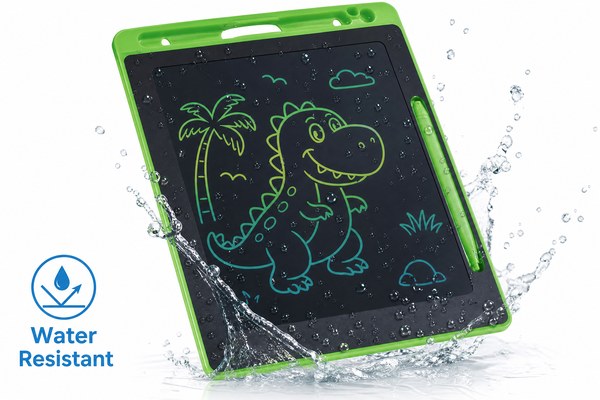
You just bought an LCD writing tablet. Then your kid spills juice on it. You panic. Is it ruined?
Most LCD writing tablets are not fully waterproof. They have no IP rating for full submersion. However, many are splash-resistant enough to survive light spills. Always check the product specs before exposing your tablet to liquids.
I get this question a lot. People love LCD writing tablets for the office, classroom, and home. They want to know how much abuse these devices can take. Water is usually the first worry. I have seen good tablets get damaged by simple accidents. I have also seen cheap ones survive a splash. The answer is not black and white. Let me walk you through what I know from working with LCD tablets every day at GY-industries in Shenzhen.
What Does “Waterproof” Really Mean for LCD Writing Tablets?
People throw around the word “waterproof” loosely. This causes real confusion. Buyers get disappointed when their tablet fails a water test.
Waterproof means a device can survive full water immersion. Splash-resistant means it can handle light drops of water. Most LCD writing tablets fall into the splash-resistant category, not truly waterproof. They have no official IP67 or IP68 rating.
I once tested a batch of LCD tablets here at our Shenzhen factory. I dripped a small amount of water on the screen. Most handled it fine. The water beaded off the smooth plastic surface. Then I submerged one in a shallow bowl of water. It stopped working within seconds. That test told me everything. The outer shell offers some protection. But the inside electronics are exposed if water gets through the seams. This is normal for most consumer-grade LCD writing tablets. I always tell buyers to understand this difference before they assume the worst or the best.
IP Ratings Explained for LCD Tablets
| IP Rating | Protection Level | Water Resistance | Common Use Case |
|---|---|---|---|
| No Rating | None guaranteed | Not tested | Most basic LCD tablets |
| IPX2 | Low | Light dripping water | Some office devices |
| IPX4 | Medium | Splashing from any direction | Kids’ writing tablets |
| IP67/IP68 | High | Full submersion | Rugged outdoor devices |
According to the International Electrotechnical Commission, IP ratings are the global standard for device protection. I always recommend buyers check for these ratings when they need real water protection.
Why Most LCD Writing Tablets Skip Full Waterproofing
You might wonder why brands don’t just make all tablets waterproof. The answer comes down to cost and design trade-offs.
Adding full waterproofing raises manufacturing costs significantly. It requires special seals, coatings, and testing. For a low-cost everyday writing tool, full waterproofing is often unnecessary. Most users never submerge their tablet in water at all.
At GY-industries, I work closely with OEM and ODM clients. Many of them ask about adding water resistance to their custom LCD writing tablets. I explain the trade-off honestly. A sealed waterproof design adds cost to each unit. It also makes the device slightly heavier. For a school notebook replacement, buyers prefer a lighter and cheaper tablet. For rugged outdoor or industrial use, the extra cost makes sense. I have helped clients choose the right level of protection for their target market. Not every tablet needs to survive a swimming pool. Sometimes basic splash resistance is more than enough for daily use at school or the office.
Design Factors That Affect Water Resistance
| Design Factor | Impact on Water Resistance | Adds Cost? |
|---|---|---|
| Sealed seams | Prevents water entering edges | Yes |
| Rubber gaskets | Blocks water around buttons | Yes |
| Nano coating | Repels light splashes on screen | Small increase |
| Port covers | Protects charging ports from moisture | Minimal |
How to Protect Your LCD Writing Tablet From Water Damage
Your tablet may not be waterproof. But that doesn’t mean you’re helpless. There are simple steps to protect it every day.
Keep your LCD tablet away from sinks, bathtubs, and drink-filled desks. Use a protective sleeve or case. If a spill happens, power off immediately and dry with a soft cloth. Acting fast can save your device from permanent damage.
I have seen so many tablets come back from customers with water damage. Almost every case was preventable. One client told me their child left a tablet on the kitchen counter. A glass of water fell onto it. The tablet died. When I looked at it, the seams were wide open. Water had gone straight inside. After that, I started advising all my clients to include a simple care guide with their product. At GY-industries, all our LCD writing tablets carry CE, RoHS, and CPC certifications. These certifications cover safety and compliance. They are not waterproof certificates. But they show the product is built to a reliable standard. Pair that with smart habits and your tablet will last a long time. Visit our service page to learn more about how we support our product quality.
Simple Daily Habits to Protect Your LCD Tablet
| Situation | Risk Level | Recommended Action |
|---|---|---|
| Drinks on desk | High | Keep tablets and drinks separated |
| Kids using tablet | Medium-High | Use a silicone protective case |
| Outdoor use | Medium | Avoid use in rain or humidity |
| Light sweat or hand moisture | Low | Wipe screen with dry cloth regularly |
Conclusion
LCD writing tablets are not waterproof. Treat them with care and they last for years. Need a custom water-resistant design? Contact GY-industries today.
