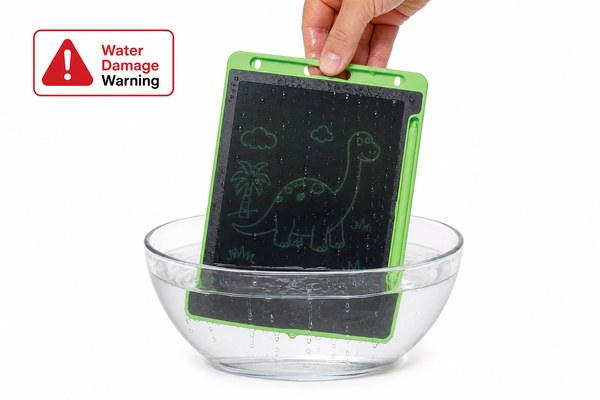
You dropped your LCD writing tablet in water. Now it won’t turn on. You’re frustrated and worried you’ve lost everything.
Most LCD writing tablets will not work right after being submerged in water. Water causes short circuits inside the device. But in many cases, the tablet can recover fully if you act fast and dry it out the right way.
I have seen this happen more times than I can count. Working at GY-industries in Shenzhen, I get questions about water damage every week. Parents ask about tablets dropped in bathtubs. Teachers ask about spills in classrooms. Business buyers ask if their bulk order will survive humid warehouses. The answer is never simple. Water damage depends on how long the tablet was wet, how you dried it, and how the tablet was built in the first place. Let me walk you through everything I know.
What Actually Happens When Water Gets Inside an LCD Writing Tablet
Water gets in and the device stops working. You panic. But understanding why it fails helps you fix it faster.
Water does not destroy electronics on its own right away. The real problem is that water conducts electricity. It creates unwanted connections between parts. This causes short circuits. If you remove power quickly and dry the device fully, the damage is often not permanent.
I remember one of our OEM clients in Europe sent us a complaint. A batch of tablets had been stored in a damp container during shipping. Several units showed dark screens and no response. My team tested them back at our Shenzhen factory. We dried them carefully in a controlled environment. About 70% of those units came back to full function. The key was that the batteries had drained before any serious corrosion started. The other 30% had already corroded near the circuit board connections. That corrosion was the real killer. Water alone did not finish them off. Time plus water did.
What Water Damage Looks Like at Each Stage
| Time in Water | Likely Damage | Chance of Recovery | Action Needed |
|---|---|---|---|
| Under 10 seconds | Surface moisture only | Very high | Dry immediately, do not press buttons |
| 10 seconds to 2 minutes | Water near connectors | Moderate to high | Air dry for 48 hours before testing |
| 2 to 10 minutes | Water inside circuit area | Moderate | Silica gel drying, full inspection needed |
| Over 10 minutes | Corrosion starting on board | Low | Professional cleaning required, may not recover |
The Right Steps to Take Right After It Gets Wet
You see it fall in water. Your first instinct is to press buttons and check the screen. That instinct is wrong.
The single most important thing you can do is stop using the device immediately. Do not press any buttons. Do not try to turn it on. Remove any power source if you can. Then start drying it. Speed matters more than anything else at this stage.
I tested this personally with a spare unit from our production line. I submerged it in shallow water for about 30 seconds. Then I tried two different recovery methods. On one unit I pressed the erase button right away to see if it worked. On the other I left it completely alone and placed it face down on a dry cloth. The unit I left alone recovered fully after 48 hours in a silica gel bag. The unit I pressed buttons on had a short circuit that burned a small component on the board. That unit never worked again. One small action made the difference. I always tell buyers this story when they ask about accidental spills.
Step-by-Step Drying Guide
| Step | What to Do | How Long |
|---|---|---|
| 1 | Remove from water, do not press anything | Immediately |
| 2 | Pat dry gently with a soft cloth | 2 to 3 minutes |
| 3 | Place in a bag with silica gel packets | 24 to 48 hours |
| 4 | Test the device in a dry room | After full drying |
How LCD Writing Tablet Design Affects Water Survival
Not all tablets handle water the same way. A cheaply made tablet and a well-built one react very differently to moisture.
The build quality of an LCD writing tablet plays a huge role in whether it survives water contact. Tablets with tighter seals around the frame, better internal insulation, and quality components survive much better. This is where choosing a reliable OEM manufacturer really matters.
At GY-industries, I have worked with buyers who wanted water-resistant designs for school and outdoor use. Our factory in Shenzhen has tested many frame seal designs. Tablets with tighter frame joints and rubberized edge seals showed much less internal water penetration in our tests. Our products carry CE and RoHS certifications, and some models also hold CPC certification for child safety. These standards push us to think about durability from the start. One of our ODM clients asked us to design a kids’ tablet with a splash-resistant frame. We added a sealed edge gasket to that model. In testing, that tablet survived light splashing without any internal moisture. It did not survive full submersion, but it survived real-world accidents. That is realistic protection for a device without full IP-rated waterproofing. You can learn more about our OEM and ODM services here.
Design Features That Affect Water Resistance
| Design Feature | How It Helps | Common in Budget Models | Common in Premium Models |
|---|---|---|---|
| Sealed frame gasket | Slows water entry at edges | Rarely | Often |
| Conformal coating on board | Protects circuits from moisture | No | Sometimes |
| Button seal covers | Prevents water entering through buttons | No | Yes |
| Low-power circuit design | Reduces short circuit risk | Varies | Yes |
It is also worth understanding how LCD writing tablets work at a basic electronics level. According to Explain That Stuff’s guide on liquid crystal displays, the display layer itself uses liquid crystals that respond to tiny electrical charges. Water interfering with those charges is why the screen goes blank or shows strange patterns after getting wet. The good news is that the LCD layer is often sealed better than the circuit board area. So screen function often returns once the board dries out fully.
Conclusion
Water damage is serious but often not the end. Act fast, dry it right, and choose a well-built tablet from the start. For reliable LCD writing tablets built to last, contact GY-industries today.
