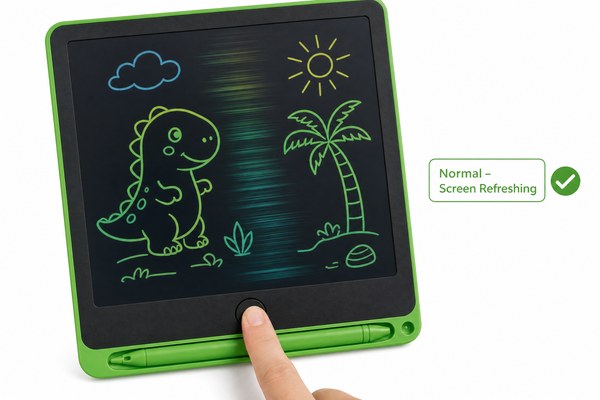
You press the erase button on your LCD writing tablet. The screen flickers. Your heart sinks. Is something broken?
Yes, it is completely normal for the screen to flicker when you press the erase button. This flicker is part of how LCD writing tablets work. It means the erase function is doing its job correctly. There is nothing wrong with your tablet.
I have seen so many people panic about this. They think their tablet is broken. They want a refund. But once I explain what is actually happening inside the screen, everything makes sense. In this article, I will walk you through exactly why the flicker happens, what causes it, and when you should actually be worried. Let me show you what I know from years of working with LCD writing tablets here at our Shenzhen factory.
Why the Screen Flickers During Erasing
You see the flicker. You feel confused. You wonder if something is wrong with the product.
The flicker happens because the tablet sends a small electrical charge through the LCD layer to reset it. This charge forces the liquid crystals to release their position. That release creates the visible flash you see on screen. It is fast, harmless, and totally expected.
I remember one of our early wholesale customers called me very upset. They had just received a batch of our LCD writing tablets. Their staff thought every single unit was defective. They were ready to send them all back. I asked them to send me a short video. When I watched it, I smiled. I could see the normal erase flicker on every tablet. I called them back and explained the science. Within ten minutes, they understood. They kept the whole order. That customer still buys from us today. It was a simple misunderstanding, but it taught me how important this explanation really is.
What Happens Inside the Screen When You Erase
| Stage | What Happens | What You See | Normal or Not |
|---|---|---|---|
| 1. Button pressed | Electrical signal is sent to LCD layer | Nothing yet | Normal |
| 2. Charge spreads | Voltage moves across the full screen | Screen flickers or flashes | Normal |
| 3. Reset complete | Liquid crystals return to resting state | Screen goes clear | Normal |
| 4. Ready to write | Tablet waits for new input | Clean blank screen | Normal |
How LCD Writing Technology Actually Works
Most people use LCD tablets every day. But very few people understand what is happening inside them. That gap causes a lot of worry.
LCD writing tablets use a pressure-sensitive layer on top of a liquid crystal display. When you write, pressure changes how the crystals align. When you erase, electricity resets them. According to HowStuffWorks, liquid crystals respond quickly to electrical charges, which is why the erase flash happens so fast.
I have spent years on the production floor here in Shenzhen. I watch our technicians assemble LCD writing tablets every single day. One thing I always notice is how consistent the erase flash is. Every unit we build goes through quality testing. We check the erase function on every tablet before it leaves our factory. Our tablets carry CE, RoHS, and CPC certifications. That means every part of the design — including the erase circuit — has been tested and approved. When I see that flicker during testing, I know the unit is working exactly as designed. It actually gives me confidence, not concern.
Key LCD Writing Tablet Components and Their Role
| Component | Function | Role in Erasing |
|---|---|---|
| LCD layer | Displays writing through crystal alignment | Resets when voltage is applied |
| Pressure-sensitive film | Captures writing input from stylus | Not involved in erasing |
| Erase circuit | Delivers reset voltage across the screen | Directly causes the flicker |
| Battery / power cell | Powers the erase function only | Supplies energy for the reset charge |
When Should You Actually Be Worried?
The normal flicker is fine. But some screen problems are real. You need to know the difference before it is too late.
You should only be worried if the screen flickers constantly without pressing erase, if the image stays dark after erasing, or if the screen does not erase at all. These signs point to a real fault. A normal erase flicker is instant and clean. Anything else is worth investigating further.
I once received a support request from a school supplies retailer. They carried our OEM LCD writing tablets under their own brand. One of their customers reported a screen that kept flickering on its own. No one was pressing the erase button. I knew right away that was not normal. We checked the unit and found a hairline crack in the erase circuit board. It was a rare manufacturing defect. We replaced the unit immediately under warranty. I tell this story because it shows the difference clearly. Random flickering without pressing erase is a problem. A single flash when you press erase is completely fine. I want my customers to feel confident telling these two things apart. If you are unsure about any unit you have received, our after-sales service team is always ready to help.
Normal Flicker vs. Problem Flicker — Quick Guide
| Symptom | When It Happens | What It Means | Action Needed |
|---|---|---|---|
| Quick single flash | Only when erase button is pressed | Normal erase cycle | None — all good |
| Screen stays dark after erase | After pressing erase | Possible screen fault | Contact support |
| Random flickering | Without pressing any button | Possible circuit issue | Request inspection |
| No erase response | Pressing erase does nothing | Dead battery or circuit fault | Replace battery or contact support |
Conclusion
The erase flicker is normal. Do not worry about it. If you have more questions, contact the GY-industries team today. We are happy to help.
