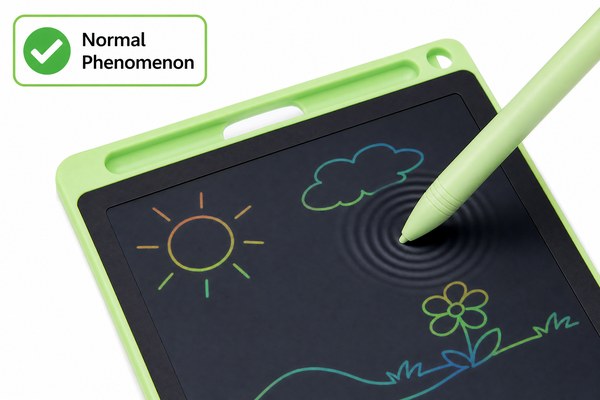
You pick up the stylus and start writing. Then you see it — the screen ripples like water. It feels wrong. It looks wrong. And you wonder if something is broken.
The screen ripples because the LCD layer inside reacts to pressure. When you press the stylus down, the liquid crystals shift and move. This creates a visible wave effect. It is completely normal in most cases. But sometimes it means you are pressing too hard or the tablet has a fault.
I have worked closely with the team at GY-industries in Shenzhen for a long time. I have seen thousands of LCD writing tablets come off the production line. I know exactly what causes that ripple effect. Some causes are harmless. Some need attention. Let me walk you through everything so you can stop worrying — or know when to act. By the end, you will understand your tablet far better than before.
The Ripple Is Built Into How LCD Tablets Work
You see the ripple and panic. But here is the truth. The ripple is not always a defect. It is often just physics doing its job.
LCD writing tablets use a layer of liquid crystal material. This material is sensitive to pressure. When you press down, the crystals move and scatter light differently. That movement looks like a ripple. It is the same reason you see waves when you press on an old LCD monitor screen.
I remember the first time I showed a customer how the screen actually worked. They had sent a complaint saying their tablet was defective. I pulled up a diagram of a standard LCD writing tablet structure. I showed them the layers — the protective film on top, then the LCD layer, then the backing board. I pressed gently on a demo unit. The small ripple appeared and disappeared instantly. Their face changed completely. They went from frustrated to fascinated. That moment taught me how important it is to explain the basics clearly. Most people have never thought about what is inside the screen they write on every day.
LCD Layer Breakdown: What Each Part Does
| Layer | Material | Role in Writing | Ripple Connection |
|---|---|---|---|
| Top Film | Thin PET plastic | Protects the surface | Distributes pressure outward |
| LCD Layer | Liquid crystal fluid | Creates visible marks | Moves when pressed — causes ripple |
| Spacer Film | Micro-bead layer | Controls LCD thickness | Too thin = more ripple |
| Back Board | Rigid plastic or cardboard | Supports the screen | Weak backing = excess ripple |
Pressing Too Hard Makes the Ripple Worse
You have been told ripple is normal. But something still looks off. Your ripple is huge. It spreads far and does not fade quickly. That is a different problem.
When you press the stylus too hard, you push more liquid crystal out of place. The ripple grows bigger and takes longer to settle. This is especially obvious in cheaper tablets with thin LCD layers. Writing with a lighter touch fixes this immediately. You do not need a new tablet. You need a new habit.
I tested this myself using two tablets side by side. One was a standard low-cost unit. The other was built to GY-industries’ OEM specification with a reinforced LCD layer. I pressed hard on both. On the cheaper unit, the ripple spread almost two centimetres wide. On the GY-industries spec unit, the ripple was tight and faded in under a second. The difference was clear. The quality of the LCD layer and the spacer film made a huge impact. I also noticed that children tend to press much harder than adults. So kids’ tablets especially need thicker, more resilient LCD construction. This is something good OEM manufacturers think about from the very start of the design process.
Pressure vs. Ripple Behaviour: What to Expect
| Pressure Level | Ripple Size | Fade Speed | Action Needed |
|---|---|---|---|
| Very light | Tiny or none | Instant | None — this is ideal |
| Normal writing pressure | Small, tight | Under 1 second | None — this is normal |
| Heavy press | Medium, spreads 1–2 cm | 1–3 seconds | Try writing lighter |
| Very heavy press | Large wave across screen | 3+ seconds or stays | Check for damage or contact support |
According to DisplayMate’s LCD pressure analysis, liquid crystal displays are inherently sensitive to localized force. This is a core characteristic of the technology itself.
When Ripple Signals a Real Problem
Most ripple is harmless. But some ripple tells you something is actually wrong. You need to know the difference. Ignoring real damage makes things worse.
If the ripple does not fade, that is a warning sign. If dark patches stay on the screen after you lift the stylus, the LCD layer may be damaged. If the ripple appears even when you are not writing, there could be a crack or a manufacturing defect. These issues need professional attention or a replacement unit.
I once handled a warranty case from a retailer who had ordered a batch of LCD tablets. A small number of units showed permanent ripple marks from day one. We traced the issue back to a storage problem during shipping. The tablets had been stacked too high. The bottom units were under constant pressure for weeks. The LCD layer had been permanently deformed. This is why GY-industries controls not just manufacturing at our Shenzhen factory but also packaging and shipping guidelines. Our products carry CE, RoHS, and CPC certifications. These certifications cover safety and material quality. But good factory practices go even further than that. They protect the tablet all the way to the customer’s hands. You can learn more about how we handle quality on our service and support page.
Ripple Problem Diagnosis: Normal vs. Defect
| Symptom | Likely Cause | Normal or Defect | What to Do |
|---|---|---|---|
| Small ripple while writing, fades fast | Normal LCD pressure response | Normal | Nothing — keep using it |
| Large ripple, fades slowly | Too much writing pressure | Normal (user habit) | Write with a lighter touch |
| Ripple stays after lifting stylus | LCD layer damage | Defect | Contact seller or manufacturer |
| Ripple appears with no writing | Internal crack or pressure damage | Defect | Replace the unit immediately |
Conclusion
Most ripple is normal. It is just physics. But if something looks wrong, trust your instinct. Contact GY-industries today — our team is ready to help.
